

In the instructions for setting up a project in Segger Embedded Studio it states...
Select File > Open nRF Connect SDK Project.
To import a project into SES, you must specify the following information:
-
CMakeLists.txt - the location of the
CMakeLists.txtproject file of the sample that you want to work with (for example, the full path toncs/nrf/applications/asset_tracker/CMakeLists.txt) -
Board Directory - the location of the board description for which to build the project (for example, the full path to
ncs/zephyr/boards/arm/nrf9160_pca10090) -
Board Name - the board name for which to build the project (for example,
nrf9160_pca10090ns) -
Build Directory - the folder in which to run the build (for example, the full path to
ncs/nrf/applications/asset_tracker/build) - Delete Existing CMakeCache.txt - select this option to ensure that you are not building with an outdated build cache
Click OK to open the project.
Looking at the dialogue box that shows when selecting File > Open nRF Connect SDK Project you see...
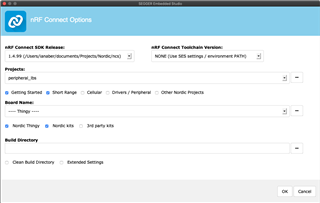
The fields on the dialogue do not match those in the instructions.

