This post is older than 2 years and might not be relevant anymore
More Info: Consider searching for newer posts

nRF Connect getting started does not match Segger Embedded Studio

In the instructions for setting up a project in Segger Embedded Studio it states...

Select File > Open nRF Connect SDK Project.

To import a project into SES, you must specify the following information:

  • CMakeLists.txt - the location of the CMakeLists.txt project file of the sample that you want to work with (for example, the full path to ncs/nrf/applications/asset_tracker/CMakeLists.txt)

  • Board Directory - the location of the board description for which to build the project (for example, the full path to ncs/zephyr/boards/arm/nrf9160_pca10090)

  • Board Name - the board name for which to build the project (for example, nrf9160_pca10090ns)

  • Build Directory - the folder in which to run the build (for example, the full path to ncs/nrf/applications/asset_tracker/build)

  • Delete Existing CMakeCache.txt - select this option to ensure that you are not building with an outdated build cache


Click OK to open the project.

Looking at the dialogue box that shows when selecting File > Open nRF Connect SDK Project you see...
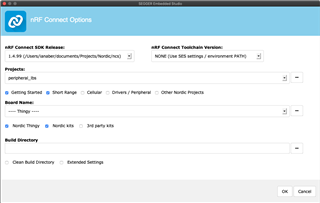
The fields on the dialogue do not match those in the instructions.

Parents
  • Hi,

    It seems like you're looking at the documentation for an older version of NCS. If you look at the documentation about building with SES in v1.4.1 or in v1.4.0, you'll find that the information there matches the fields in SES:

    • nRF Connect SDK Release - Select the nRF Connect SDK version that you want to work with.

      The drop-down list contains the current version of all nRF Connect SDK installation directories that SES knows about. To add a missing nRF Connect SDK installation directory to that list, run west zephyr-export in the installation repository or define the Zephyr base to point to the directory (see Setting up the SES environment).

    • nRF Connect Toolchain Version - If you used the Toolchain manager to install the nRF Connect SDK, select the version of the toolchain that works with the selected nRF Connect SDK version. Otherwise, select NONE and make sure that your SES environment is configured correctly (see Setting up the SES environment).

    • Projects - Select the project that you want to work with.

      The drop-down list contains a selection of samples and applications from the sdk-nrf and sdk-zephyr repositories. Select any of the checkboxes underneath to add the samples from that area to the drop-down list. To add projects to the drop-down list, for example, your own custom projects, click  and select the folder that contains the projects that you want to add.

    • Board Name - Select the board that you want to work with.

      The drop-down list contains the build targets for all Nordic Semiconductor boards that are defined in the sdk-nrf and sdk-zephyr repositories. Select any of the checkboxes underneath to add the build targets from that area to the drop-down list. To add build targets to the drop-down list, for example, targets for your own custom board, click  and select the folder that contains the board definitions.

    • Build Directory - Select the folder in which to run the build. The field is filled automatically based on the selected board name, but you can specify a different directory.

    • Clean Build Directory - Select this option to ensure that you are not building with an outdated build cache.

    • Extended Settings - Select this option to display a field where you can specify additional CMake options to be used for building. See Providing CMake options.

    This is also true for the latest version of the documentation, which is for the master branch. However, I recommend using either v1.4.1 or v1.4.0 as they're stable releases.

    Best regards,

    Marte

  • A review of the online documentation shows that this still points to the Gettin Started application in NRF Connect for Mac OS-X which is the system I am using. If this is no longer correct it should be updated.

  • Hi,

    You're correct that the Getting Started application is still supported for Linux and macOS, so the documentation should be correct and up to date. It might be that the application hasn't been updated since before v1.4.0 of NCS, which is when the changes in SES happened. I will take this up with the team responsible for the application internally.

    Best regards,

    Marte

Reply Children
No Data
Related