This post is older than 2 years and might not be relevant anymore
More Info: Consider searching for newer posts

How can you set up debug and release options for the Zigbee samples

When I open the Light Bulb project in Segger Embedded Studio I see a bewildering list of project items. I pick the first project, 'zephyr/merged.hex' and right click to set the project options there is no Pre-Processor definitions section where one would normally expect to define the DEBUG macro. What is the process for managing this.

As is, when I run the code the output in main.c that sends text to the debug log 'NRF_LOG()' does not result in code and a breakpoint cannot be set on it...
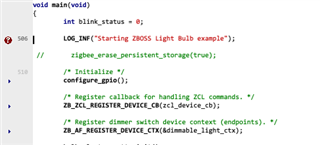
The same statements in some of the library files do output to the debug windows but not those in main.c. How can this be turned on?

  • Have you ever done the configuration NRF log function enable in your sdk_confif.h file? If it's not , you may not get the code of null function. So that , you can't set the breakpoint.

  • Looking at the folder structure for this project there is no sdk_config.h file. The structure of these projects seems to have completely changed in the latest versions of the SDK. The application is based on the zephyr architecture and uses a kconfig setup system to define what the settings are. I did have to change a number of settings in the kconfig files using the 'Configure nRF Connect SDK Project' menu option to anything at all to come out in the debug window which I find extremely disappointing. It would be nice to thing that samples supplied for use with the provided development environment would work properly without having to dive into a horrendously complex set up system just to get basic debug output working. Something that 100% of the audience is going to want to do.

  • I found that changing the log level for the statement in main.c to LOG_DBG instead of LOG_INF results in output being generated so this must be a compilation setting somewhere that can be adjusted. I have combed through all the settings and files I can find to see where it might be but have so far drawn a blank. This is probably very obvious when you know about it but it should be documented clearly in the getting started section for those who are new to this particular incarnation of the development kit. Please help, someone...

  • Hi Ian,

    I just wanted to add that for future reference logging in NCS is described here: https://developer.nordicsemi.com/nRF_Connect_SDK/doc/latest/zephyr/reference/logging/index.html#logging-api
    Also, if you set the LOG_DEFAULT_LEVEL Kconfig option to 4(debug) you will get more logs. If you look for Kconfig options ending with 'LOG_LEVEL' you will get per-module configs. This is pretty similar as nRF5 SDK, but in my experience it's just takes a bit of time and patience to find the equivalent when using a new coding enviroment.

    If you haven't look into them yet I also recommend using the nRF Connect SDK tutorial guides available in Devzone to get to know the new enviroment:
    https://devzone.nordicsemi.com/nordic/nrf-connect-sdk-guides/b/getting-started

    BR,

    Marjeris

  • Finally I have worked out how to enable logging in my main program. This is not, I am sure, the complete answer but it has got logging to work in my program. In kconfig there is an option to enable sample default settings...

    Zephyr Kernel => Modules => Nordic nRF Connect => Enable NCS sample default settings

    If this is checked, for some reason that completely escapes me at the moment, the default setting for log level for the samples is only WARN so any LOG_INF or LOG_DBG is compiled out. Unchecking this option allows these logs to be generated.

    I propbably m issed the documentation explaining this but for someone starting out with this system this sort of thing should be shouting at you from page one not hidden in the small print.

Related