This post is older than 2 years and might not be relevant anymore
More Info: Consider searching for newer posts

establishing mesh network by using a nrf52840 devkit and two nrf52840 dongle boards

Hello everyone,

I am going tp establish a mesh network by using a devkit and two or more dongle. take as an example, turning off a led on the dongle boards by using a bottom on the devkit through the mesh network.

Thanks for help in advance. 

Parents
  • Hello everyone,

    Thank you for your reply.

    I could program the devkit as a client by adding the root of the example in the Global Macros.

    I saw the devkit in the nrf Mesh application as nrf mesh switch. 

    After which, I followed the instruction suggested in this link to program the dongle board as a server.

    https://devzone.nordicsemi.com/nordic/short-range-guides/b/getting-started/posts/nrf52840-dongle-programming-tutorial

    I used the hex file built in the build folder in the server folder to program the dongle through nrf connect software. 

    after witting the hex file, these messages appeared.

    04:35:21.240
    Reopen device failed: Timeout while waiting for device D4AC8646D4D6 to be attached and enumerated
    04:35:21.240
    Nordic DFU Trigger Interface was not found.Please physically reset device.
    04:35:21.266
    Device not found due to failure during DFU
    04:35:22.283
    Target device closed.
    unfortunately I could not find the dongle as a server in the nrf Mesh application.
    Could you please help me about this problem?
    Thank you
  • Hi Sama,

    Please try to test first with blinky example as showed in the tutorial. 

    Have you ever managed to program any example into the dongle using nRF Connect software ? 

    I suspect that the bootloader doesn't run on your dongle. 

    If you press the reset button on the dongle do you see the  red LED breathing ? 

  • Hi Hung,

    Thank you for your reply.

    I have run the Blinky example on the dongle.

    I reset the dongle to program and the red LED was breathing and then I follow the instruction in the tutorial.

    I don not understand where is the problem.

    Thank you

    Sama

  • Hi Sama, have you flashed the softdevice when you flash the application via nRF Connect software ? 
    Softdevice needed for mesh application. 

    I would strongly suggest you to solder the P1 header to do programming directly via the SWD interface instead of testing using the bootloader as you are doing now. 

  • Hi Hung,

    Thank you for your advice. I will do it and inform you about the results.

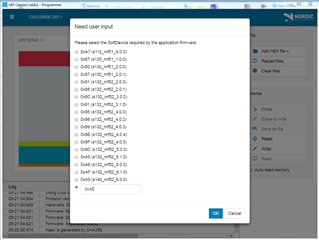
    What about the soft device code ID?

    During programing, the NRF connect software required the soft device code ID. I used S140_nrf52_7.2.0. so I entered 0x0100 code, which I found in the devezone.nordic for the soft device.

    was that wrong?

    Actually I think this is the last thing I should test before soldering the SWD connector.

    Further, I have built the hex code in the debug mode in SES. Is there any different in Release or Debug mode? Does it affect solving the problem?

    Regards,

    Sama

Reply
  • Hi Hung,

    Thank you for your advice. I will do it and inform you about the results.

    What about the soft device code ID?

    During programing, the NRF connect software required the soft device code ID. I used S140_nrf52_7.2.0. so I entered 0x0100 code, which I found in the devezone.nordic for the soft device.

    was that wrong?

    Actually I think this is the last thing I should test before soldering the SWD connector.

    Further, I have built the hex code in the debug mode in SES. Is there any different in Release or Debug mode? Does it affect solving the problem?

    Regards,

    Sama

Children
Related