Hello everyone,
I am going tp establish a mesh network by using a devkit and two or more dongle. take as an example, turning off a led on the dongle boards by using a bottom on the devkit through the mesh network.
Thanks for help in advance.
Hello everyone,
I am going tp establish a mesh network by using a devkit and two or more dongle. take as an example, turning off a led on the dongle boards by using a bottom on the devkit through the mesh network.
Thanks for help in advance.
Hi Hung,
Thank you for your advice. I will do it and inform you about the results.
What about the soft device code ID?
During programing, the NRF connect software required the soft device code ID. I used S140_nrf52_7.2.0. so I entered 0x0100 code, which I found in the devezone.nordic for the soft device.
was that wrong?
Actually I think this is the last thing I should test before soldering the SWD connector.
Further, I have built the hex code in the debug mode in SES. Is there any different in Release or Debug mode? Does it affect solving the problem?
Regards,
Sama
HI Sama,
I don't really understand why you need the softdevice ID ?
Just select the softdevice you plan to use and click write.
Before testing the dongle with mesh, please try to test it with normal BLE application.
Hi Hung,
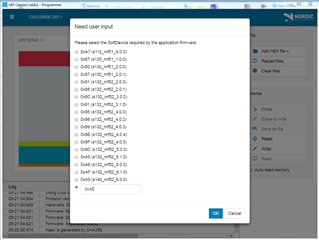
This is the stage which the NRF connect software needs the softdevice ID I am using.

As you can see there is not the s140_nrf52_7.2.0 version in the list and I have to enter the softdevice ID.
I used the 0x0100 code in this stage and I think that was wrong.
I would appreciate if you can advice me on the hex ID of the softdevice.
Thank you,
Sama
Hi Hung,
Thank you for your reply.
I found my mistake. Actually I did not load the softdevice correctly through the dfu folder.
Thanks a lot.
Sama