This post is older than 2 years and might not be relevant anymore
More Info: Consider searching for newer posts

After DFU application is not Booting

Hello , 

I am trying DFU over BLE.I am using SDK 14.0.2 .

i Flashed Bootloader Code and Softdevice 5.0.0 .then Device is Starting Advertised as DfuTarg and As Mention in Documentation I done Update Through nRF Connect Mobile App.

After complete dfu Process Device is not Booting Application. I Tried with Different Different Application but Result is Same.

Below Step i am Following : 

- Compiled BootLoader Successfully with Correct Public Key inclusion.

- Download s132_5.0.0 Softdevice and Used s132_nrf52_5.0.0_softdevice.hex as it is .

- using Mergehex i merged bootloader.hex s132_nrf52_5.0.0_softdevice.hex -o Boot_Soft.hex

- I Erased Chip and Programmed with Boot_Soft.hex .Device Start Advertising DfuTarg Name .

- i Create Application Pkg using nrfutil 

  nrfutil pkg generate --hw-version 52 --sd-req 0x9D --application-version 2 --application application.hex --key-file privatehp.key application_dfu.zip

- I connect Mobile with DfuTarg and Using DFU option i uploaded application_dfu.zip package Successfully but after Completing Device is not booting Actual Application . LED 3 on Board Glowing Continuously.

Can you please Help me out from This .. Thanks !!!!!!!!!!


Parents
  • Hello,

    Are you testing this on a Nordic dev kit, or a custom board? If you are testing on a custom board, please debug the bootloader and check if the nrf_dfu_button_enter_check() in nrf_dfu.c::nrf_dfu_enter_check() is returning true. The bootloader will enter DFU mode if this functiion return true. Maybe the button configuration is wrong for your board.

    Also, have you verified that the application runs ok if you only flash the Softdevice and application with the debugger?

  • Dear Vidar Berg,

    Thanks For Response !!

    I am Using Dev Kit. 

    I verified that With Softdevice and Application my Application is not Working Properly.

    And Also With Mergehex i am not able to merge hex Files. 

    D:\NRF_SDK\DFU\BLE_OTA>

    mergehex -m application.hex s132_nrf52_5.0.0_softdevice.hex -o Output.hex


    Parsing input files.
    Merging file "application.hex" into output.
    Merging file "s132_nrf52_5.0.0_softdevice.hex" into output.
    Overlapping segments detected at address 0.ERROR: The hex files cannot be merged since there are conflicts.

    It's Giving Error Like this.

    Can you Guide me what will be the Issue or how to Resolve this.

    I tried with nrfjprog : 

    nrfjprog -f NRF52 --program softdevice.bin application.hex --chiperase

    Output Is not Proper.

    Thanks !!

  • Hi,

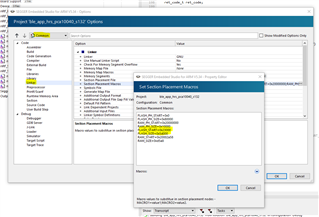
    It looks like the application.hex has been linked with the wrong start address in flash based on the error you are getting from mergehex. Please go over the linker settings and make sure the start address have been set to 0x23000 like in the other SDK BLE examples.

    Memory layout configuration settings if you're using the Segger embedded studio IDE

Reply Children
Related