Hello community!
I have curious problems with the bootloading process in SDK 17.0.2. What I am trying to do is the following:
1. Create a bootloader settings page with nrfutil 6.1.0:
nrfutil settings generate --family NRF52840 --application APP.hex --application-version 0 --bootloader-version 0 --bl-settings-version 2 BLS.hex
2. Merge the secure bootloader (UART DFU version), the settings page, the application (ble_app_blinky) and the softdevice (s140 version 7.2.0) together:
mergehex --merge BL.hex BLS.hex SD.hex --output BL_BLS_SD.hex
mergehex --merge BL_BLS_SD.hex APP.hex --output Production.hex
3. Erase flash and program the nrf52840 with the merged hex file:
nrfjprog --family nrf52 --recover
nrfjprog --reset --program Production.hex
4. Restart the board.
My expectation: After the restart, the application should start running.
What happens: The bootloader gets stuck in DFU mode.
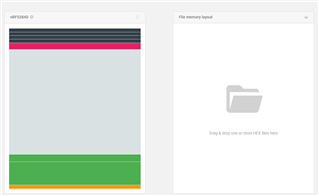
At the same time, I also check the memory layout with the desktop application nRF Connect - Programmer. It shows the following weird image:
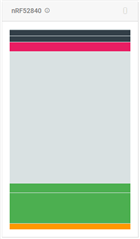 I read the following values when I hover over the different sections (from bottom to top):
1. Region name: MBR or Application / Address range: 0x00000000 - 0x00000AFF / Size: 2816 bytes
2. Region name: Application / Address range: 0x00000FF8 - 0x0002663F / Size: 153160 bytes
3. Region name: Application / Address range: 0x00027000 - 0x0002CB27 / Size: 23336 bytes
4. Region name: Bootloader / Address range: 0x000F8000 - 0x000FD83F / Size: 22592 bytes
5. Region name: MBR Parameters / Address range: 0x000FE000 - 0x000FE32F / Size: 816 bytes
6. Address range: 0x000FF000 - 0x000FF32F / Size: 816 bytes
Out of curiosity, I decide to test the DFU process to see what happens. I proceed to send the DFU zip file via UART:
nrfutil pkg generate --hw-version 52 --sd-req 0x0100 --application-version 0 --application APP.hex --key-file private_key.pem app_dfu_package.zip
nrfutil dfu serial -pkg app_dfu_package.zip -p COM5 -b 115200
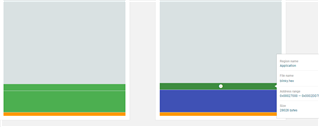
It works fine and the application starts running. But, when I check the memory layout again, this is the ugliness that greets me (bottom to top):
 1. Region name: MBR or Application / Address range: 0x00000000 - 0x00000AFF / Size: 2816 bytes
2. Region name: Application / Address range: 0x00000FF8 - 0x0002663F / Size: 153160 bytes
3. Region name: Application / Address range: 0x00027000 - 0x0002CB1F / Size: 23328 bytes
4. Region name: Application / Address range: 0x0002D000 - 0x00032B1F / Size: 23328 bytes
5. Region name: Bootloader / Address range: 0x000F8000 - 0x000FD83F / Size: 22592 bytes
6. Region name: MBR Parameters / Address range: 0x000FE000 - 0x000FE05B / Size: 92 bytes
7. Address range: 0x000FE25C - 0x000FE32F / Size: 212 bytes
8. Address range: 0x000FF000 - 0x000FF05B / Size: 92 bytes
9. Address range: 0x000FF25C - 0x000FF32F / Size: 212 bytes
I have to add to the story that I have successfully implemented a similar bootloading process before, but that time I was using SDK 15.0.0 (now 17.0.2), secure bootloader with BLE DFU (now UART DFU), and probably an older version of the nRF Command Line Tools.
Please help me find what the problem is!