Hello
I am trying the UDP example, but I can't find the IP address and port number of transmission, also I would like know how to view the code of functions and libraries use in code to understand better the functioning.
Thanks in advance
Julio
Hello
I am trying the UDP example, but I can't find the IP address and port number of transmission, also I would like know how to view the code of functions and libraries use in code to understand better the functioning.
Thanks in advance
Julio
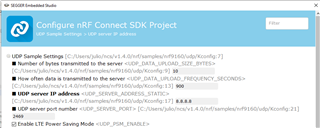
In case you are using SES, you go to Project - Configure nRF Connect SDK Project... - menuconfig - UDP Sample Settings
There you can edit the server IP and port. Finally, press 'Configure' to apply the settings you made
Hi Chistian
Thank you for your fast answer!
sorry but I am really new in this topic, how I can to see the transmitted data?

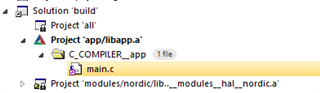
I think you are looking for the 'send' function called within 'server_transmission_work_fn' in main.c
err = send(client_fd, buffer, sizeof(buffer), 0);

I understand that the UDP example transmit the current consumption of the nRF9160, I want to visualize that data and then how I can modify the data to transmitt
The data is contained in the 'buffer' array and you can print its content to the console using printk
sorry again, but I don’t know how printk works in SES, I have searched in
https://www.segger.com/downloads/embedded-studio/EmbeddedStudio_Manual
and
but I can’t find how printk works
sorry again, but I don’t know how printk works in SES, I have searched in
https://www.segger.com/downloads/embedded-studio/EmbeddedStudio_Manual
and
but I can’t find how printk works
I can't find the IP address and port number of transmission
By default, they are defined in the sample's Kconfig file as 8.8.8.8:2469.
You can change this by setting CONFIG_UDP_SERVER_ADDRESS_STATIC and CONFIG_UDP_SERVER_PORT in the prj.conf file.
If you build the sample with SES, you must re-open the project or use Project -> Run CMake for changes in prj.conf to take effect.
Or, you can use the configuration menu in SES directly, as explained by Christian Zingl.
tracking said:how I can to see the transmitted data?
The sample sends CONFIG_UDP_DATA_UPLOAD_SIZE_BYTES 0x00s.
tracking said:I understand that the UDP example transmit the current consumption of the nRF9160
This is wrong. The sample can be used to measure the current consumption. It doesn't measure it itself.
To measure the current consumption, you can use a ampere-meter, a PPK2, or more fancy equipment.
tracking said:I don’t know how printk works in SES
When enabled (set CONFIG_SERIAL to y), logs will be sent over UART. You can then use a terminal emulator such as the LTE Link Monitor application in nRF Connect for Desktop, to see the log.
Note that enabling UART will significantly increase the current consumption.
Best regards,
Didrik