This post is older than 2 years and might not be relevant anymore
More Info: Consider searching for newer posts

XSOCKET unknown error code -116

Hello,

I am using serial LTE modem for communication.

After trying to connect to TCP server using AT#XCONNECT I get following error:

#XSOCKET: -116, closed 
ERROR 
[00:08:43.509,582] [1;31m<err> tcpip: connect() failed: -116[0m

The only official documentation to error is here.

Do you know how to find what error do I have?

Or do you know how to fix it?

Parents
  • Hi,

    I recommend reading the part about error handling in NCS in the nRF Connect SDK Tutorial There you can see that if CONFIG_NEWLIB_LIBC is set to "y", then you can find the error in the file \ncs\toolchain\opt\arm-none-eabi\sys\errno.h, and if it's set to "n", then the errno.h file in the C minimal library in Zephyr will be used. Since you get the error -116 I can see that it's the former errno.h file. There you can find that -116 is ETIMEDOUT, which means that the connection timed out. Were you able to establish a LTE-M or NB-IoT connection?

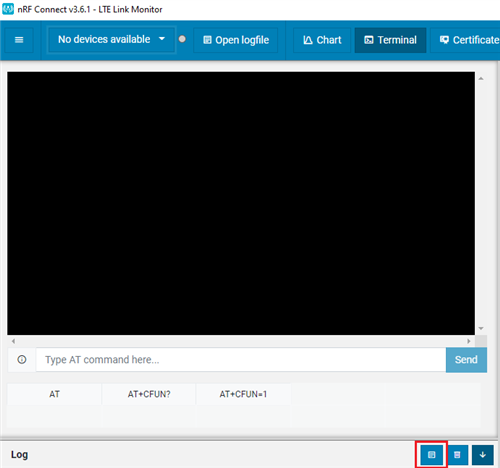
    Which version of NCS are you using? Could you provide a longer log of what is happening before the AT#XCONNECT command? If you're using the LTE Link Monitor you can open and then save the log by clicking the following button:

    Best regards,

    Marte

Reply
  • Hi,

    I recommend reading the part about error handling in NCS in the nRF Connect SDK Tutorial There you can see that if CONFIG_NEWLIB_LIBC is set to "y", then you can find the error in the file \ncs\toolchain\opt\arm-none-eabi\sys\errno.h, and if it's set to "n", then the errno.h file in the C minimal library in Zephyr will be used. Since you get the error -116 I can see that it's the former errno.h file. There you can find that -116 is ETIMEDOUT, which means that the connection timed out. Were you able to establish a LTE-M or NB-IoT connection?

    Which version of NCS are you using? Could you provide a longer log of what is happening before the AT#XCONNECT command? If you're using the LTE Link Monitor you can open and then save the log by clicking the following button:

    Best regards,

    Marte

Children
Related