
Followed steps in stated in read me still unable to compile thingy 52 sdk

Followed steps in stated in read me still unable to compile thingy 52 sdk
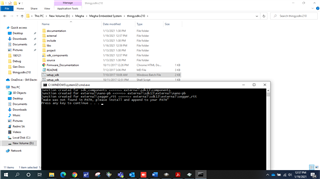
While running setup_sdk.bat having below error, please refer screenshot
Hi,
I am sorry for the delay.
The error message indicates that you have not installed make, or that it is installed but not found by the build script.
The readme suggests getting make from http://gnuwin32.sourceforge.net/packages/make.htm. (Although you are free to choose version and implementation of make as you would like.)
In order for make to be found by the build script, you need to put the install path of make in the PATH system environment variable. This is how to do that in Windows 10:
From control panel, select System, then "Advanced system settings". That should give you the "System Properties" window. Find the "Advanced" tab:
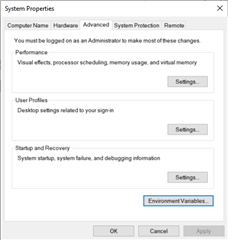
Click the "Environment Variables..." button. This gives you the "Environment Variables" window. There are two lists there. The top one is for your user only, and any settings there will affect your user, but not any other user on the same computer, if any. The bottom one is "System variables", which is system wide for all users. Which one to use depend on whether you want to set this up only for yourself, or if you want it set up for other users of the computer as well.
Find the "PATH" entry in the list, select it, and click the "Edit...'" button below the list. You should then get an "Edit environment variable" window.
To add an entry, click the "New" button on the top right. You can then enter a new line in the list. You need to put in the file path for where the installed make.exe is to be found. On my computer, that path is "C:\Program Files (x86)\GnuWin32\bin", but it depends on what installation of make you are using.
Regards,
Terje
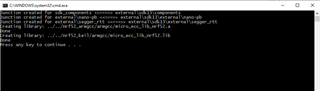
After following these steps now I'm able to run setup_sdk.bat Please find below screenshot for your reference.
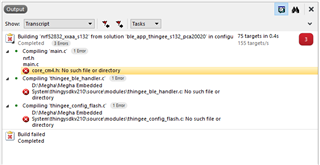
But now if I opened the ses project from path (\thingysdkv210\project\pca20020_s132\ses\ble_app_thingee_s132_pca20020) was unable compile still. Please refer below screenshot,
Hi,
According to the documentation for compiling the code, referred from the readme: "You must compile the Thingy firmware using either GCC or Keil μVision."
In other words: The Segger Embedded Studio project is not expected to work.
If you do not have Keil μVision then you can follow the instructions for Compiling with GCC.
Regards,
Terje
Hello,
Thanks for the suggestion.
I have tried using Keil uVision & got below error while building the project,
.\_release_v1_0_0\app_thingy_s132.axf: error: L6050U: The code size of this image (125112 bytes) exceeds the maximum allowed for this version of the linker.
Also refer below screenshot.
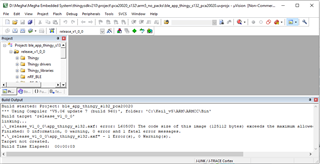
Also one more try I have done with GCC & got below error,
D:\Megha\Megha Embedded System\thingysdkv210\project\pca20020_s132\armgcc>make -j
rm -rf _build
process_begin: CreateProcess(NULL, rm -rf _build, ...) failed.
echo makefile
make: *** No rule to make target `_build/Megha', needed by `nrf52832_xxaa_s132'. Stop.
make: *** Waiting for unfinished jobs....
make (e=2): The system cannot find the file specified.
make: *** [clean] Error 2
makefile
mkdir _build
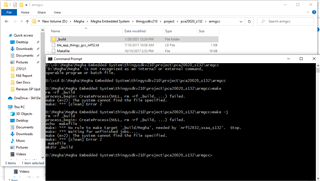
Hi,
Keil can only build targets up to 32 kB in size using the free trial version. I suggest that you use the GCC option.
Unfortunately the Makefile does not handle spaces in the file path. It is your folder named "Megha Embedded System" that it cannot handle. The easiest workaround is to change the folder name to something not containing spaces, for instance "MeghaEmbeddedSystem" or "Megha_Embedded_System" or similar.
Regards,
Terje
Dear sir,
I have tried using both methods suggested by you i.e. The easiest workaround is to change the folder name to something not containing spaces, for instance "MeghaEmbeddedSystem" or "Megha_Embedded_System" or similar.
But still facing issue, please refer below screenshot.
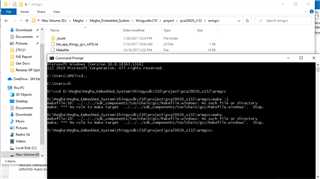
Dear sir,
I have tried using both methods suggested by you i.e. The easiest workaround is to change the folder name to something not containing spaces, for instance "MeghaEmbeddedSystem" or "Megha_Embedded_System" or similar.
But still facing issue, please refer below screenshot.
Hi,
I am sorry for the delay.
You may need to rerun the install script after the folder name has been changed, in order for everything to be correctly set up and mapped. Did you do that?
Regards,
Terje
Hi,
Have a nice day!!!
Rerun the setup_sdk.bat and after that again rerun make - j in armgcc, still got following error. Please find below cmd prompt log:
Microsoft Windows [Version 10.0.18363.1316]
(c) 2019 Microsoft Corporation. All rights reserved.
C:\Users\SMET>cd..
C:\Users>d:
D:\>cd D:\Megha\Megha_Embedded_System\thingysdkv210\project\pca20020_s132\armgcc
D:\Megha\Megha_Embedded_System\thingysdkv210\project\pca20020_s132\armgcc>make -j
rm -rf _build
process_begin: CreateProcess(NULL, rm -rf _build, ...) failed.
Compiling file: main.c
Compiling file: m_ble.c
Compiling file: m_ble_flash.c
Compiling file: advertiser_beacon_timeslot.c
Compiling file: twi_manager.c
Compiling file: support_func.c
Compiling file: m_environment_flash.c
Compiling file: m_environment.c
Compiling file: m_sound.c
Compiling file: m_motion_flash.c
Compiling file: m_motion.c
Compiling file: m_ui.c
Compiling file: m_ui_flash.c
Compiling file: m_batt_meas.c
Compiling file: drv_gas_sensor.c
Compiling file: drv_ccs811.c
Compiling file: drv_pressure.c
Compiling file: drv_lps22hb.c
Compiling file: drv_humidity.c
Compiling file: drv_hts221.c
Compiling file: drv_ext_light.c
Compiling file: drv_ext_gpio.c
Compiling file: drv_nfc.c
Compiling file: sx150x_led_drv_calc.c
Compiling file: drv_sx1509.c
Compiling file: drv_bh1745.c
Compiling file: drv_color.c
Compiling file: drv_speaker.c
Compiling file: drv_mpu9250.c
Compiling file: drv_motion.c
Compiling file: drv_acc_lis3dh.c
Compiling file: drv_mic.c
Compiling file: inv_mpu.c
Compiling file: inv_mpu_dmp_motion_driver.c
Compiling file: data_builder.c
Compiling file: hal_outputs.c
Compiling file: message_layer.c
Compiling file: ml_math_func.c
Compiling file: mlmath.c
Compiling file: mpl.c
Compiling file: results_holder.c
Compiling file: start_manager.c
Compiling file: storage_manager.c
Compiling file: eMPL_outputs.c
Compiling file: log_nrf52.c
Compiling file: dvi_adpcm.c
Compiling file: drv_audio_coder_adpcm.c
Compiling file: drv_audio_coder_bv32fp.c
Compiling file: drv_audio_dsp.c
Compiling file: drv_audio_pdm.c
Compiling file: ble_advdata.c
Compiling file: ble_advertising.c
Compiling file: ble_conn_params.c
Compiling file: ble_srv_common.c
Compiling file: ble_conn_state.c
Compiling file: ble_tes.c
Compiling file: ble_tcs.c
Compiling file: ble_uis.c
Compiling file: ble_tms.c
Compiling file: ble_tss.c
Compiling file: nrf_drv_common.c
Compiling file: nrf_drv_gpiote.c
Compiling file: nrf_drv_twi.c
make (e=2): The system cannot find the file specified.
make: *** [clean] Error 2
make: *** Waiting for unfinished jobs....
Please suggest further solution.Thanks in advance for your valuable assistance.
Regards,
Megha Choudhari
Hi,
I have tried make -j two three times. Please find below log:
D:\Megha\Megha_Embedded_System\thingysdkv210\project\pca20020_s132\armgcc>make -j
rm -rf _build
process_begin: CreateProcess(NULL, rm -rf _build, ...) failed.
Compiling file: nrf_drv_pwm.c
Compiling file: nrf_drv_pdm.c
Compiling file: nrf_drv_clock.c
Compiling file: nrf_drv_saadc.c
Compiling file: nrf_saadc.c
Compiling file: nfc_launchapp_msg.c
Compiling file: nrf_drv_rng.c
Compiling file: nfc_launchapp_rec.c
Compiling file: nfc_uri_msg.c
Compiling file: nfc_uri_rec.c
Compiling file: nfc_ndef_msg.c
Compiling file: nfc_ndef_record.c
Compiling file: nfc_text_rec.c
Compiling file: app_button.c
Compiling file: hal_nfc_t2t.c
Compiling file: app_error.c
Compiling file: app_scheduler.c
Compiling file: app_timer.c
Compiling file: nrf_assert.c
Compiling file: retarget.c
Compiling file: led_softblink.c
Compiling file: low_power_pwm.c
Compiling file: fstorage.c
Compiling file: fds.c
Compiling file: app_util_platform.c
Compiling file: sdk_mapped_flags.c
Compiling file: nrf_queue.c
Compiling file: RTT_Syscalls_GCC.c
Compiling file: SEGGER_RTT.c
Compiling file: SEGGER_RTT_printf.c
Compiling file: softdevice_handler_appsh.c
Compiling file: softdevice_handler.c
Compiling file: system_nrf52.c
Compiling file: nrf_log_frontend.c
Compiling file: nrf_log_backend_serial.c
Compiling file: nrf_dfu_flash_buttonless.c
Compiling file: ble_dfu.c
Compiling file: ble_bas.c
Compiling file: nrf_dfu_settings.c
Compiling file: crc32.c
Compiling file: nrf_strerror.c
make (e=2): The system cannot find the file specified.
make: *** [clean] Error 2
make: *** Waiting for unfinished jobs....
Assembly file: gcc_startup_nrf52.S
D:\Megha\Megha_Embedded_System\thingysdkv210\project\pca20020_s132\armgcc>make -j
rm -rf _build
process_begin: CreateProcess(NULL, rm -rf _build, ...) failed.
make (e=2): The system cannot find the file specified.
make: *** [clean] Error 2
make: *** Waiting for unfinished jobs....
Linking target: nrf52832_xxaa_s132.out
make[1]: Entering directory `D:/Megha/Megha_Embedded_System/thingysdkv210/project/pca20020_s132/armgcc'
Preparing: nrf52832_xxaa_s132.bin
Preparing: nrf52832_xxaa_s132.hex
''
text data bss dec hex filename
186240 380 19780 206400 32640 _build/nrf52832_xxaa_s132.out
''
make[1]: Leaving directory `D:/Megha/Megha_Embedded_System/thingysdkv210/project/pca20020_s132/armgcc'
Is this means Thingy52 sdk compiled successfully? Kindly confirm.
Regards,
Megha Choudhari
Hi,
Please confirm also, If I dumped this hex file in nRF52832DK, can it work?
Because, I have dumped this hex through nRF Connect but not able scan in Thingy App.
Waiting for your suggestions earliest.
Regards,
Megha Choudhari
Hi,
I suspect the error message might be problems with running the rm command. What output do you get from the following command?
rm --version
The hex file is built for the Thingy:52, not for the nRF52832 DK. You should not expect the firmware to work on the DK. This is because buttons, LEDs and other peripherals are connected at different GPIO pins or not existing at all on the DK. Also, for instance clock sources may differ. In general, different boards require different configuration of the project. You should test the project on a Thingy:52.
Regards,
Terje

