This post is older than 2 years and might not be relevant anymore
More Info: Consider searching for newer posts

BusFault exception when debugging nrf9160 with segger ozone

Hi,

I have written one application with logging disabled to save power.

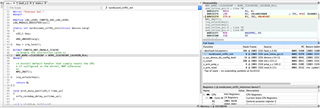
However, when I tried to debug the code with Ozone, during startup, it raises BusFault exception.

According to call stack, it happened after calling nordisemi_nrf91_init in nrf91 soc.c file.

I loaded with the zephyr.elf file and chosen M33 as the target, with SWD 4MHz.

NCS 1.2.0 is used and I want to avoid any upgrade if it is possible.
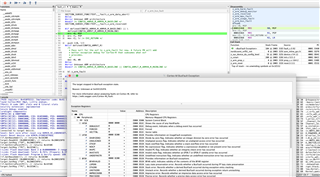
Do you have any idea what leads to this weird behavior? And do you have the same issue on your side?

Thanks!

Parents
  • Hi,

    Just to follow up on this. I too had exactly the same problem when I started using Ozone. Again the documentation from Nordic on this is not exactly stellar on what to do. Nordic suggested to use Ozone but then you're left to your own devices to work out why it hard faults all the time when you reset.

    Anyway, here's what I had to do to get Ozone working. As the answer below suggests you have to edit the generated .jdebug project file. There is a jump table at address 0 which needs to be read in order to get the starting PC and SP addresses. So all I had to do to get this working was to set VectorTableAddr = 0; in _SetupTarget.

    So my _SetupTarget looks like this.

    void _SetupTarget(void) {
      unsigned int SP;
      unsigned int PC;
      unsigned int VectorTableAddr;
    
      VectorTableAddr = 0; // <- change this to 0
      //
      // Set up initial stack pointer
      //
      SP = Target.ReadU32(VectorTableAddr);
      if (SP != 0xFFFFFFFF) {
        Target.SetReg("SP", SP);
      }
      //
      // Set up entry point PC
      //
      PC = Target.ReadU32(VectorTableAddr + 4);
      if (PC != 0xFFFFFFFF) {
        Target.SetReg("PC", PC);
      } else {
        Util.Error("Project script error: failed to set up entry point PC", 1);
      }
    }
    

    Hopefully this should work for you. It did for me on the nrf9160dk with the bootloader. As suggested below you can see the addresses that the debugger is using to set the PC and SP to on a reset. So you can hopefully work out what you need to set.

    Regards,

    Paul

Reply
  • Hi,

    Just to follow up on this. I too had exactly the same problem when I started using Ozone. Again the documentation from Nordic on this is not exactly stellar on what to do. Nordic suggested to use Ozone but then you're left to your own devices to work out why it hard faults all the time when you reset.

    Anyway, here's what I had to do to get Ozone working. As the answer below suggests you have to edit the generated .jdebug project file. There is a jump table at address 0 which needs to be read in order to get the starting PC and SP addresses. So all I had to do to get this working was to set VectorTableAddr = 0; in _SetupTarget.

    So my _SetupTarget looks like this.

    void _SetupTarget(void) {
      unsigned int SP;
      unsigned int PC;
      unsigned int VectorTableAddr;
    
      VectorTableAddr = 0; // <- change this to 0
      //
      // Set up initial stack pointer
      //
      SP = Target.ReadU32(VectorTableAddr);
      if (SP != 0xFFFFFFFF) {
        Target.SetReg("SP", SP);
      }
      //
      // Set up entry point PC
      //
      PC = Target.ReadU32(VectorTableAddr + 4);
      if (PC != 0xFFFFFFFF) {
        Target.SetReg("PC", PC);
      } else {
        Util.Error("Project script error: failed to set up entry point PC", 1);
      }
    }
    

    Hopefully this should work for you. It did for me on the nrf9160dk with the bootloader. As suggested below you can see the addresses that the debugger is using to set the PC and SP to on a reset. So you can hopefully work out what you need to set.

    Regards,

    Paul

Children
No Data
Related