Beware that this post is related to an SDK in maintenance mode
More Info: Consider nRF Connect SDK for new designs
This post is older than 2 years and might not be relevant anymore
More Info: Consider searching for newer posts

DFU secure bootloader doesn't compile in SES (V15.2 and V17.0)

Hi,

Thanks in advance.

Anybody experiencing the same problem? I'm trying to test the DFU functionality by compiling the example in SDK/examples/dfu/secure_bootloader/pca10040_ble/ses/ , but I got errors like this every time:

micro_ecc_backend_ecc.c

uECC.h: No such file or directory

and the source code in micro_ecc_backend_ecc.h is :

#include "uECC.h"

I was using nRF5 SDK V17.0 first, then I tried an earlier version V15.2, and had the same error, I searched the whole SDK folder and couldn't find a file named uECC.h, how could I fix this problem?

  • Please run the file:

    SDK17.0.0\external\micro-ecc\build_all.bat (Just double click it). It requires you to have "make" installed on your computer).

    While we're at it, if you are using SDK17.0.0, I recommend that you switch to SDK17.0.2, since it is API compatible, and contains some bugfixes. If you have started some projects, just copy them over to the new SDK17.0.2.

    Best regards,

    Edvin

  • Thank you Edvin,

    Sorry for not responding earlier. Thank you for the help. I'm still having some problems, here is what I get:

    I'm using Linux Mint with SES 5.32,  the SDK is V17.02 as suggested. In ./external/micro-ecc/ folder, the build_all.sh script didn't run, then I figured it out as the file has DOS line returns and after converting it to Linux format the script can run and I can get the needed files downloaded.

    But I found it still reporting the uECC.h file missing, turns out the include file path settings for it "../../../../../external/micro-ecc/micro-ecc" is not correct. After changing the path to the file's absolute address the "uECC.h file not found" error is gone, but then comes a new one:

    Linking secure_bootloader_ble_s132_pca10040_debug.elf
    cannot find ../../../../../external/micro-ecc/nrf52hf_armgcc/armgcc/micro_ecc_lib_nrf52.a: No such file or directory

    In that folder, I can only find 2 files: Makefile and ext_micro_ecc_gcc_nRF5x.ld

    I tried to run make but received the following errors:

    make: /usr/local/gcc-arm-none-eabi-7-2018-q2-update/bin/arm-none-eabi-gcc: Command not found
    Cannot find: '/usr/local/gcc-arm-none-eabi-7-2018-q2-update/bin/arm-none-eabi-gcc'.
    Please set values in: "/home/jianjiao/tmp/nRF5_SDK_17.0.2_d674dde/components/toolchain/gcc/Makefile.posix"
    according to the actual configuration of your system.
    ../../../../components/toolchain/gcc/Makefile.common:129: *** Cannot continue.  Stop.
    

    Please advice how could I fix this problem ?

    Kind regards,

    Jian

  • jj8431 said:
    I tried to run make but received the following errors:

     This suggests that this probably also happened when you ran the script, which is why the micro_ecc_lib_nrf52.a is not generated.

    Do you have arm-none-eabi-gcc installed? If so, what version? You can have several versions. Whenever I download a new SDK, I always also download the correct arm-none-eabi-gcc version that corresponds to that SDK version. As you see, it is looking for the 7-2018-q2-update version, which you can find here. (all versions for Windows, Mac and Linux. Please download the version that you are missing, and put it in the same folder as you have your current version.

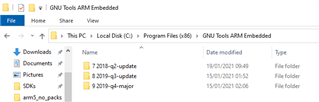
    My versions are located here:

    Best regards,

    Edvin

Related