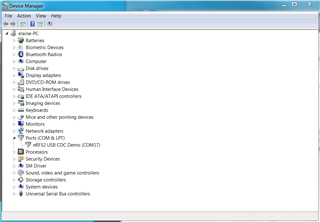
I am trying to use the dongle as a sniffer. I followed the following instructions to download sniffer code onto the dongle:
#### nRF52840-Dongle (PCA10059)
1. Download and install [nRF Connect for Desktop](www.nordicsemi.com/.../nRF-Connect-for-desktop).
2. Click `Add/remove apps` and install `Programmer` application.
3. Plug the dongle to USB port and click reset button to enter DFU mode. Red diode should start blinking.
4. Select `Nordic Semiconductor DFU Bootloader` device from the list.
5. Click `Add HEX file` and select `nrf802154_sniffer_dongle.hex` from `nrf802154_sniffer` directory.
6. Verify that the selected application begins at the `0x00001000` address to avoid overwriting the MBR section.
7. Click `Write` to flash the device.
8. Unplug the dongle from the USB port and plug it again. Do not click the reset button.
### Install extcap script
To find the correct installation path of the extcap utility on any system please see:
```
"Help" -> "About Wireshark" -> "Folders" -> "Extcap path"
```
Copy the provided `nrf802154_sniffer.py` script to the extcap directory.
__Note to Windows users:__ `nrf802154_sniffer.bat` has to be copied to the same directory as well.
Ensure that Python directory is included in your `PATH` system environment variable.
Installed python interpreter 3.7.7 onto Windows 7 and added to environment path.
Wireshark doesn't recognize the dongle. I tried to install the driver: nrfconnect_cdc_acm.inf but won't install. The PID for the dongle fw does not match this driver. Is there a Windows 7 driver for a VID_1915 and PID_154A?
Thanks.