This post is older than 2 years and might not be relevant anymore
More Info: Consider searching for newer posts

BLE sniffer firmware nRF52833 DK

Greetings,

We are attempting to install the nRF Sniffer program onto our nRF52833 DK as directed in the Nordic instructions.  We've installed the nRF Connector S/W as well as the Programmer application but when we try to "Select Device" from the drop down we don't see the "Select Device" option.  We've connected our nRF52833 DK to our computer and it's powered up but the Programmer application still doesn't allow the "Select Device" from drop down.   

Is the nRF52833 DK not supported by the nRF Sniffer S/W?  We figured it should be the same as the nRF 52 DK or do we need to purchase a different DK?

Thank you.

Parents
  • Hello,

    as daviddedwin says, the nrf52840 .hex file doesn't work out of the box with the nRF52833 DK, unfortunately. 

    I'll create an internal ticket letting the developers know that there is currently no pca10100 .hex files, but I don't know when/if that will be published. I guess it depends on their worklog. 

    The nRF52840 DK works with the sniffer_nrf52840dk_nrf52840_7cc811f.hex file, but if you want a cheaper solution, you can now use the nRF52 Dongle with the sniffer_nrf52840dongle_nrf52840_7cc811f.hex file from nRF Sniffer for Bluetooth v3.1.0.

    Note that the nRF52 dongle doesn't have an onboard debugger, so you need to use nRF Connect for Desktop to flash it (not a problem), but it makes it not great for application development. If you intend to do application development on the nRF52840, I would recommend an nRF52840 DK. If you need it just as a sniffer, or alternatively as a development tool with nRF Connect for Desktop, the dongle should work just fine!

    Best regards,

    Edvin

  • Additionally the nRF52-Dongle will need some more work to get it to work on Windows 7 as the nRF Connect Desktop only supports the driver for Win 10 out of the box.

    Can you also request addition of the Win 7 drivers in nRF Connect Desktop so we dont have to hand edit the inf files.

  • I will add that to the ticket.

    Although keep in mind that Windows 7 is officially deprecated.

    BR,
    Edvin

  • Wow!  Thank you all for responses.  We've ordered the 52840 DK as we need to a BLE sniffer that can detect Coded PHY packets which is why we ordered the 52833 DKs initially.  Now just waiting for the 52840 DK to arrive.

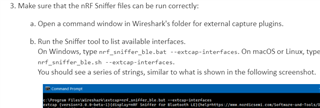
    Follow-on question.  We are getting all the software downloaded (as outlined in Nordic instructions for the BLE Sniffer) to program the 52840 DK for when it arrives and encountered an error with the steps for ensuring the nRF Sniffer files runs correctly with Wireshark.  Specifically, do we need to have the 52840 DK physically connected to our computer to ensure the Sniffer files run correctly?  We get an error stating "serial not found" when we do the below but again we don't have the DK just yet.


  • I do not think that support for coded PHY is available in the nRF Sniffer. You do need the COM port which the nRF52840-DK exposes to get this to work correctly.

Reply Children
Related