This post is older than 2 years and might not be relevant anymore
More Info: Consider searching for newer posts

NDK board is unable to power up

Currently I am facing an issue where the board was not able to power up by itself when a USB is port into it. However, when an external source is connected through the debugger port, the LED on the board lit up, but the board was not detected by computer/laptop. I was wondering is there servicing for it or perhaps a replacement if a warranty is still valid?

  • Hello,

    What did you flash to the DK, and what are the switches on your DK set to when you are testing this?

    I assume the power switch is on, but what are the following switches set to:

    -nRF power source (SW9)

    -SW6

    -SW7

    -SW10

    Best regards,

    Edvin

  • Hi Edwin, 

    I am flashing segger code nordic16 to the DK board so the following switches i have set to in the DK board are:

    SW9 - VDD mode (middle)

    SW6 - DEFAULT (right side)

    SW7 - Def (switch is at the right side)

    SW10 - OFF (towards the left side)

    This is the default settings i believe as i did not move any of the switches when it arrived. It was working well with this configuration for approx 5 months before the DK suddenly was unable to power up.

    Regards,

    Jie Hao

  • And what did you program the board with before you use the USB peripheral port?

    Can you try to flash the attached file:

    0456.test.hex

    Program it using:

    nrfjprog --eraseall
    nrfjprog --program test.hex
    nrfjprog --reset

    Try to power off the DK, change from the programmer USB to the USB peripheral, and power it back on. Let me know if the LEDs are not blinking then.

    Best regards,

    Edvin

  • Hi Edvin,

    I did not program anything onto the board before using the USB peripheral port.

    I have also tested out the attached file that you have sent, however the DK board is not having any LEDs blinking. But when i plugged the programmer USB into another board with power supply, the DK board's LED is dimly lit and blinking. I do not have a USB peripheral to do the 2nd step of the testing.

    Regards,

    Jie Hao

  • Hello,

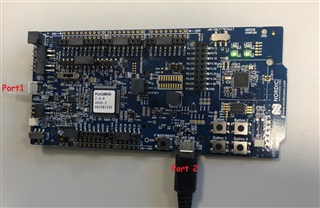
    When I said USB peripheral port, I just meant that you should take the USB cable that you used to program the DK (when it was inserted in the programming USB port), and plug it into the other USB on the nRF52840 DK (after it is programmed with the .hex attached in my previous reply), like this:

    Questions:

    1: Do the LEDs blink after you programmed the attached .hex file?

    2: Does the LEDs blink when you move the USB cable from port 1 to port 2 and power cycle the DK?

    Best regards,

    Edvin

Related