This post is older than 2 years and might not be relevant anymore
More Info: Consider searching for newer posts

Zigbee enhanced move to hue and saturation not handled correctly

Hi,

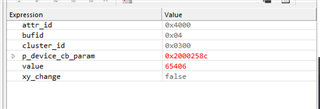
I'm currently developing the code of a RGB led lamp. The thing is, when I change the color while sniffing with Wireshark, I see only 1 payload (the way it should be), but I get two callbacks at zcl_device_cb with the ZB_ZCL_ATTR_COLOR_CONTROL_ENHANCED_CURRENT_HUE_ID instead of one.

The first callback it's random info (the value parameter), I don't know why is there and that's why I'm trying to understand.
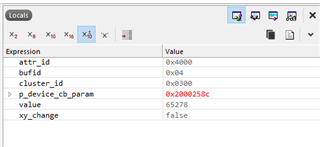
The second callback contains the actual info (value parameter), but only half of it. The only info I can get is the Enhanced HUE value, but the saturation nor the transition time.
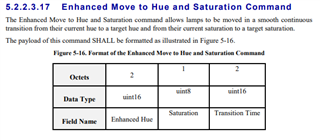
As you can see in the ZCL specification, saturation and transition time should be also there.

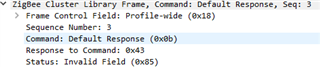
Wireshark screenshot:
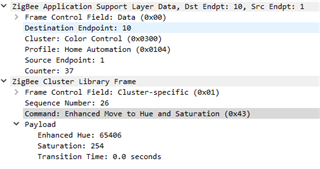
The callback handler function:

static zb_void_t zcl_device_cb(zb_bufid_t bufid)
{
    zb_uint16_t                      cluster_id;
    zb_uint16_t                      attr_id;
    zb_zcl_device_callback_param_t * p_device_cb_param = ZB_BUF_GET_PARAM(bufid, zb_zcl_device_callback_param_t);

    NRF_LOG_INFO("Received new ZCL callback %hd on endpoint %hu", p_device_cb_param->device_cb_id, p_device_cb_param->endpoint);

    /* Set default response value. */
    p_device_cb_param->status = RET_OK;

    switch (p_device_cb_param->device_cb_id)
    {
        case ZB_ZCL_LEVEL_CONTROL_SET_VALUE_CB_ID:
            level_control_set_value(p_device_cb_param->cb_param.level_control_set_value_param.new_value);
            break;

        case ZB_ZCL_SET_ATTR_VALUE_CB_ID:
            cluster_id = p_device_cb_param->cb_param.set_attr_value_param.cluster_id;
            attr_id    = p_device_cb_param->cb_param.set_attr_value_param.attr_id;

            if (cluster_id == ZB_ZCL_CLUSTER_ID_ON_OFF)
            {
                uint8_t value = p_device_cb_param->cb_param.set_attr_value_param.values.data8;

                if (attr_id == ZB_ZCL_ATTR_ON_OFF_ON_OFF_ID)
                {
                    on_off_set_value((zb_bool_t)value);
                }
            }
            else if (cluster_id == ZB_ZCL_CLUSTER_ID_LEVEL_CONTROL)
            {
                uint16_t value = p_device_cb_param->cb_param.set_attr_value_param.values.data16;
                if (attr_id == ZB_ZCL_ATTR_LEVEL_CONTROL_CURRENT_LEVEL_ID)
                {
                    level_control_set_value(value);
                }
            }
            else if (cluster_id == ZB_ZCL_CLUSTER_ID_COLOR_CONTROL)
            {
                uint16_t value = p_device_cb_param->cb_param.set_attr_value_param.values.data16;
                
                switch (attr_id)
                {
                    case ZB_ZCL_ATTR_COLOR_CONTROL_CURRENT_HUE_ID:
                        color_control_set_value_hue(value);
                        break;

                    case ZB_ZCL_ATTR_COLOR_CONTROL_ENHANCED_CURRENT_HUE_ID:
                        color_control_set_value_enhanced_hue(value, m_dev_ctx.color_control_attr.set_color_info.current_saturation, 0);
                        break;

                    case ZB_ZCL_ATTR_COLOR_CONTROL_CURRENT_SATURATION_ID:
                        color_control_set_value_saturation(value);
                        break;

                    case ZB_ZCL_ATTR_COLOR_CONTROL_CURRENT_X_ID:
                        m_dev_ctx.color_control_attr.set_color_info.current_X = p_device_cb_param->cb_param.set_attr_value_param.values.data16;
                        color_control_set_value_xy();
                        break;

                    case ZB_ZCL_ATTR_COLOR_CONTROL_CURRENT_Y_ID:
                        m_dev_ctx.color_control_attr.set_color_info.current_Y = p_device_cb_param->cb_param.set_attr_value_param.values.data16;
                        color_control_set_value_xy();
                        break;

                    default:
                        NRF_LOG_INFO("Unused attribute");
                        break;
                }
            }
            else
            {
                /* Other clusters can be processed here */
                NRF_LOG_INFO("Unhandled cluster attribute id: %d", cluster_id);
            }
            break;

        default:
            p_device_cb_param->status = RET_ERROR;
            NRF_LOG_INFO("Default case, returned error");
            break;
    }

    NRF_LOG_INFO("zcl_device_cb status: %hd", p_device_cb_param->status);
}

Could someone in the development team show me or explain me how I should handle the callback for the command Enhanced Move to Hue and Saturation? I can't find any info at all in your documentation.

Thanks.

Regards,

Carlos

Parents
  • Charlio99 said:
    Documentation is quite poor when you are looking at "non standard" commands. On/Off, Level control and such things are pretty well documented, but, there's almost no info on how to handle non SDK implemented commands and how to build the response for those commands.

     That is true, but to be fair, the Zigbee specification is not written by Nordic, and this is a Philips Hue specific cluster, which also is not written by Nordic. 

    However, how did you set up your device to act as a Zigbee light bulb? Do you have a project that you can share? Is there some way for me to replicate the issue you are seeing using only some nRF52840 DKs? I don't have a Hue light switch, so are you able to replicate the Hue switch signal on a DK?

    BR,

    Edvin

Reply
  • Charlio99 said:
    Documentation is quite poor when you are looking at "non standard" commands. On/Off, Level control and such things are pretty well documented, but, there's almost no info on how to handle non SDK implemented commands and how to build the response for those commands.

     That is true, but to be fair, the Zigbee specification is not written by Nordic, and this is a Philips Hue specific cluster, which also is not written by Nordic. 

    However, how did you set up your device to act as a Zigbee light bulb? Do you have a project that you can share? Is there some way for me to replicate the issue you are seeing using only some nRF52840 DKs? I don't have a Hue light switch, so are you able to replicate the Hue switch signal on a DK?

    BR,

    Edvin

Children
  • Hi Edvin,

    I used the light bulb example provided in the 4.1.0 SDK, I replaced the dimmer light cluster with the color cluster instead.

    I finally managed to handle (partially) the Enhanced Move to Hue and Saturation command correctly. All I had to do is set an endpoint handler, but I don't know how to build the response for it. Could you help me with that?

    Rigth now the handler has this partially working code that sets the color:

    /* Handler function for incoming ZCL frames. */
    static zb_uint8_t color_ep_handler(zb_uint8_t param)
    {
        zb_bufid_t zcl_cmd_buf = param;
        zb_zcl_parsed_hdr_t *cmd_info = ZB_BUF_GET_PARAM(zcl_cmd_buf, zb_zcl_parsed_hdr_t);
    
        /* Make sure that received frame was sent with proper profile and to proper cluster. */
        if (cmd_info->cluster_id != ZB_ZCL_CLUSTER_ID_COLOR_CONTROL ||
            cmd_info->profile_id != ZB_AF_HA_PROFILE_ID)
        {
            return ZB_FALSE;
        }
     
        /* Check if the received command is ENHANCED MOVE TO HUE SATURATION command. */
        if (cmd_info->cmd_id == ZB_ZCL_CMD_COLOR_CONTROL_ENHANCED_MOVE_TO_HUE_SATURATION)
        {
            zb_zcl_color_control_enhanced_move_to_hue_saturation_req_t payload;
            zb_zcl_parse_status_t status;
    
            ZB_ZCL_COLOR_CONTROL_GET_ENHANCED_MOVE_TO_HUE_SATURATION_REQ(zcl_cmd_buf, payload, status);
    
            if (status == ZB_ZCL_PARSE_STATUS_SUCCESS)
            {
                NRF_LOG_INFO("Set color hue value: %i", payload.enhanced_hue);
                
                //Function to set the RGB light PWM.
                color_control_set_value_enhanced_hue(payload.enhanced_hue, payload.saturation, payload.transition_time);
    
                //HERE A RESPONSE TO THE ENHANCED MOVE TO HUE SATURATION COMMAND SHOULD BE GENERATED.
            
                //NEXT LINE SHOULD BE UNCOMMENTED AND THE RETURN SHOULD BE TRUE.
                //zb_buf_free(zcl_cmd_buf);
                return ZB_FALSE;
            }
        }
     
        return ZB_FALSE;
    }
    

    The problem is that I have to return ZB_FALSE for this to work, meaning that the default response stack is creating a Invalid Field response.

    The way it should work (according to ZCL specification and Nordic SDK) is creating a response packet for the Enhanced Move to Hue and Saturation command with ZB_ZCL_PARSE_STATUS_SUCCESS and after sending that packet, the buffer should be freed and the return ZB_TRUE so the default response handler knows that the response has been handled properly.

    The whole code: http://transfer.sh/R1TsY/light_rgb.zip

    Have in mind, that right know the code it's quite dirty and poorly commented (sorry for that).

    The zip file should be extracted under: ZIGBEE_AND_THREAD_4.1.0_SDK/examples/zigbee/light_control/FOLDER_WITH_THE_ZIP_CONTENTS

    I don't know if I explained myself well enough, if you need any clarification, let me know.

    Best regards,

    Carlos

  • Hello Carlos,

    Can you please upload the project (your zip file) here? If you encounter any errors, try to reduce it's size by deleting the build folders. (The firewall will not allow me to download from transfer.sh). 

    I am sorry for the late response, but I haven't been able to see your current implementation. How did you build up your response?


    Charlio99 said:
    The problem is that I have to return ZB_FALSE for this to work, meaning that the default response stack is creating a Invalid Field response.

     Where does that come from? Why do you need it to return ZB_FALSE, and why does that mess up the response?

    Best regards,

    Edvin

  • Hello Edvin,

    I am sorry for the late response, but I haven't been able to see your current implementation. How did you build up your response?

    As I said in my previous message, what I need help with is with the response, so I can't show you an implementation I dont have.

    Where does that come from? Why do you need it to return ZB_FALSE, and why does that mess up the response?

    I need to return ZB_FALSE because I don't know how to generate the response to the Enhanced Move to Hue and Saturation command (as I said in my previous message). Returning ZB_FALSE creates a generic "command not supported" response. I just do that in order to get some kind of response to that command while I'm waiting to get the right response, but I wan't to do it the way it should be done (with the Enhanced Move to Hue and Saturation response), that's where I need help.

    Can you please upload the project (your zip file) here?

    light_rgb.zip

    Best regards,

    Carlos

  • Hello Carlos,

    For your information. I have asked our Zigbee team to have a look at your questions, but I have not heard back from them yet. I will update you as soon as I hear from them. Please let me know if you make any progress in the meantime.

    I just wanted you to know that your ticket is not forgotten. 

  • Hello,

    I got a reply from our Zigbee team last week, but I have been out of office, so I am sorry for the delay.

    "I think that there is some misunderstanding in this issue.

    The ZCL callback is used by the stack to inform the user application about the value of an attribute that has changed. For commands with non-zero transition time, the transition from the initial attribute value to the value set by the command needs to be achieved incrementally, in steps, in time set by transition time. This is handled by the stack and simplifies the user application. ZCL callbacks are being called on each attribute value that is being changed.

    Look at the light bulb example: When it receives a Move to Level command, it does not handle the transition time directly. The bulb is informed by the stack about a new value of an attribute to set the on-board LED to the correct brightness. Try sending a Move to Level command with transition time set to 3 seconds, and you should see the LED brightness slowly increasing/decreasing.

    In your case, you can see two ZCL callbacks being called, both for the same attribute. This is the transition to the attribute's final value as received in the command. There is no ZCL callback for the saturation attribute and most probably the saturation value was already the same value as set by the command.

    When it comes to the ZB_ZCL_SET_ATTRIBUTE(), it calls the zb_zcl_set_attr_val() function. It is used to perform additional checks before the value is written to an attribute. It also informs the stack that the value of an attribute is changed. The multisensor example measures the temperature and the corresponding attribute value is being updated. When using the functions to set the attribute's value, the stack is informed about this change and can perform additional actions if required (e.g. send reporting).

    The default response packet is sent in response if requested by the ZCL command. If not either the status contains an error or no command is sent in response to the received command. The ZCL Frame Control Field has a bit "Disable Default Response" which informs the device receiving the packet if the Default Response must be sent. In your ZCL callback, is the status of the Default Response command set to true or false? And what is the status (return code)?"

Related