
I just got a new nrf9160DK rev 0.15.0. While plugged in to USB and the switch in the off position, my meter reports 4.95V and 0.016A. Why is this happening? My older rev 0.8.2 DK reports 0V when off.

I just got a new nrf9160DK rev 0.15.0. While plugged in to USB and the switch in the off position, my meter reports 4.95V and 0.016A. Why is this happening? My older rev 0.8.2 DK reports 0V when off.
Hi,
Can you be more specific to where you measured? Please see the measurement documentation in our nRF9160DK documentation.
Kind regards,
Øyvind
I am using the cheap meter in the picture between my computer and the USB connection at J6. I realize that it may not be the most precise, but trying to understand why the new rev DK reports 0.017A while the older DK reported 0A while off. Changing the IFMCU DISCONN switch had no effect.
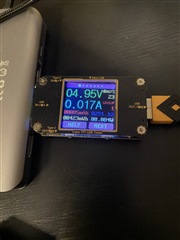
I'm not sure why there would be a difference between the two boards but this may be caused by parts of the USB circuit, the debugger circuit and/or other regulators on the board. That said, the nRF9160DK itself is not designed to be low power, and not to be measured using USB. You are measuring everything on the board, and not the nRF9160 alone. This is why you should follow the documentation I linked to yesterday and measure current draw on the nRF Current Measurement pins, which will measure current from the nRF9160.
Kind regards,
Øyvind
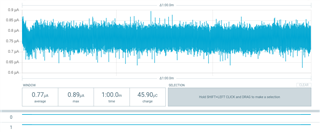
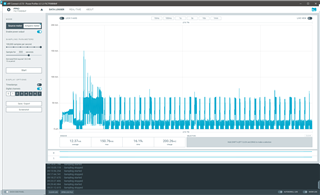
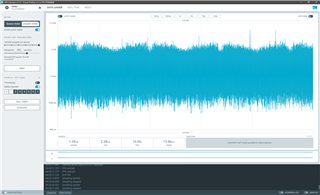
I'm finally getting back to this. I have a PPK2 to do the measurement now and ran a simple program: "k_thread_suspend(k_current_get())" as the only line and an empty prj.conf file, using NCS 1.4.1. tried it on HW 0.8.2 and 0.15.0 and see a big difference in power usage.
results with 0.8.2:
results with 0.15.0:
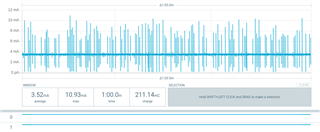
As you can see 0.15.0 has a higher baseline and frequent spikes. The test was powered by USB with the PPK2 GND, VIN, VOUT connected as per the directions and the profiler in ampere mode. I don't think that's the right way to measure this, so can you explain the correct setup to me?
Ultimately, I want to understand why 0.15.0 is using so much more and hopefully be able to correct it. Perhaps is there a CONFIG option I should be using with this rev?
Mike
Hi Mike,
Can you provide information on your test setup? Have you connected the DK as per instructions in our infocenter? 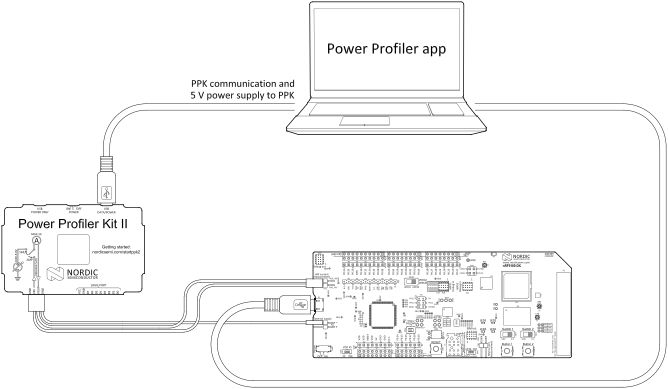
How is connection done on DK v0.8.2 vs DK v0.15.0?
Thanks.
-Øyvind
the connection is per the instructions. connection to 0.8.2 is in the pic: 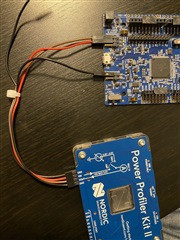
both powered by USB, but disconnected for the photo op
the connection is per the instructions. connection to 0.8.2 is in the pic:
both powered by USB, but disconnected for the photo op
Hello, and thanks for sharing that image. From this I can see that you have not moved SW10 to position EXT.
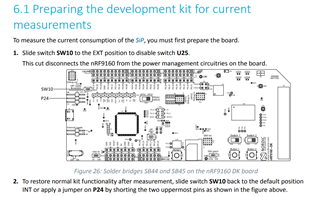
I did a test with the Asset Tracker application from the Precompiled FW package (v1.5.0 2021-03-01_8e8c6089) on my v0.8.2 of the nRF9160DK.
With SW10 in default position I got the following result running the asset tracker and modem FW 1.2.3: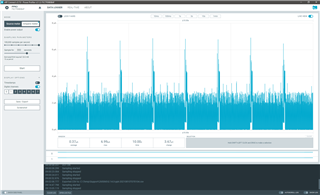
And with SW10 in EXT position, running the asset tracker:
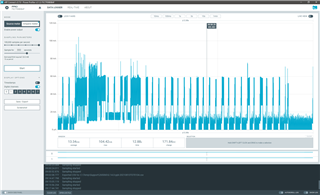
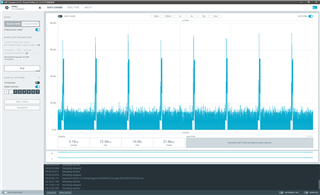
I did not have a v0.15.0 of the DK, but tried with a 0.14.0 running same modem FW (v1.2.3):
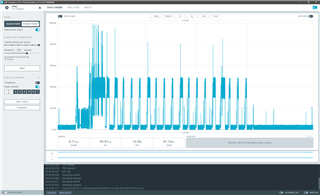
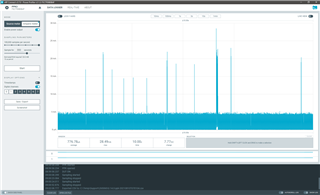
I did a quick test using the AT Client application as well:
v0.8.2 compared between off and on:
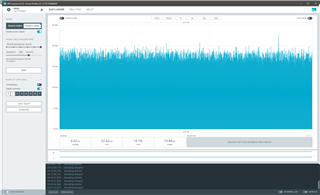
v0.14.0 compared between off and on:
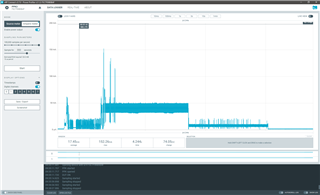
Looking at the more steady charts, it looks like you are seeing a difference of about 4x between the boards, correct?
The at_client sample is good to use also. To use as little power and be as consistent as possible, I use AT+CFUN=4 (or 0).
I don't see SW10 on the 0.15.0 DK. Did it move or is there an equivalent jumper or such that I can try?

