This post is older than 2 years and might not be relevant anymore
More Info: Consider searching for newer posts

Programming Nordic Thingy 91 with Segger Embedded Studio.

Hello Nordic team,

I am following up the tutorial (https://developer.nordicsemi.com/nRF_Connect_SDK/doc/latest/nrf/include/net/azure_iot_hub.html#lib-azure-iot-hub) conencting nordic thingy 91 to azure iot hub.

I have already obtained the certificates and key for azure iot hub. 

This step tells me to  .

But following the above, in the last step of this link (https://developer.nordicsemi.com/nRF_Connect_SDK/doc/latest/nrf/gs_programming.html#gs-programming) "Build and Debug" I get an error "J link cannot find any emulator".

I have the following questions.

01.  Do I need a nRF9160 DK to program nordic thingy 91? or is there a work around?

02. Is there any tutorial link on how to program his application "samples/nrf9160/at_client" ?

03. When I connect the nordic thingy 91 to the multi port USB hub, the other connected devices to the same multi port aren't functioning any more. Is that a common one?

PS: I am a new bie to nordic thingy 91. I bought a nordic thingy 91 to connect it to the Azure IoT HUB.

Thanks and Regards,

Raj

Parents
  • Hello Raj, 

    When working with the Thingy:91 please see our documentation on Programming Nordic Thingy:91 and Working with Thingy:91.

    As the Thingy:91 does not have a Segger OB debugger device as the nRF9160 DK, you can only program the Thingy:91 using either the nRF9160 DK with a 10 pin external debug cable or a Segger JLink programmer with support for Arm Cortex M33, or as a workaround you can program the device using MCUboot which lets you program the Thingy:91 through your USB.

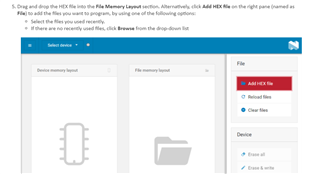
    On the top of Building and programming a sample application it also states the following:


    When I connect the nordic thingy 91 to the multi port USB hub, the other connected devices to the same multi port aren't functioning any more.

    Can you please elaborate on what happens? What kind of multi port USB hub are you using? 

    Kind regards,
    Øyvind

Reply
  • Hello Raj, 

    When working with the Thingy:91 please see our documentation on Programming Nordic Thingy:91 and Working with Thingy:91.

    As the Thingy:91 does not have a Segger OB debugger device as the nRF9160 DK, you can only program the Thingy:91 using either the nRF9160 DK with a 10 pin external debug cable or a Segger JLink programmer with support for Arm Cortex M33, or as a workaround you can program the device using MCUboot which lets you program the Thingy:91 through your USB.

    On the top of Building and programming a sample application it also states the following:


    When I connect the nordic thingy 91 to the multi port USB hub, the other connected devices to the same multi port aren't functioning any more.

    Can you please elaborate on what happens? What kind of multi port USB hub are you using? 

    Kind regards,
    Øyvind

Children
  • Hello Øyvind,

    Thanks for the links they were helpful.

    I went through them and I have a question. 

    To make the Nordic Thingy 91 communicate with the IoT Hub; I need to Build and Install the ""samples/nrf9160/at_client"" which has a main.c file.

    In the tutorials it was mentioned that to drag and drop the .HEX file.

    Could you please inform me how can I program this samples/nrf9160/at_client/main.c to Nordic thingy 91?

    Regarding the USB Multiport, when I connect the nordic things 91 the connection to my PC is established. But the existing usb connections to my wireless mouse and keyboard is lost. It was weird, But I shall look more on it and fix them.

    Regards,

    Raj

Related