This post is older than 2 years and might not be relevant anymore
More Info: Consider searching for newer posts

example test problem

hi support team,

i was testing this this example "http://developer.nordicsemi.com/nRF_Connect_SDK/doc/1.4.0/nrf/samples/nrf5340/netboot/README.html#nc-bootloader"

 i have recovered flash using below command 
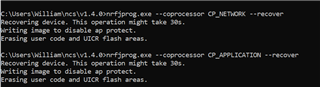
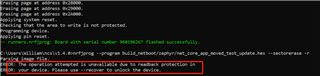
after west flash in step 4, still there will be one problem as below, testing process is not as testing instructions described.

how to disable lock function after program? is there any config?
regards,

William.

Parents
  • I was able to complete the 4 steps in  doc/1.5.0/nrf/samples/nrf5340/netboot/README.html#nc-bootloader using NCS v1.5.0, an nRF5340 DK (v0.11.0) and the board selection nrf5340dk_nrf5340_cpuapp. I got the following output:

    I: Turned off network core
    I: Done updating network core
    I: Bootloader chainload address offset: 0xc000
    I: Jumping to the first image slot
    *** Booting Zephyr OS build v2.4.99-ncs1  ***
    Starting Nordic UART service example

    The JLink and nrfjprog versions are the following:

    $ nrfjprog -v
    nrfjprog version: 10.12.1
    JLinkARM.dll version: 6.96  

    In step 2 I used the following commands below. There has been some issues regarding path length due to Windows limitations, therefore I used the name "bld" for the build folder

    cd <ncs location>nrf/samples/bluetooth/peripheral_uart
    west build -b nrf5340dk_nrf5340_cpuapp -d bld -f -- -DCONFIG_BOOTLOADER_MCUBOOT=y -Dmcuboot_CONFIG_PCD=y

    If you encounter issues could you try the command below, to see if approtect is enabled on the network core

    nrfjprog --memrd 0x01FF8000 --coprocessor CP_NETWORK

    It should read the network core approtect register, and it should return 50FA50FA (unprotected).

    Best regards,

    Simon

Reply
  • I was able to complete the 4 steps in  doc/1.5.0/nrf/samples/nrf5340/netboot/README.html#nc-bootloader using NCS v1.5.0, an nRF5340 DK (v0.11.0) and the board selection nrf5340dk_nrf5340_cpuapp. I got the following output:

    I: Turned off network core
    I: Done updating network core
    I: Bootloader chainload address offset: 0xc000
    I: Jumping to the first image slot
    *** Booting Zephyr OS build v2.4.99-ncs1  ***
    Starting Nordic UART service example

    The JLink and nrfjprog versions are the following:

    $ nrfjprog -v
    nrfjprog version: 10.12.1
    JLinkARM.dll version: 6.96  

    In step 2 I used the following commands below. There has been some issues regarding path length due to Windows limitations, therefore I used the name "bld" for the build folder

    cd <ncs location>nrf/samples/bluetooth/peripheral_uart
    west build -b nrf5340dk_nrf5340_cpuapp -d bld -f -- -DCONFIG_BOOTLOADER_MCUBOOT=y -Dmcuboot_CONFIG_PCD=y

    If you encounter issues could you try the command below, to see if approtect is enabled on the network core

    nrfjprog --memrd 0x01FF8000 --coprocessor CP_NETWORK

    It should read the network core approtect register, and it should return 50FA50FA (unprotected).

    Best regards,

    Simon

Children
No Data
Related