This post is older than 2 years and might not be relevant anymore
More Info: Consider searching for newer posts

GATTS Characteristic without "read" properties can be read

Hi

I did some experiments with the GATT capabilities of the S140 7.2.0 softdevice. An experiment that I did showed a behavior that is not as I would expect it.

Steps to reproduce:

1) Create a peripheral project based on the S140 7.2.0
2) Setup the GATT server with a service and a test characteristic. The characteristic should have the "read" bit within the characteristic properties not set. 
3) Try to read the characteristic with another device that implements the GATT client.
4) When a read to this characteristic is initiated I would expect that the read fails, but the GATT server in the S140 7.2.0 gives normal access to the value.

From the Core Spec 5.0 the definition for not permitted reading is the following:
If the attribute value cannot be read due to permissions then an Error
Response shall be sent with the error code «Read Not Permitted». 

Is it possible that the permission handling in the GATT server of the softdevice is not properly handling the permissions?

Regards Adrian

Parents
  • Hello,

    Can you please share a project that can replicate this issue? If you use one of our examples, e.g. the ble_app_hrs example, zip the folder SDK\examples\ble_peripheral\ble_app_hrs, so that when I unzip it into the SDK\examples\ble_peripheral in an unmodified SDK, the issue replicates. 

    Best regards,

    Edvin

  • Hi Edwin

    I did a short test based on the examples ble_app_blinky and ble_app_blinky_c running on two nRF52 DK boards. The only change I did to the SDK 17.0.2 is changing a single line in the ble_lbs.c.

    I changed the properties for the led characteristic of the BLE_LBS service to not support write (the changed file is attached).

    Original: add_char_params.char_props.write = 1;
    New: add_char_params.char_props.write = 0;

    After this change it is expected that the write of the led characteristic failed with a not permitted error. But when I press the button on the device running ble_app_blinky_c I can still see that the write normally is done.

    Log of the central:
    <info> app_timer: RTC: initialized.<CR>
    <info> app: Blinky CENTRAL example started.<CR>
    <info> app: Connected.<CR>
    <info> app: LED Button service discovered on conn_handle 0x0.<CR>
    <info> app: LBS write LED state 1<CR>
    <info> app: LBS write LED state 0<CR>

    Log of the peripheral:
    <info> app_timer: RTC: initialized.<CR>
    <info> app: Blinky example started.<CR>
    <info> app: Connected<CR>
    <info> app: Received LED ON!<CR>
    <info> app: Received LED OFF!<CR>

    By this the not working write permission can be shown. I didn't make an example for the read permission as I think it's the same problem there. 

    Hope that helps to analyze the behavior.

    Adrian

    /**
     * Copyright (c) 2013 - 2020, Nordic Semiconductor ASA
     *
     * All rights reserved.
     *
     * Redistribution and use in source and binary forms, with or without modification,
     * are permitted provided that the following conditions are met:
     *
     * 1. Redistributions of source code must retain the above copyright notice, this
     *    list of conditions and the following disclaimer.
     *
     * 2. Redistributions in binary form, except as embedded into a Nordic
     *    Semiconductor ASA integrated circuit in a product or a software update for
     *    such product, must reproduce the above copyright notice, this list of
     *    conditions and the following disclaimer in the documentation and/or other
     *    materials provided with the distribution.
     *
     * 3. Neither the name of Nordic Semiconductor ASA nor the names of its
     *    contributors may be used to endorse or promote products derived from this
     *    software without specific prior written permission.
     *
     * 4. This software, with or without modification, must only be used with a
     *    Nordic Semiconductor ASA integrated circuit.
     *
     * 5. Any software provided in binary form under this license must not be reverse
     *    engineered, decompiled, modified and/or disassembled.
     *
     * THIS SOFTWARE IS PROVIDED BY NORDIC SEMICONDUCTOR ASA "AS IS" AND ANY EXPRESS
     * OR IMPLIED WARRANTIES, INCLUDING, BUT NOT LIMITED TO, THE IMPLIED WARRANTIES
     * OF MERCHANTABILITY, NONINFRINGEMENT, AND FITNESS FOR A PARTICULAR PURPOSE ARE
     * DISCLAIMED. IN NO EVENT SHALL NORDIC SEMICONDUCTOR ASA OR CONTRIBUTORS BE
     * LIABLE FOR ANY DIRECT, INDIRECT, INCIDENTAL, SPECIAL, EXEMPLARY, OR
     * CONSEQUENTIAL DAMAGES (INCLUDING, BUT NOT LIMITED TO, PROCUREMENT OF SUBSTITUTE
     * GOODS OR SERVICES; LOSS OF USE, DATA, OR PROFITS; OR BUSINESS INTERRUPTION)
     * HOWEVER CAUSED AND ON ANY THEORY OF LIABILITY, WHETHER IN CONTRACT, STRICT
     * LIABILITY, OR TORT (INCLUDING NEGLIGENCE OR OTHERWISE) ARISING IN ANY WAY OUT
     * OF THE USE OF THIS SOFTWARE, EVEN IF ADVISED OF THE POSSIBILITY OF SUCH DAMAGE.
     *
     */
    #include "sdk_common.h"
    #if NRF_MODULE_ENABLED(BLE_LBS)
    #include "ble_lbs.h"
    #include "ble_srv_common.h"
    
    
    /**@brief Function for handling the Write event.
     *
     * @param[in] p_lbs      LED Button Service structure.
     * @param[in] p_ble_evt  Event received from the BLE stack.
     */
    static void on_write(ble_lbs_t * p_lbs, ble_evt_t const * p_ble_evt)
    {
        ble_gatts_evt_write_t const * p_evt_write = &p_ble_evt->evt.gatts_evt.params.write;
    
        if (   (p_evt_write->handle == p_lbs->led_char_handles.value_handle)
            && (p_evt_write->len == 1)
            && (p_lbs->led_write_handler != NULL))
        {
            p_lbs->led_write_handler(p_ble_evt->evt.gap_evt.conn_handle, p_lbs, p_evt_write->data[0]);
        }
    }
    
    
    void ble_lbs_on_ble_evt(ble_evt_t const * p_ble_evt, void * p_context)
    {
        ble_lbs_t * p_lbs = (ble_lbs_t *)p_context;
    
        switch (p_ble_evt->header.evt_id)
        {
            case BLE_GATTS_EVT_WRITE:
                on_write(p_lbs, p_ble_evt);
                break;
    
            default:
                // No implementation needed.
                break;
        }
    }
    
    
    uint32_t ble_lbs_init(ble_lbs_t * p_lbs, const ble_lbs_init_t * p_lbs_init)
    {
        uint32_t              err_code;
        ble_uuid_t            ble_uuid;
        ble_add_char_params_t add_char_params;
    
        // Initialize service structure.
        p_lbs->led_write_handler = p_lbs_init->led_write_handler;
    
        // Add service.
        ble_uuid128_t base_uuid = {LBS_UUID_BASE};
        err_code = sd_ble_uuid_vs_add(&base_uuid, &p_lbs->uuid_type);
        VERIFY_SUCCESS(err_code);
    
        ble_uuid.type = p_lbs->uuid_type;
        ble_uuid.uuid = LBS_UUID_SERVICE;
    
        err_code = sd_ble_gatts_service_add(BLE_GATTS_SRVC_TYPE_PRIMARY, &ble_uuid, &p_lbs->service_handle);
        VERIFY_SUCCESS(err_code);
    
        // Add Button characteristic.
        memset(&add_char_params, 0, sizeof(add_char_params));
        add_char_params.uuid              = LBS_UUID_BUTTON_CHAR;
        add_char_params.uuid_type         = p_lbs->uuid_type;
        add_char_params.init_len          = sizeof(uint8_t);
        add_char_params.max_len           = sizeof(uint8_t);
        add_char_params.char_props.read   = 1;
        add_char_params.char_props.notify = 1;
    
        add_char_params.read_access       = SEC_OPEN;
        add_char_params.cccd_write_access = SEC_OPEN;
    
        err_code = characteristic_add(p_lbs->service_handle,
                                      &add_char_params,
                                      &p_lbs->button_char_handles);
        if (err_code != NRF_SUCCESS)
        {
            return err_code;
        }
    
        // Add LED characteristic.
        memset(&add_char_params, 0, sizeof(add_char_params));
        add_char_params.uuid             = LBS_UUID_LED_CHAR;
        add_char_params.uuid_type        = p_lbs->uuid_type;
        add_char_params.init_len         = sizeof(uint8_t);
        add_char_params.max_len          = sizeof(uint8_t);
        add_char_params.char_props.read  = 1;
        add_char_params.char_props.write = 0;
    
        add_char_params.read_access  = SEC_OPEN;
        add_char_params.write_access = SEC_OPEN;
    
        return characteristic_add(p_lbs->service_handle, &add_char_params, &p_lbs->led_char_handles);
    }
    
    
    uint32_t ble_lbs_on_button_change(uint16_t conn_handle, ble_lbs_t * p_lbs, uint8_t button_state)
    {
        ble_gatts_hvx_params_t params;
        uint16_t len = sizeof(button_state);
    
        memset(&params, 0, sizeof(params));
        params.type   = BLE_GATT_HVX_NOTIFICATION;
        params.handle = p_lbs->button_char_handles.value_handle;
        params.p_data = &button_state;
        params.p_len  = &len;
    
        return sd_ble_gatts_hvx(conn_handle, &params);
    }
    #endif // NRF_MODULE_ENABLED(BLE_LBS)
    

  • Oh. I see. 

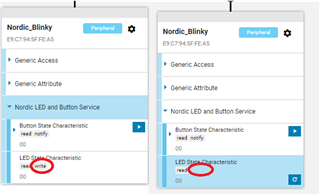
    So the add_char_params.char_props.write only indicates during service discovery what characteristics that can be read or written to (or enable notifications or indications). As you can see if you try to connect using nRF Connect for Desktop, the write button disappears when setting this to 0:

    But as you say, you will still be able to physically write to it using e.g. the ble_app_blinky_c example (so by forcing it).

    If you want to physically disallow writes (or reads), you need to change the parameter a few lines down:

        add_char_params.write_access = SEC_OPEN;
        
    to:
        add_char_params.write_access = SEC_NO_ACCESS;

    Or any other value defined in the enum security_req_t in ble_srv_common.h if you want to require encryption before reading.

    I can agree that this is a bit unintuitive, but hopefully, it solves your requirement.

    Best regards,

    Edvin

  • I see I didn't refresh my window for a while here. But basically, what is saying is correct.

Reply Children
No Data
Related