This post is older than 2 years and might not be relevant anymore
More Info: Consider searching for newer posts

How to configure nRF82540 for using multiple BLE packages in one connection interval?

Hi,

I try to achieve high throughput via BLE connection between two nRF82540dk boards. I would like to maximize duty cycle of transmission in the connection interval.
Unfortunately I observe only one or two BLE packets in each interval.
How can I configure SoftDevice to transmit more packets in one interval?

I use slighly modified ble_app_uart_c_pca10056_s140 and ble_app_uart_pca10056_s140 as starting point examples for the serial connection.
A stream of 244 bytes packets is sent from peripheral to the central device. 

Other options:
1) BLE PHY 2Mbps,
2) Connection interval = 7.5ms
3) NRF_SDH_BLE_GAP_EVENT_LENGTH = 6

Kind regards,

Piotr Romaniuk

  • Hello Piotr,

    Piotr Romaniuk said:
    Are the numbers that you asked for?

    Yes, the numbers on the Nordic chip - QIAAD0 - is the build number, and tells us that these are Revision 2 chips, great!

    Piotr Romaniuk said:
    According to Softdevice version I only know that I use S140 from SDK 17.0.2. I don't know how to check more. Maybe I missunderstood version numbering [?]

    Thank you for clarifying.
    The SoftDevice is located at nRF5_SDK_17.0.2_d674dde\components\softdevice\s140\hex in the SDK, and the name will contain its version. If you have not made any changes to this, SDK 17.0.2 ships with S140 v7.2.0 by default.

    Piotr Romaniuk said:
    I thought that Softdevice is programmed together with my program as precompiled binary module. Is it true?

    This is correct, the SoftDevice is supplied as a precompiled hex file, which is programmed together with the application when the preprocessor defines S140 and SoftDevice_present is set. 

    Piotr Romaniuk said:
    I assumed that by selecting folder pca10056 and its subfolder S140 for Segger Embedded Studio project I have selected what chip version and Softdevice version I use. I also assumed that S140 will support all the chips.
    I am I wrong?

    No, you are not wrong - the SDK only contains compatible SoftDevice versions.
    The reason why I asked for SoftDevice version is because customers sometimes use older versions of them without ensuring that the SoftDevice version they are using is compatible with the SDK version they are using. This could have been the reason for the RAM adjustment warnings you are getting. It sounds to me like this is not the case here, however. My apologies if this seemed like a unnecessary detour from the issue, I just wanted to rule out compatibility issues being the cause.

    Did you try to do the RAM adjustments as detailed in the warning, by the way? Did this resolve the NRF_ERROR_NO_MEM error you were getting?

    Best regards,
    Karl

  • Hi Karl,

    I did not try yet RAM adjustment.
    Can you send me exact expression that I should write into linker window options?
    I browsed source code including linker script and I am really confused.

    I very concerned that the same problem (i.e. with memory) exists in Nordic original example (ble_uart project) without any modification. I plan to open new case for that, because it is basic code and is not influenced by any my changes.

    I am very worried that I stuck in some basic issue, that further coding depends on. We are sending one message per day.
    I am sending you private messages in chat window. I am not sure if you receive them?
    Maybe chat will be faster to determine the cause of the problem.

    Kind regards,
    Piotr Romaniuk

  • Hello Piotr,

    Piotr Romaniuk said:
    I did not try yet RAM adjustment.
    Can you send me exact expression that I should write into linker window options?
    I browsed source code including linker script and I am really confused.

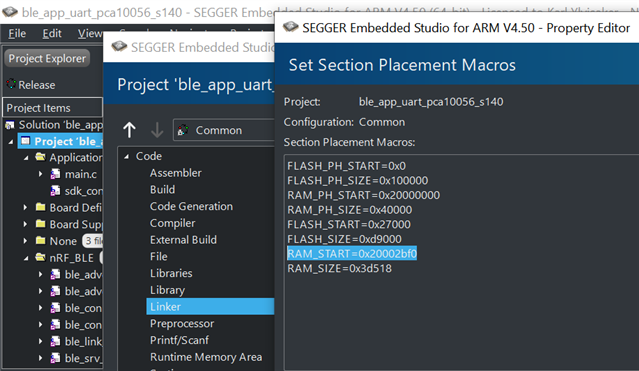
    I have attached an image that shows how it should look for you, after you have made the RAM start changes. The exact expression is the same as written in the warning in your log, and the location can be found by right clicking on the 'Project' in SES project explorer, selecting 'options', selecting 'Common' configuration, opening the 'Linker' tab, and double clicking on the 'Section Placement Macros'. Make sure to click OK to close all windows, once you have made the changes.
    Please do this, and let me know if it resolves your error. 

    Piotr Romaniuk said:
    I very concerned that the same problem (i.e. with memory) exists in Nordic original example (ble_uart project) without any modification. I plan to open new case for that, because it is basic code and is not influenced by any my changes.

    I have tested this on a mint SDK, and I am not seeing this issue.
    Are you certain that you have tested this on an example which you have made no changes to?
    The SoftDevice's memory footprint may change if you change its configuration, and this may be the reason why you have to update the RAM_START macro.
    Could you download a mint version of the SDK 17.0.2, and see if you get this error there as well? If the issue persists, you should open a new ticket for this, yes.

    Piotr Romaniuk said:
    I am very worried that I stuck in some basic issue, that further coding depends on. We are sending one message per day.

    This is indeed a seemingly basic issue, but I hope and think this error will be resolved when you change the RAM_START macro.

    Piotr Romaniuk said:
    I am sending you private messages in chat window. I am not sure if you receive them?
    Maybe chat will be faster to determine the cause of the problem.

    It is best to keep all related information in the ticket, so it may be of use to other's experiencing the same, or a similar issue, later, and to easily look up earlier information regarding the issue. The chat feature is not quicker than the tickets, unfortunately.

    I look forward to hearing the effects of the RAM_START macro change, on your issue.

    Best regards,
    Karl

  • Hi Karl,

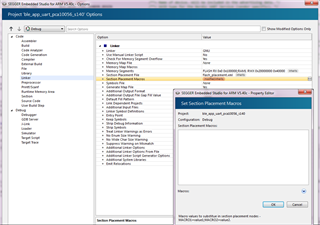
    I was confused with linker macro window because it was inherited in my IDE:

    Where the linker options are inherited from?

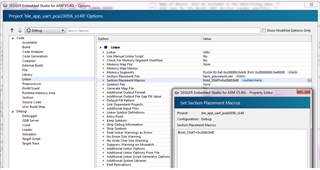
    Your suggestion to setup RAM_START solve the problem:

    I was able then to increase the event length.

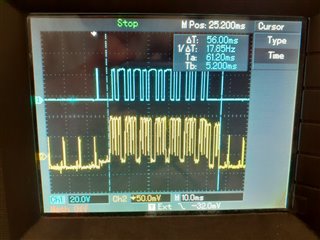
    Above oscillogram is for ConnInterval=7.5ms Edges on top (blue) signal are moments of passing packets to BLE stack.

    If I increase ConnInterval (e.g. 10ms, 50ms) still no more than 4 packets are transmitted in one chunk.

    What is the reason for that? Looks like some queue is filled up or temporary missing resources (dynamic memory).

    Kind regards

    Piotr Romaniuk

    PS
    Please do not mark this case as solved yet. Above question is still opened.

  • Hello again Piotr,

    Piotr Romaniuk said:
    Please do not mark this case as solved yet. Above question is still opened.

    Do not worry, it is you yourself that needs to mark an answer as the solution to your problem.
    I would not not close the case until the issue(s) are resolved, and for future reference you also always have the option to re-open tickets that have been closed.
    I am literally here to help, and I am happy to do so.

    Piotr Romaniuk said:
    Your suggestion to setup RAM_START solve the problem:

    I am happy to hear that this resolved your issue, Piotr!

    Piotr Romaniuk said:
    I was confused with linker macro window because it was inherited in my IDE:
    Piotr Romaniuk said:
    Where the linker options are inherited from?

    Piotr, I think a lot of this confusion could have been avoided if you had read the steps I wrote out more carefully. I specifically mentioned the 'common' configuration twice, and it is also visible in the screenshot I sent you.
    The 'debug' build configuration (which you are editing in your screenshots) inherits from the 'common' build configuration that I have asked you to modify. The common build configuration is the core of the project, which all other configurations inherits from. The reason why you must make the change in the common configuration, is because currently only your debug configuration will work (because it is the only one with the proper RAM_START macro).
    So, once you switch to the 'release' configuration, your project will break again.

    Please see the steps I wrote out earlier, or the screenshot I attached. In the upper left corner of the options window there is a drop down menu, which in your pictures says 'debug'. Click this, and change to common, and make the RAM_START changes there.

    Piotr Romaniuk said:
    I was able then to increase the event length.

    This is great! Glad to see that it produced the desired and expected results.

    Piotr Romaniuk said:
    Above oscillogram is for ConnInterval=7.5ms Edges on top (blue) signal are moments of passing packets to BLE stack.

    By this, do you mean that the blue channel indicates calls to 'ble_nus_data_send', for queueing of data to be transferred?
    If so, what does the length of the toggle indicate?

    Piotr Romaniuk said:

    If I increase ConnInterval (e.g. 10ms, 50ms) still no more than 4 packets are transmitted in one chunk.

    What is the reason for that? Looks like some queue is filled up or temporary missing resources (dynamic memory).

    What MTU size are you using for your transfers, when changing to 10 or 50 ms connection intervals?
    Is the call to ble_nus_data_send (which in turn calls sd_ble_gatts_hvx) returning any errors, such as NRF_ERROR_RESOURCES, when you try to queue your data for transfer?
    How have you ensured that there is enough data queued for transer to fill the entire connection interval of 50 ms?
    Please elaborate what you are referring to when you say '(dynamic memory)'.
    Are you using dynamic memory allocation in your application, and asking if this may interfere with the SoftDevice's data queueing process?

    Looking forward to resolving these issues together!

    Best regards,
    Karl


Related