This post is older than 2 years and might not be relevant anymore
More Info: Consider searching for newer posts

Use of NCP in Zigbee

Hello,

I am using nRF52833, nRF Connect SDK  v1.5.0.

In v1.5.0 there is one new example i.e Zigbee NCP. ( Zigbee: NCP — nRF Connect SDK 1.5.0 documentation (nordicsemi.com)..)

In the above link, NCP and coordinator are both used for testing.

I'm not understanding what is the use of NCP.  I am confused between the use of coordinator and NCP.

Can you please explain to me why and in which case NCP required?

What is the difference between NCP and coordinator?

Thank you,

Pranav.

Parents
  • Hello,

    Understood. Thank you for your quick reply. I have encountered two problems while testing,

    1. With the help of this link Zigbee: NCP — nRF Connect SDK 1.5.0 documentation (nordicsemi.com) and Readme file under ncp_sdk_v0.9.3. I        tried to test the NCP example. But after completing all the steps under testing, my light control device doesn't join the Zigbee network. It doesn't show any led indication on board. 

    2. Also tried to test the (SDK v1.5.0) Zigbee network_coordinator, light_switch,light_bulb example but after building while testing it  light_switch doesn't respond. Doesn't show any led indication and not joined the network. Previously, I tested the same scenario with SDK v1.4.2 its works fine there.  

    Can you please help me to resolve this issue?

    Thanks,

    Pranav.

  • Pranav3 said:
    2. Also tried to test the (SDK v1.5.0) Zigbee network_coordinator, light_switch,light_bulb example but after building while testing it  light_switch doesn't respond. Doesn't show any led indication and not joined the network. Previously, I tested the same scenario with SDK v1.4.2 its works fine there.  

     Does the logs from the nRFs say anything?

    Try erasing all boards completely using "nrfjprog --eraseall" (nRF command line tools is needed for this) and re-program them.


    Pranav3 said:
    1. With the help of this link Zigbee: NCP — nRF Connect SDK 1.5.0 documentation (nordicsemi.com) and Readme file under ncp_sdk_v0.9.3. I        tried to test the NCP example. But after completing all the steps under testing, my light control device doesn't join the Zigbee network. It doesn't show any led indication on board. 


    Is your NCP connected to anything physically? What is running the application?

  • Pranav3 said:
    2. Also tried to test the (SDK v1.5.0) Zigbee network_coordinator, light_switch,light_bulb example but after building while testing it  light_switch doesn't respond. Doesn't show any led indication and not joined the network. Previously, I tested the same scenario with SDK v1.4.2 its works fine there.  

     Does the logs from the nRFs say anything?

    Try erasing all boards completely using "nrfjprog --eraseall" (nRF command line tools is needed for this) and re-program them.

    Thank you for your quick reply. I tried what you suggested. But facing the same problem.

    While comparing both SDK i.e v1.4.2 and v1.5.0 I came to know that path for the light_switch example in v1.5.0 is different than v1.4.2

    v1.4.2 - C:/Users/Pranav/ncs/v1.4.2/nrf/samples/zigbee/light_switch/build_nrf52833dk_nrf52833

    v1.5.0 - C:/Users/Pranav/ncs/v1.5.0/nrf/samples/bluetooth/mesh/light_switch/build_nrf52833dk_nrf52833 

    Also after building the v1.5.0 light_switch example, When I am trying to connect "nRF Toolbox" it shows a message -  "The device does not have the required services" 

    Also in v1.5.0 light_switch example, there is  modle_handler.c instead of  nus_cmd.c . In v1.4.2 light_switch example there is nus_cmd.c file is present.

    So can you please look into it?

    Thank you,

    Pranav

  • Pranav3 said:

    While comparing both SDK i.e v1.4.2 and v1.5.0 I came to know that path for the light_switch example in v1.5.0 is different than v1.4.2

    v1.4.2 - C:/Users/Pranav/ncs/v1.4.2/nrf/samples/zigbee/light_switch/build_nrf52833dk_nrf52833

    v1.5.0 - C:/Users/Pranav/ncs/v1.5.0/nrf/samples/bluetooth/mesh/light_switch/build_nrf52833dk_nrf52833 

     These are not at all the same examples. The one from 1.4.2 is zigbee, and the other is bluetooth mesh. That is like comparing carrots and cars.

    Try looking into ncs\v1.5.0\nrf\samples\zigbee\light_switch

  • Hello,

    Thank you for your reply. I think I may not have explained you properly. Sorry for that.

    I have attached some screenshots for proper understanding.

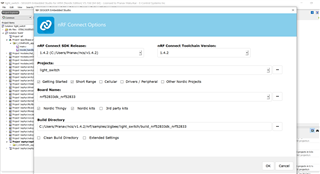
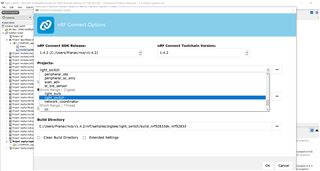
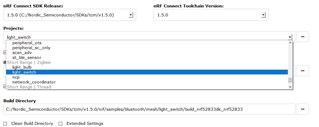
    In the first step, I have imported/selected the light_switch example(under zigbee - light_switch)from SDK v1.4.2. 

    In this the path of the example is - C:/Users/Pranav/ncs/v1.4.2/nrf/samples/zigbee/light_switch/build_nrf52833dk_nrf52833

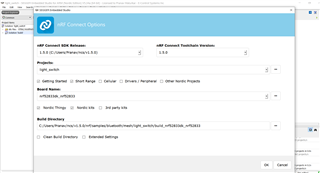
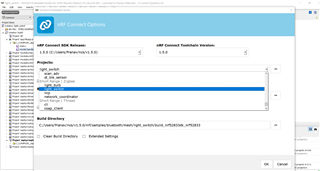
    In the second step, I have followed the same for SDK v1.5.0.

    In this the path of the example is 

    - C:/Users/Pranav/ncs/v1.5.0/nrf/samples/bluetooth/mesh/light_switch/build_nrf52833dk_nrf52833

    I have also tried to enter the path manually in v1.5.0. But it also redirects to Bluetooth/mesh. 

    I also confirmed this issue with my colleague and the same issue occurred on his pc.

    1. About the NCP example 

    I am running the light_control application and NCP connected to my Linux pc. Also tried the same step with my colleague but encountered the same issue.

    Can you please suggest to me some solution by trying it out on your side? 

    Thank you,

    Pranav.

Reply
  • Hello,

    Thank you for your reply. I think I may not have explained you properly. Sorry for that.

    I have attached some screenshots for proper understanding.

    In the first step, I have imported/selected the light_switch example(under zigbee - light_switch)from SDK v1.4.2. 

    In this the path of the example is - C:/Users/Pranav/ncs/v1.4.2/nrf/samples/zigbee/light_switch/build_nrf52833dk_nrf52833

    In the second step, I have followed the same for SDK v1.5.0.

    In this the path of the example is 

    - C:/Users/Pranav/ncs/v1.5.0/nrf/samples/bluetooth/mesh/light_switch/build_nrf52833dk_nrf52833

    I have also tried to enter the path manually in v1.5.0. But it also redirects to Bluetooth/mesh. 

    I also confirmed this issue with my colleague and the same issue occurred on his pc.

    1. About the NCP example 

    I am running the light_control application and NCP connected to my Linux pc. Also tried the same step with my colleague but encountered the same issue.

    Can you please suggest to me some solution by trying it out on your side? 

    Thank you,

    Pranav.

Children
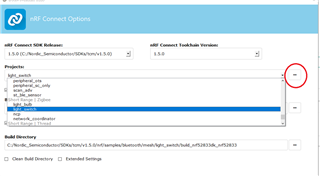
  • Oh, I see. When you select zigbee: Light_switch, then the project generator in SES uses the Mesh light switch example:

    Yes. That looks like a bug. Thank you for reporting. I will forward this bug to our developers. 

    As a workaround, you can select the project folder manually, using the 3 dots to the right of the projects selecter:

    and select the folder "v1.5.0\nrf\samples\zigbee\light_switch"

    Best regards,

    Edvin

  • Hello Edvin,

    Yes. That looks like a bug. Thank you for reporting. I will forward this bug to our developers. 

    As a workaround, you can select the project folder manually, using the 3 dots to the right of the projects selecter:

    Thank you for your quick reply. I tried what you suggested here.

    But facing another problem after imported(imported same as you mentioned) the light_switch project.

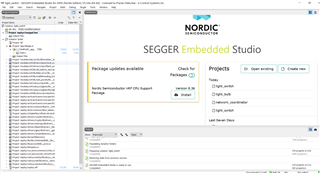
    nus_cmd.c file is missing in the project.


    Also, After building and running the same project. There is no advertisement on the nRF Toolbox application and also it is not joining the network

    In the previous SDK i.e 1.4.2 the nus_cmd file is present and it also visible on the nRF Toolbox i.e working properly to both protocol (BLE + Zigbee)

    Thanks,

    Pranav

  • Hello Pranav,

    I am not sure what you are trying to point to in your screenshot here.


    Pranav3 said:
    nus_cmd.c file is missing in the project.

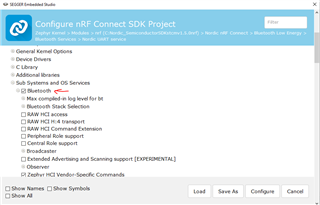
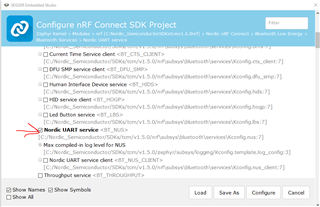
     But is it used in the project at all? Have you compared the project config the same way as in 1.4.2? I see that CONFIG_BT_NUS is not enabled by default.

    Try to set:

    And:

    BR,

    Edvin

  • Hello Edvin,

    Thank you for your reply. I tried what you suggested. It worked but In the light_switch board only LED 3: (On and solid when the device is connected to a Zigbee network.) is ON. 

    LED 4 i.e. (On and solid when the light switch has found a light bulb to control) is not glowing/OFF.

    I am not able to control the light_bulb from boards as well as a mobile application 

    I am not able to understand what's wrong. In SDK v1.4.2 it's worked easily and seamlessly ( also setup part) without any additional steps.

    Can you please help to resolve this issue?

    Is your NCP connected to anything physically? What is running the application?

    1. About the NCP example 

    I am running the light_control application and NCP connected to my Linux pc. Also tried the same step with my colleague but encountered the same issue.

    Can you please suggest to me some solution by trying it out on your side? 

    Also still I am facing this issue.

    Can you please also help me to resolve this issue? 

    Thank you,

    Pranav.

  • With version 1.5.0, if I flash the unmodified light_bulb, light_switch and network_coordinator from the ncs\nrf\samples\zigbee folder, they all connect and I can control the light bulb using the light switch. LED3 and LED4 is on on the switch. If that is not the case in your test, can you please try to erase all boards, and compile and flash them. NB: LED4 on the light_switch doesn't turn on until you press button1 or 2 to turn on/off the light.

    Regarding the BLE:

    Does it work after the configurations? I don't know what to say. I can't guarantee that all examples are the exact same from version to version. There are probably some differences in main.c as well. 

    I see that in v1.4.2, CONFIG_BT_NUS is not set to y either, so bluetooth is not enabled by default. Is that what you claim it was doing, or do I misunderstand?

    BR,

    Edvin

Related