This post is older than 2 years and might not be relevant anymore
More Info: Consider searching for newer posts

Actinius Icarus nrF9160 issues with hex file

Hi,

I have a board Actinius Icarus nrf9160 and I'm trying to program with external hex file through nrfConnect sdk and Actinius programmer.

Loading prebuilt example works.

1) I followed step by step the hello_world example. Open nrfConnect sdk project ....

secure or non secure gives anyway the same result.

then I select the project and go to Build Solution.
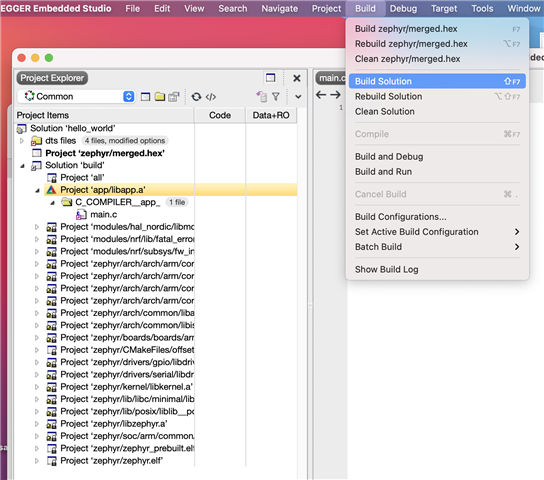
If I upload now the hex file that I find under /.../hello_world/build_nrf9160dk_nrf9160ns/zephyr/zephyr.hex through Actinius programmer, flashing works fine but the file doesn't work.

Same thing if I download the sample file from Actinius and build the solution through nrf Connect.

Thanks for any support you can provide.

Parents
  • Hi!

    From your screenshots it looks like you have the nRF9160 DK selected as the target for the build instead of the Icarus. Could you confirm that you actually selected the Icarus (actinius_icarus_ns) from the list during your tests? The "3rd party kits" checkbox needs to be checked, otherwise no board other than Nordic's own boards appear in the board lists.

    Also, are you uploading via JLink or USB (MCUboot)? If it is the latter, you need to make sure that the partitions in your project are the same as what the MCUboot on the board expects, because partitioning changed after nRF Connect v1.3.x (see https://docs.actinius.com/icarus/building/zephyr). If you are using JLink or you have uploaded MCUboot yourself and you are not using the preinstalled MCUboot you can disregard this!

    -- Mike

Reply
  • Hi!

    From your screenshots it looks like you have the nRF9160 DK selected as the target for the build instead of the Icarus. Could you confirm that you actually selected the Icarus (actinius_icarus_ns) from the list during your tests? The "3rd party kits" checkbox needs to be checked, otherwise no board other than Nordic's own boards appear in the board lists.

    Also, are you uploading via JLink or USB (MCUboot)? If it is the latter, you need to make sure that the partitions in your project are the same as what the MCUboot on the board expects, because partitioning changed after nRF Connect v1.3.x (see https://docs.actinius.com/icarus/building/zephyr). If you are using JLink or you have uploaded MCUboot yourself and you are not using the preinstalled MCUboot you can disregard this!

    -- Mike

Children
  • Hi Thanks, for the support, but ...

    First time I was selecting the wrong board. Quite awkward ...

    Now the board is the right one 

    I'm trying to use the Actinius Programmer to program with Icarus connected directly to the Mac via USB

    In hello_world folder

    In prj.conf

    In CMakeLists.txt

    Then I build solution

    and I get both merged.hex and zephyr.hex

    From Actinius Programmer

    And after successful uploading ... nothing happen.

    So I went to the link from Mike and added the two files.

    and I also tried with and without the two additional lines in CmakeLists.txt

    Still the same result. Sorry if I keep wasting your time. I'm probably doing something stupid, but I don't see it (with Arduino was easier ...)

    Thanks all

  • Hi Robi,

    The screenshots did not come through, but if I understand correctly you tried to upload merged.hex/zephyr.hex via USB (MCUboot) which indeed won't work. The merged.hex should only be used when uploading with a JLink as it contains all of the hex files together (MCUboot, SPM, Application). When uploading with MCUboot, only the application should be uploaded (that's the "app_signed.hex" that is mentioned in the docs).

    -- Mike

Related