This post is older than 2 years and might not be relevant anymore
More Info: Consider searching for newer posts

How to assign a button using app_button.c?

I connected a button to pin 27 on board, and using app_button_init in app_button.c to declare a button, and use that button to control LED and it does not work. But when I change a pin to 11(which is a pin for button 1 on board) the function work correctly. What was I do wrong about my project.

Thank you

Parents
  • Hello,

    I connected a button to pin 27 on board, and using app_button_init in app_button.c to declare a button, and use that button to control LED and it does not work.

    How have you connected the button to your board, and could you elaborate on what you are observing when you say "it does not work"? Does the device register your button press, or is it only the LED not lighting up?
    The more information you give in your ticket, the easier it will be to help you.

    But when I change a pin to 11(which is a pin for button 1 on board) the function work correctly. What was I do wrong about my project.

    This indicates that it is the hardware connection and/or setup of your button that is the issue here.
    Could you share a schematic of how you have connected your button, and could you share the snippet of your code?

    It might also be useful for you to have a look at the BSP example from the SDK, to see how the described functionality can be implemented in the firmware.

    Best regards,
    Karl 

  • I connected 1 leg of an LED to a GND pin and 1 leg to pin number 17. For button I connected 3 pins, 1 to 5V pin, 1 to GND and 1 to pin number 27. I have tested with normal button-LED control, whenever I press a button, an LED light up normally so I do not think there is something wrong with a way I connected.

    About code, I declare button cfg in main() like this:

    static app_button_cfg_t p_button[] = { {11, false, NRF_GPIO_PIN_PULLUP,button_handler},
                                               {27, false, NRF_GPIO_PIN_PULLUP, button_handler},     
                                              };
    // Initializing the buttons.
    app_button_init(p_button, ARRAY_SIZE(p_button), BUTTON_DEBOUNCE_DELAY);
     
    // Enabling the buttons.										
    app_button_enable();

    For button_handler function is something like this 

    static void button_handler(uint8_t pin_no, uint8_t button_action){
       if(pin_no == 27){
          if(button_action == APP_BUTTON_PUSH){
              nrf_gpio_pin_toggle(17);
              flag_led17 = 1-flag_led17;
              if(flag_led17 == 1 ){
                msg_sent(flag_led17);
              }else{
                 msg_sent(flag_led17);
              }
          }
       }else if(pin_no == 11){
          if(button_action == APP_BUTTON_PUSH){
              nrf_gpio_pin_toggle(17);
              flag_led17 = 1-flag_led17;
              if(flag_led17 == 1 ){
                msg_sent(flag_led17);
              }else{
                 msg_sent(flag_led17);
              }
          }
       }
    }

    When I pressed pin 11(button 1 on board), the LED lights up normally, but pin 27 which is connected to button on breadboad, LED wasnot light up.

    Could you show me the way to fix it?

    Thank you.

Reply
  • I connected 1 leg of an LED to a GND pin and 1 leg to pin number 17. For button I connected 3 pins, 1 to 5V pin, 1 to GND and 1 to pin number 27. I have tested with normal button-LED control, whenever I press a button, an LED light up normally so I do not think there is something wrong with a way I connected.

    About code, I declare button cfg in main() like this:

    static app_button_cfg_t p_button[] = { {11, false, NRF_GPIO_PIN_PULLUP,button_handler},
                                               {27, false, NRF_GPIO_PIN_PULLUP, button_handler},     
                                              };
    // Initializing the buttons.
    app_button_init(p_button, ARRAY_SIZE(p_button), BUTTON_DEBOUNCE_DELAY);
     
    // Enabling the buttons.										
    app_button_enable();

    For button_handler function is something like this 

    static void button_handler(uint8_t pin_no, uint8_t button_action){
       if(pin_no == 27){
          if(button_action == APP_BUTTON_PUSH){
              nrf_gpio_pin_toggle(17);
              flag_led17 = 1-flag_led17;
              if(flag_led17 == 1 ){
                msg_sent(flag_led17);
              }else{
                 msg_sent(flag_led17);
              }
          }
       }else if(pin_no == 11){
          if(button_action == APP_BUTTON_PUSH){
              nrf_gpio_pin_toggle(17);
              flag_led17 = 1-flag_led17;
              if(flag_led17 == 1 ){
                msg_sent(flag_led17);
              }else{
                 msg_sent(flag_led17);
              }
          }
       }
    }

    When I pressed pin 11(button 1 on board), the LED lights up normally, but pin 27 which is connected to button on breadboad, LED wasnot light up.

    Could you show me the way to fix it?

    Thank you.

Children
  • Xiam said:
    I connected 1 leg of an LED to a GND pin and 1 leg to pin number 17. For button I connected 3 pins, 1 to 5V pin, 1 to GND and 1 to pin number 27. I have tested with normal button-LED control, whenever I press a button, an LED light up normally so I do not think there is something wrong with a way I connected.

    A schematic of this would be the best, to show exactly how it is all wired, and which pins are connected.
    If I understand you correctly you are not limiting the current of your LED and button at all, is that correct? Both buttons and LEDs are basically short circuits if there is no resistor placed in series with them. Not limiting the current can cause the components to burn out, or damage the components supplying and sinking their current.
    What diode are you using, do you have its part number or data sheet, or more specifically, what is the forward voltage and current of the diode?

    Xiam said:
    I have tested with normal button-LED control, whenever I press a button, an LED light up normally so I do not think there is something wrong with a way I connected.

    Please elaborate what you mean when you say this - how did you test this, did you use an existing example to test it? Or do you mean that you have tested just the button and the LED connected directly to your power source.

    Xiam said:
    About code, I declare button cfg in main() like this:

    You are not checking your returned error codes. Like your calls to app_button_enable and app_button_init, so you never really know if your configuration is successful, or why it fails if it fails. Please add an APP_ERROR_CHECK, and let me know if you see an error message appear in your log when you test this.

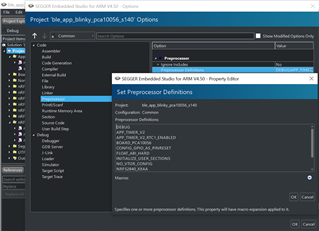
    Please make sure to add DEBUG to your preprocessor defines, so that the logger will output a detailed error message if an error code != NRF_SUCCESS is passed to an APP_ERROR_CHECK. The included image demonstrates where you should add the DEBUG define.


    Best regards,
    Karl

Related