
Hello,
How do disable code optimization in SES Nordic Edition when using nRF Connect SDK? I can't find "Options - Code Generation - Optimization Level" as when using nRF5 SDK.
Best regards,
Lars

Hello,
How do disable code optimization in SES Nordic Edition when using nRF Connect SDK? I can't find "Options - Code Generation - Optimization Level" as when using nRF5 SDK.
Best regards,
Lars
Hi Lars,
This is done using Kconfig configurations. Have a look at the following alternatives from the Kconfig Reference:
You can condigure these in prj.conf or using Project --> Configure nRF Connect SDK project in SES.
The KConfig Reference is available found in the drop-down menu in the bottom right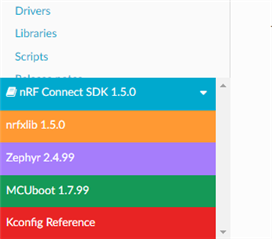
Kind regards,
Øyvind
Hi Øyvind,
And thanks for your fast response! I can't find the same menu as you show in the picture. I selected "Configure nRF Connect SDK Project...", and came to this window: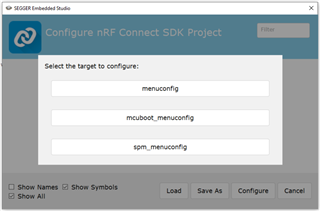
I click menuconfig, and in the search box at the upper right I type "optimization". Then I get the list shown below: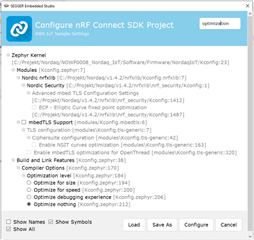
So it seems anyway that I am able to adjust the optimization. I select "Optimize nothing", and click "Configure". After recompiling and debugging I get into real trouble. The last row of code that works is this:

Then I come to file fault_s.S. So the program starts over and over again. As you can see I have started my development from the aws_iot-example.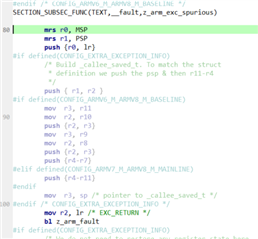
By reselecting "Optimize for size", things work as before. Am I doing something wrong?
In the picture you show it seems you run nRF Connect V1.5.0. Where do I find the menu shown in the picture? I thought it would pop up when selecting "Configure nRF Connect SDK Project...". I run V1.4.2, so I installed V1.5.0 instead. But then I got a lot of compilation errors:

Am I doing something wrong?
Anyway, when selecting "Configure nRF Connect SDK Project..." in V1.5.0 it looks the same as in V1.4.2, no colourful menu pops up.
Best regards,
Lars
Hi Lars, here is the PR that our developers have issued:
https://github.com/nrfconnect/sdk-nrf/pull/4214/files
Kind regards,
Øyvind
Hi Öyvind,
When starting this project I thought I wouldn't need to care about updating to a certain tag. But now I have tried to fetch the latest tag by typing
git fetch origin
git checkout origin/master
west update
Correct? Compiling gives then an error. I can see that aws_iot.c has changed according to what you said, but there seems to be more updates that may interfere.
I changed back to v1.5.0 by typing
git checkout v1.5.0
west update
Now the compilation works as before.
Instead I tried to add the changes manually in aws_iot.c. Now the updated rows are passed nicely, but instead there will be a reset somewhere in
k_sem_take(<e_connected, K_FOREVER);
in the end of main(). I thought I had done something in my code to cause this, so I tested to run the aws_iot-example again. But it also crashes on k_sem_take().
Best regards
Lars
Hi Lars,
My sincere apologies for the late reply. Somehow your latest answer vanished from my radar and I have not been able to follow.
Have you been able to solve this issue?
Kind regards,
Øyvind
Hi Øyvind,
No worries, I've been busy anyway :-)
No, unfortunately it's not solved. I have still the same questions and problems from previous reply.
Best regards,
Lars
Lars M said:No worries, I've been busy anyway :-)
That's good to hear.
Lars M said:When starting this project I thought I wouldn't need to care about updating to a certain tag.
You should not need to update the tag to apply the pull request. You can either change the files as you see in the Git link, or you can add .diff after the PR number:
github.com/.../4214.diff
This will generate a .diff file which you can save and apply to you NCS tag. Navigate to the nrf folder, then in your command line enter the following:
git apply <diff file>
Let me know how that works for you
Kind regards,
Øyvind
Lars M said:No worries, I've been busy anyway :-)
That's good to hear.
Lars M said:When starting this project I thought I wouldn't need to care about updating to a certain tag.
You should not need to update the tag to apply the pull request. You can either change the files as you see in the Git link, or you can add .diff after the PR number:
github.com/.../4214.diff
This will generate a .diff file which you can save and apply to you NCS tag. Navigate to the nrf folder, then in your command line enter the following:
git apply <diff file>
Let me know how that works for you
Kind regards,
Øyvind

