This post is older than 2 years and might not be relevant anymore
More Info: Consider searching for newer posts

Setting attribute not working

Hello everyone.

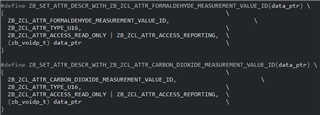
I am trying to set the attributes' value of a custom cluster I have defined.

I have defined 2 attributes:
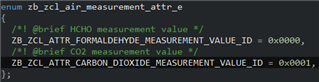
I have followed the same procedure as in the Multisensor example included in SDK for Thread and Zigbee v4.1.0 to set the new value for one of the attributes, in this case, the first one.

But when I use the API function "zb_zcl_set_attr_val()", the status retuned is always "ZB_ZCL_STATUS_INVALID_VALUE". I have tried several possible solutions, but neither of them worked.
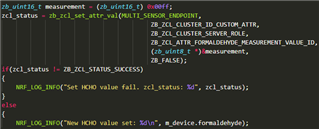
Could anyone give me some tips or guidance on what I am doing wrong please?

Thanks, regards.

Parents
  • Hi,

    I have started looking into your case.

    In the meantime there are some things you can check out.

    You need to also define a custom cluster ID for your clusters, as they do not look to be standard Zigbee clusters from their names. In external\zboss\include\zcl\zb_zcl_common.h you can see that several standard Zigbee clusters are defined, among them the pressure measurement cluster (ZB_ZCL_CLUSTER_ID_PRESSURE_MEASUREMENT), which is defined with ID 0x0403. For standard clusters, this ID can be found in the Zigbee Cluster Library (ZCL) specification, under the "Cluster Identifiers" chapter for each cluster.

    However, since you are using a manufacturer specific cluster, you must use an ID that is not reserved for standard Zigbee clusters, so your ID must be in the range 0xfc00 – 0xffff. This can be found in chapter 2.6.1.3 in the ZCL specs revision 6.

    Cluster Identifier Description
    0x0000 – 0x7fff Standard ZigBee cluster
    0xfc00 – 0xffff Manufacturer specific cluster
    all other values Reserved

    If you have not already, I would recommend taking a look at the guide on how to declare custom clusters. On the same page you can also find information about declaring attributes and other things needed to implement a Zigbee product with ZCL.

    Best regards,

    Marte

Reply
  • Hi,

    I have started looking into your case.

    In the meantime there are some things you can check out.

    You need to also define a custom cluster ID for your clusters, as they do not look to be standard Zigbee clusters from their names. In external\zboss\include\zcl\zb_zcl_common.h you can see that several standard Zigbee clusters are defined, among them the pressure measurement cluster (ZB_ZCL_CLUSTER_ID_PRESSURE_MEASUREMENT), which is defined with ID 0x0403. For standard clusters, this ID can be found in the Zigbee Cluster Library (ZCL) specification, under the "Cluster Identifiers" chapter for each cluster.

    However, since you are using a manufacturer specific cluster, you must use an ID that is not reserved for standard Zigbee clusters, so your ID must be in the range 0xfc00 – 0xffff. This can be found in chapter 2.6.1.3 in the ZCL specs revision 6.

    Cluster Identifier Description
    0x0000 – 0x7fff Standard ZigBee cluster
    0xfc00 – 0xffff Manufacturer specific cluster
    all other values Reserved

    If you have not already, I would recommend taking a look at the guide on how to declare custom clusters. On the same page you can also find information about declaring attributes and other things needed to implement a Zigbee product with ZCL.

    Best regards,

    Marte

Children
No Data
Related