
Hello, I have a nRF52832 DK and a nRF9160 DK and I would like to establish a Bluetooth connection between them and also send data to each other. How can I do that?

Hello, I have a nRF52832 DK and a nRF9160 DK and I would like to establish a Bluetooth connection between them and also send data to each other. How can I do that?
One of them will have to be a Central, and one will have to be a Peripheral.
Check the SDKs for examples.
Do you mean ble_app_uart_c and ble_app_uart? I have flashed them into the boards and not sure if they're working.
I have tried previously with ble_app_blinky_c on 52832 DK and ble_app_blinky on 9160 DK. I can see that the LED 2 on the 52832 DK turned on when it is connecting to the 9160 DK but LED 3 never turned on. Does it mean that the connection wasn't complete?
Siang said:Do you mean ble_app_uart_c and ble_app_uart? I have flashed them into the boards and not sure if they're working.
None of these samples are supported on nrf9160 according to documentation. You can try with the LTE sensor gateway sample, and remove the cloud stuff if you don't need it. Remember to flash the HCI uart on the nrf52840 board controller.
Hello Hakon, thank you for the reply. I have been testing the LTE sensor gateway sample that you suggested. I could use the cloud stuff so I just left it there. I have flashed hci_lpuart on the nRF52840 board controller and also flashed lte_ble_gateway on the nRF9160 main controller. Everything seems to work fine. So how exactly can I send messages/data from an nRF52832 DK to nRF9160DK?
Siang said:So how exactly can I send messages/data from an nRF52832 DK to nRF9160DK?
Are you able to get a BLE connection to an nRF52832 DK? The LTE BLE gateway sample scans for thingy:52 peripherals by default, so you would need to change or remove the scan filter so it will find your device. The sample code should demonstrate quite well how to receive BLE data on the central device. In order to advise you on how to send the data from the nRF52832 I would need to know if you are using NCS or the nRF5 SDK for that device.
No, I have removed the scan filter as you said and also tried to flash both hci_lpuart and peripheral_uart on the nRF52832 DK but it didn't work because they couldn't connect to the nRF9160 DK. I am using NCS to do all the flashing.
Previously, I have also tried to flash (NCS) central_uart and peripheral_uart on nRF52832 DK and nRF9160 DK respectively and it worked well. I could send data through the BLE connection using HTerm. Is it possible for me to use central_uart instead of the hci_lpuart on the nRF52840 on the nRF9160 DK for the BLE connection and data transferring? I will also need to send the data to the cloud as I am planning to build a cloud gateway for my sensors.
Siang said:Is it possible for me to use central_uart instead of the hci_lpuart on the nRF52840 on the nRF9160 DK for the BLE connection and data transferring?
I don't think it's possible, or it's at least impractical to make it work with central_uart. You need to be able to communicate with the nRF9160 application.
If you want I can make the case private so you can send me the projects.
Siang said:Is it possible for me to use central_uart instead of the hci_lpuart on the nRF52840 on the nRF9160 DK for the BLE connection and data transferring?
I don't think it's possible, or it's at least impractical to make it work with central_uart. You need to be able to communicate with the nRF9160 application.
If you want I can make the case private so you can send me the projects.
So you're saying that hci_lpuart is the better option for the nrf52840 to communicate with nrf9160 so that I can then send the data to the cloud right? If that is the case then I will go with hci_lpuart.
How can I get both of the DKs connected via BLE? What I have done were:
1. Flashed lte_sensor_gateway on nrf9160 and removed the scan filter.
2. Flashed hci_lpuart on nrf9160_52840.
3. Flashed peripheral_uart on nrf52832 DK.
The nrf9160 just won't connect with the nrf52832. I also tried to keep the scan filter and changed the UUID to the UUID of the nrf52832. It seemed to react and the nrf52832 DK showed: LED 1 flashing and LED 2 ON.
Siang said:I also tried to keep the scan filter and changed the UUID to the UUID of the nrf52832. It seemed to react and the nrf52832 DK showed: LED 1 flashing and LED 2 ON.
Do you have any log output from this? Do you get the connected callback?
I think I've defined the BT_UUID_TMS and BT_UUID_TOC wrongly because I don't know where to find them. Can you please tell me where I can find the correct UUID?
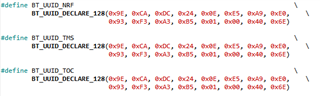
Siang said:Can you please tell me where I can find the correct UUID?
Are you talking about these?
Siang said:Device found: DA:C9:F7:DC:94:26 (random)Connected: DA:C9:F7:DC:94:26 (random)
It looks like the device is getting connected. I don't see any reason why it shouldn't be able to receive data from the nrf52832 device.
Are you talking about these?
Yes, exactly. I changed the BT_UUID_THINGY to the UUID of my nRF52832 but didn't know how to change the BT_UUID_TMS and BT_UUID_TOC. I actually gave them all the same UUID, which I doubt is the right way to do so.


