
Hello, I have a nRF52832 DK and a nRF9160 DK and I would like to establish a Bluetooth connection between them and also send data to each other. How can I do that?

Hello, I have a nRF52832 DK and a nRF9160 DK and I would like to establish a Bluetooth connection between them and also send data to each other. How can I do that?
One of them will have to be a Central, and one will have to be a Peripheral.
Check the SDKs for examples.
Do you mean ble_app_uart_c and ble_app_uart? I have flashed them into the boards and not sure if they're working.
I have tried previously with ble_app_blinky_c on 52832 DK and ble_app_blinky on 9160 DK. I can see that the LED 2 on the 52832 DK turned on when it is connecting to the 9160 DK but LED 3 never turned on. Does it mean that the connection wasn't complete?
So you're saying that hci_lpuart is the better option for the nrf52840 to communicate with nrf9160 so that I can then send the data to the cloud right? If that is the case then I will go with hci_lpuart.
How can I get both of the DKs connected via BLE? What I have done were:
1. Flashed lte_sensor_gateway on nrf9160 and removed the scan filter.
2. Flashed hci_lpuart on nrf9160_52840.
3. Flashed peripheral_uart on nrf52832 DK.
The nrf9160 just won't connect with the nrf52832. I also tried to keep the scan filter and changed the UUID to the UUID of the nrf52832. It seemed to react and the nrf52832 DK showed: LED 1 flashing and LED 2 ON.
Siang said:I also tried to keep the scan filter and changed the UUID to the UUID of the nrf52832. It seemed to react and the nrf52832 DK showed: LED 1 flashing and LED 2 ON.
Do you have any log output from this? Do you get the connected callback?
I think I've defined the BT_UUID_TMS and BT_UUID_TOC wrongly because I don't know where to find them. Can you please tell me where I can find the correct UUID?
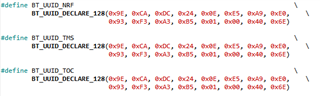
Siang said:Can you please tell me where I can find the correct UUID?
Are you talking about these?
Siang said:Device found: DA:C9:F7:DC:94:26 (random)Connected: DA:C9:F7:DC:94:26 (random)
It looks like the device is getting connected. I don't see any reason why it shouldn't be able to receive data from the nrf52832 device.
Are you talking about these?
Yes, exactly. I changed the BT_UUID_THINGY to the UUID of my nRF52832 but didn't know how to change the BT_UUID_TMS and BT_UUID_TOC. I actually gave them all the same UUID, which I doubt is the right way to do so.
Are you talking about these?
Yes, exactly. I changed the BT_UUID_THINGY to the UUID of my nRF52832 but didn't know how to change the BT_UUID_TMS and BT_UUID_TOC. I actually gave them all the same UUID, which I doubt is the right way to do so.
I don't think you need those. The sample uses BT_UUID_THINGY by default when scanning and connecting to the thingy:91 device, which it seems you are able to do already. BT_UUID_TMS and BT_UUID_TOC are specific to the thingy service.


