This post is older than 2 years and might not be relevant anymore
More Info: Consider searching for newer posts

Scanning for Bluetooth 5 device using nRF52840 dongle

I have a situation where a customer needs to DFU some nRF52840 custom boards that we shipped. The firmware that I wrote used extended advertising and thus appears as a Bluetooth 5.0 device when scanned by my BLE 5 enabled smartphone.

The problem is that my customer does not wish to purchase a smartphone with BLE 5 to perform the DFU, so I supplied him with an nrf52840 dongle and instructed him to scan for the devices with the nRFConnect app for WIndows. However, the devices failed to appear on the scan list. I performed the same action on my side and discovered the same thing. I could scan for BLE 4.2 devices but not BLE 5.0 ones. Is this a limitation of the connectivity firmware or the dongle?

Parents
  • UPDATE: Tried using an nRF52840 DK in place of the dongle and it still doesn't scan my BLE 5 device. I suspect it's the connectivity firmware then. The version I'm using is 4.1.2 as used by nRFConnect for Desktop. 

    Is there a newer version available?

  • Arif@Lynxemi said:
    UPDATE: Tried using an nRF52840 DK in place of the dongle and it still doesn't scan my BLE 5 device. I suspect it's the connectivity firmware then. The version I'm using is 4.1.2 as used by nRFConnect for Desktop. 

     Shortly explained, all BLE 5 devices should be able to communicate with BLE 4.2 devices.

    Do you see any advertisements from any device while scanning using the DK/Dongle with nRF Connect for Desktop -> Bluetooth Low Energy?

    Are you sure your device (peripheral) is advertising? If you don't see advertisements from your device either using nRF Connect for Desktop or nRF Connect for Android/iOS? If not, it would suggest that the peripheral is not advertising at all.

    Have you tried debugging the peripheral application? Does the log say anything that would suggest it is not advertising?

    Best regards,

    Edvin

  •  Shortly explained, all BLE 5 devices should be able to communicate with BLE 4.2 devices.

    I agree and understand this. However, I have seen that BLE 4.2 devices can't scan for BLE 5.0 devices if the advertising parameters are configured for BLE 5.0 use only, in particular: setting up the secondary PHY and enabling extended advertisements.

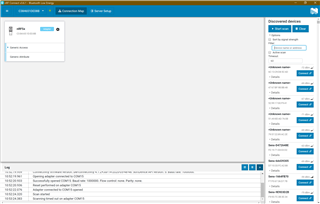
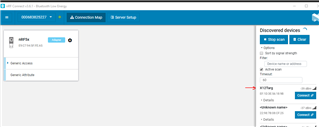
    I see advertisements from our legacy BLE 4.2 devices. 

    Advertisements from other devices

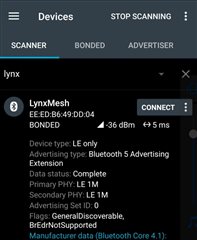
    My peripheral is advertising according to my BLE 5.0 enabled smartphone, my client's phone can't see it:

    From nRFConnect on Android

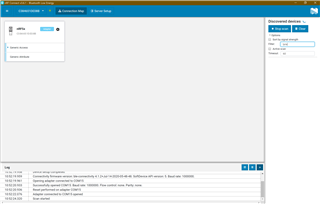
    And on nRFConnect for Desktop:

    I let the scan complete of course

    One thing I'd like to add, our devices can scan and connect to each other. This is because in scan parameters, the extended flag is set to 1. Perhaps the scan parameters in the connectivity firmware does not set this flag?

Reply
  •  Shortly explained, all BLE 5 devices should be able to communicate with BLE 4.2 devices.

    I agree and understand this. However, I have seen that BLE 4.2 devices can't scan for BLE 5.0 devices if the advertising parameters are configured for BLE 5.0 use only, in particular: setting up the secondary PHY and enabling extended advertisements.

    I see advertisements from our legacy BLE 4.2 devices. 

    Advertisements from other devices

    My peripheral is advertising according to my BLE 5.0 enabled smartphone, my client's phone can't see it:

    From nRFConnect on Android

    And on nRFConnect for Desktop:

    I let the scan complete of course

    One thing I'd like to add, our devices can scan and connect to each other. This is because in scan parameters, the extended flag is set to 1. Perhaps the scan parameters in the connectivity firmware does not set this flag?

Children
  • So you are using some of the BLE5 features in your advertisements, then? What feature? Only extended flag, or do you use e.g. CODED_PHY?

    I don't think nRF Connect for Desktop supports this. Are you testing this on your own computer, or are you getting these screenshots from the customer?

    Do you see the same behavior if you use the nRF52840DK (not dongle) as the connectivity device? Is it an alternative to perform the DFU via a mobile phone? It clearly sees the device as from your screenshot. (you can send the device update file via email, and use the .zip file with nRF Connect for iOS/Android to perform the DFU.

  • Extended flag and support for updating PHYs when requested. Default PHY is 1M as shown above.

    I did testing on client's computer and my own. These are my screenshots though.

    I have tested using a full DK, yes, and have seen the same results with the connectivity firmware. The DK, when programmed with my firmware though was able to scan and connect with my devices, as well as advertise as a BLE5 device if need be.

    I wanted to do it via phone DFU in the first place, however, I realised my client's phone does not support all BLE5 features and cannot scan for the device. I have confirmed using nRFConnect for Android, that his phone's device information supports everything except extended advertisements and coded PHY. My phone has all the features. Asking him to get a new phone is...out of the question.

    For now, I have given up and sacrificed my DK to use as a SEGGER J-LINK programmer. My client isn't entirely happy with a wired solution but it'll have to do. 

    It'll be a great help if the connectivity firmware was updated to support scanning for BLE5 devices.

  • I was not aware that was the case for nRF Connect for Desktop. I'll report it to our nRF Connect for Desktop team.

    I have not tested this either on nRF Connect for Desktop, or nrfutil, but perhaps you can try using nrfutil to transfer your packet? It may not work if nRF Connect for Desktop doesn't, but it is worth a shot. You don't have to create a second DFU image. Just use the command:

    nrfutil dfu ble -pkg <dfu_image>.zip -ic NRF52 -p (COM port) -n <advertising name> -f

    NB: you may need to call this two times, because the first time it will flash the dongle with the connectivity firmware because of the -f flag. Flashing this firmware may change the COM port, so you may need to call it again with the new COM port. This time you may skip the "-f" flag.

    If you don't have an advertising name, you can use the address of the device by using -a instead of -n. It may also be that nrfutil is able to connect to an address, but not the name if the device is using extended advertisements. 

    If that doesn't work, I am afraid there isn't much I can do. I can tell the developers, but I have no idea how long it will take to add this feature to nRF Connect (if it will be added). 

    Can you please tell me what sort of extended advertising you are using? 

    I assume your device doesn't have a button, and that the bootloader is set up to enter DFU mode when this button is held down on reset? By default, the bootloader project is configured to enter DFU mode if pin 25 is grounded while resetting. Please check the NRF_BL_DFU_ENTER_METHOD_BUTTON_PIN and NRF_BL_DFU_ENTER_METHOD_BUTTON definitions in sdk_config.h of your bootloader project.

    The last option, as I see it is to write a custom application that your customer can flash to the dongle that will look for your device, connect to it and perform the DFU.

    Is there some way that I can reproduce this? Can you modify the application to run on an nRF52DK/nRF52840DK? At least the advertisement part, so that I can check whether I can perform the DFU using nrfutil? And confirm that it doesn't work on nRF Connect for Desktop?

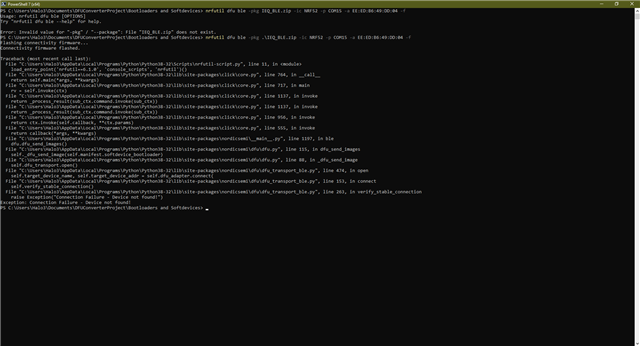
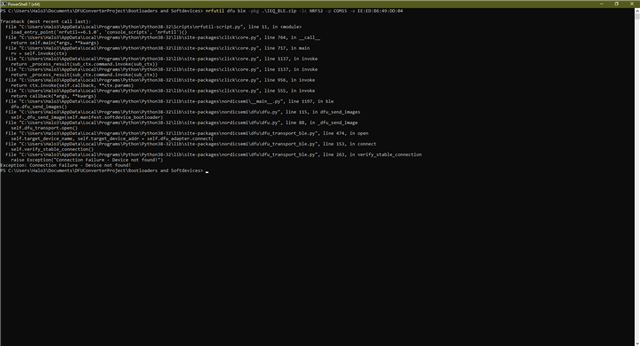
  • I have just tested nrfutil and here are the results:

    First attempt with -f flag

    First attempt with -f flag

    Second attempt without after connectivity firmware was flashed.

    The sample device was advertising according to my phone's nRFConnect app.

    I am hesitant to recommend nrfutil's use to my client as they aren't technically inclined and prefer a GUI. 

    Can you please tell me what sort of extended advertising you are using? 

    These are my some of my advertising params:

        init.config.ble_adv_directed_enabled            = true;
    	init.config.ble_adv_directed_interval           = 0x0200;
    	init.config.ble_adv_directed_timeout			= 10;
    	init.config.ble_adv_fast_enabled                = true;
    	init.config.ble_adv_fast_interval               = 0x0200;
    	init.config.ble_adv_fast_timeout                = 0;
    	init.evt_handler								= NULL;
    	init.config.ble_adv_primary_phy = ATTR_MESH_BLE_GAP_PHY;   // Default 1M
    	init.config.ble_adv_secondary_phy = ATTR_MESH_BLE_GAP_PHY; // Default 1M
    	init.config.ble_adv_extended_enabled = true;
    	m_advertising.adv_data.scan_rsp_data.p_data = NULL;
    	m_advertising.adv_data.scan_rsp_data.len = 0;

    Please check the NRF_BL_DFU_ENTER_METHOD_BUTTON_PIN and NRF_BL_DFU_ENTER_METHOD_BUTTON definitions in sdk_config.h of your bootloader project.

    Here you go:

    #ifndef NRF_BL_DFU_ENTER_METHOD_BUTTON
    #define NRF_BL_DFU_ENTER_METHOD_BUTTON 1
    #endif
    
    #ifndef NRF_BL_DFU_ENTER_METHOD_BUTTON_PIN
    #define NRF_BL_DFU_ENTER_METHOD_BUTTON_PIN 25
    #endif

    The last option, as I see it is to write a custom application that your customer can flash to the dongle that will look for your device, connect to it and perform the DFU.

    I am considering allocating some development time to do this, but it shall be my last resort as I'm busy developing other products at the moment.

    Is there some way that I can reproduce this?

    Here is a test hex file that I use, it's for a nRF52840 device. It advertises as LynxMesh and in DFU mode it advertises as X12Dfu. If you need the passkey to bond with it and perform the DFU, for security purposes I request that you pm me.

    The application and bootloader versions are set to 0. Softdevice is included (s140 7.2.0). Let me know how it goes.

    test_combined.hex

  • Yes, it looks like nrfutil can't find it either. 

    Is pin 25 connected to anything? A button? Is there a way for the customer to short P0.25 to GND while resetting the device? I tested this on a DK with your FW, and that puts it in DFU mode. Then I can use nrfutil or nRF Connect for Desktop:

    Please note that this increments the address by 1. My DK typically has the address EF:1D:3E:56:18:9A, but it is changed to EF:1D:3E:56:18:9B when in DFU mode.

    If he manages to put it in DFU mode, you might want to consider adding an advertisement packet every now and then that doesn't use advertising extensions, so that most phones can find it.

    BR,
    Edvin

Related