This post is older than 2 years and might not be relevant anymore
More Info: Consider searching for newer posts

Enabling SD Card in asset_tracker V1

Hi

I am trying to get the SDHC/Disk access with FAT working on the nRF9160 dev platform and Asset_Tracker V1 app

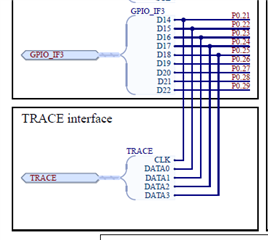
It is shown to be connected on the TRACE connector
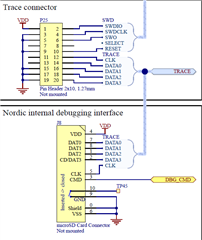
so P0.21 to P0.25 and the DBG_CMD going to U1B pin 125 if soldered
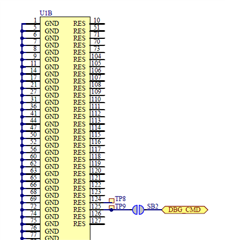
So I have bought the correct socket and soldered it down

I am only using the 9140 for this

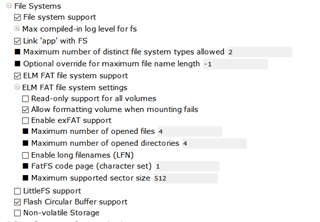
In the config I turn on SDHC
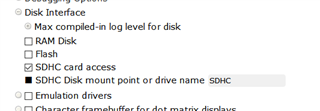
and I have tried the following code added to the asset_tracker v1 app

#include <fs/fs.h>
#include <ff.h>
#include <disk/disk_access.h>

static FATFS fat_fs;
/* mounting info */
static struct fs_mount_t mp = {
	.type = FS_FATFS,
	.fs_data = &fat_fs,
};

static const char *disk_mount_pt = "/SD:";

static int lsdir(const char *path)
{
	int res;
	struct fs_dir_t dirp;
	static struct fs_dirent entry;

	/* Verify fs_opendir() */
	res = fs_opendir(&dirp, path);
	if (res) {
		printk("Error opening dir %s [%d]\n", path, res);
		return res;
	}

	printk("\nListing dir %s ...\n", path);
	for (;;) {
		/* Verify fs_readdir() */
		res = fs_readdir(&dirp, &entry);

		/* entry.name[0] == 0 means end-of-dir */
		if (res || entry.name[0] == 0) {
			break;
		}

		if (entry.type == FS_DIR_ENTRY_DIR) {
			printk("[DIR ] %s\n", entry.name);
		} else {
			printk("[FILE] %s (size = %zu)\n",
				entry.name, entry.size);
		}
	}

	/* Verify fs_closedir() */
	fs_closedir(&dirp);

	return res;
}

static void init_disk(void)
{
    /* raw disk i/o */
    do {
            static const char *disk_pdrv = "SD";
            uint64_t memory_size_mb;
            uint32_t block_count;
            uint32_t block_size;

            if (disk_access_init(disk_pdrv) != 0) {
                    LOG_ERR("Storage init ERROR!");
                    break;
            }

            if (disk_access_ioctl(disk_pdrv,
                            DISK_IOCTL_GET_SECTOR_COUNT, &block_count)) {
                    LOG_ERR("Unable to get sector count");
                    break;
            }
            LOG_INF("Block count %u", block_count);

            if (disk_access_ioctl(disk_pdrv,
                            DISK_IOCTL_GET_SECTOR_SIZE, &block_size)) {
                    LOG_ERR("Unable to get sector size");
                    break;
            }
            printk("Sector size %u\n", block_size);

            memory_size_mb = (uint64_t)block_count * block_size;
            printk("Memory Size(MB) %u\n", (uint32_t)(memory_size_mb >> 20));
    } while (0);


    mp.mnt_point = disk_mount_pt;

    int res = fs_mount(&mp);

    if (res == FR_OK) {
            printk("Disk mounted.\n");
            lsdir(disk_mount_pt);
    } else {
            printk("Error mounting disk.\n");
    }
}

void main(void)
{
	LOG_INF("Asset tracker started");
	k_work_q_start(&application_work_q, application_stack_area,
		       K_THREAD_STACK_SIZEOF(application_stack_area),
		       CONFIG_APPLICATION_WORKQUEUE_PRIORITY);
	if (IS_ENABLED(CONFIG_WATCHDOG)) {
		watchdog_init_and_start(&application_work_q);
	}

#if defined(CONFIG_USE_UI_MODULE)
	ui_init(ui_evt_handler);
#endif

#if defined(CONFIG_LWM2M_CARRIER)
	k_sem_take(&nrf_modem_lib_initialized, K_FOREVER);
#else
	handle_nrf_modem_lib_init_ret();
#endif


//TRY THE DISK
  init_disk();

	cloud_api_init();

	work_init();
	
	............

But I have no luck.

Do I also need to configure a SPI port in hal_nordic? and specify the pins in use somewhere?
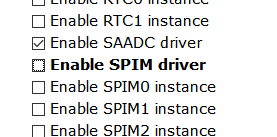
Is there a working example of the SDCard socket being used anywhere that I can refer to?

Parents
  • Hi Carl,

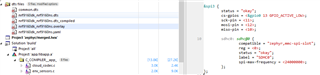
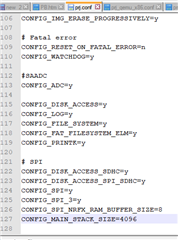
    In the asset tracker folder, I have copied across the settings from the example in the link you sent to prj.conf

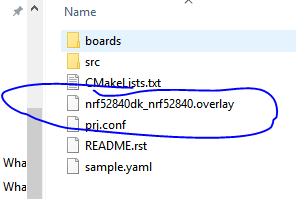
    But where is the overlay file? or does the asset_tracker not have one?

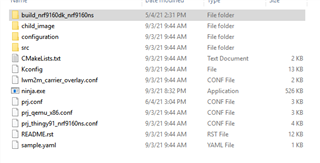
    The asset_tracker files:

    I was imagining I could copy the data from the example overlay file into the asset_tracker overlay file and change the pin numbers appropriately

  • Hi again!

    The asset tracker does not have an overlay file and this must be added. For the nRF9160DK you can create a new file called "nrf9160dk_nrf9160ns.overlay" and add your desired configurations there. This will be included automatically next time you build the application (make sure to reopen the project in SES). Please notify me if you face any issues with this!

    Best regards,
    Carl Richard

  • Hi Carl,

    It seems to be something to do with the SPI config as if I move the MISO and MOSI to other pins, the same problem is apparent, I never see any activity on them, I have just moved them to 0.23 and 0.24, removed the SDCARD and just watched the lines.

    CLK works,

    CS works

    nothing on MOSI

    I'm pretty sure the init routine should be sending a string of 0xff's via MOSI on startup.

    What could I have missed to stop the signals?

  • Hi again,

    Some additional information.

    I am not sure where the configuration is now supposed to happen, using the menuconfig option or directly in the prj.conf file.

    I tried using the menuconfig to enable log debug for the SDHC driver, but was not successful, the option seems to be ignored, if i manually add

    #define LOG_LEVEL LOG_LEVEL_DBG

    to disk_access_spi_sdhc.c then i get the following output

    >> ff ff ff ff ff ff ff ff ff ff[00:00:00.205,627] <dbg> sdhc_spi.sdhc_spi_tx_cmd: cmd0 payload=0
    
    
    >> 40 0 0 0 0 94
    << 0 0[00:00:00.206,848] <dbg> sdhc_spi.sdhc_spi_tx_cmd: cmd8 payload=426
    
    
    >> 48 0 0 1 aa 86
    << 0 0 0 0 0 0[00:00:00.208,435] <dbg> sdhc_spi.sdhc_spi_tx_cmd: cmd59 payload=1
    
    
    >> 7b 0 0 0 1 82
    << 0 0[00:00:00.209,686] <dbg> sdhc_spi.sdhc_spi_tx_cmd: cmd55 payload=0
    
    
    >> 77 0 0 0 0 64
    << 0 0[00:00:00.210,937] <dbg> sdhc_spi.sdhc_spi_tx_cmd: cmd41 payload=0
    
    
    >> 69 0 0 0 0 e4
    << 0 0[00:00:00.212,158] <dbg> sdhc_spi.sdhc_spi_tx_cmd: cmd16 payload=512
    
    
    >> 50 0 0 2 0 14
    << 0 0[00:00:00.213,439] <dbg> sdhc_spi.sdhc_spi_tx_cmd: cmd9 payload=0
    
    
    >> 49 0 0 0 0 ae
    << 0 0[00:00:00.214,691] <err> asset_tracker: Storage init ERROR!

    So i would certainly expect activity on the MOSI pin, some kind of other configuration must be stopping this somewhere.

    Thanks for your help

    Billy

  • Hi again, Billy!

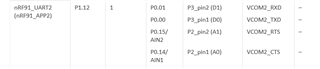
    Thank you for your patience. Do I understand it correctly that you are using the nRF9160DK? In that case, some GPIO pins have already dedicated functions and should not be used for other means. There is an overview of these on in the infocenter documentation. From this I see that you have been using the pins that are dedicated to the interface MCU and DK board control. Could you try another set of pins instead, for example P0.10, P0.11, P0.12 and P0.13?

    How did you try to enable the debug log in prj.conf? It should be enough to add CONFIG_DISK_LOG_LEVEL_DBG=y.

    Best regards,
    Carl Richard

  • Hi Carl, thanks for your reply

    Yes i am using the nRF9160DK

    adding CONFIG_DISK_LOG_LEVEL_DBG=y to prj.conf works - thanks, so menuconfig is not the way

    Changing the overlay to

    &spi3 {
            status = "okay";
            cs-gpios = <&gpio0 13 GPIO_ACTIVE_LOW>;
            sck-pin = <11>;
    	mosi-pin = <12>;
    	miso-pin = <10>;
    
            sdhc0: sdhc@0 {
                    compatible = "zephyr,mmc-spi-slot";
                    reg = <0>;
                    status = "okay";
                    label = "SDHC0";
                    spi-max-frequency = <24000000>;
            };
    };

    Using 10, 11, 12 and 13 does not help, in fact now not even the CS or CLK lines are working, i get no output from any of the pins

    Could it be the overlay is not being included?

  • Hello!

    Good to hear. Menuconfig is unfortunately unaware of the log level Kconfigs as they are generated.

    I should have mentioned this earlier: when changing the overlay you must reopen the project with a "Clean Build Folder" for the changes to take place. Did you do this?

    Best regards,
    Carl Richard

Reply Children
Related