This post is older than 2 years and might not be relevant anymore
More Info: Consider searching for newer posts

The adc-uart sampling is only about 9k.

I am using the SAADC example to check the sampling rate between ADC and UART.

I am using an Arduino serial plotter and logic analyzer to check the correct data.

To check this, the following settings were made.

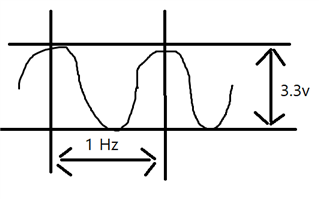
1 Hz, 3.3 Vp-p


0.nRF52832
    Baud rate 1000000
    ADC Sampling bit 12bit
    Modify the source code to check the optimized Arduino float output value (data [4byte] + newline character [2byte] = 6byte)


    Source code

/**
 * Copyright (c) 2014 - 2019, Nordic Semiconductor ASA
 *
 * All rights reserved.
 *
 * Redistribution and use in source and binary forms, with or without modification,
 * are permitted provided that the following conditions are met:
 *
 * 1. Redistributions of source code must retain the above copyright notice, this
 *    list of conditions and the following disclaimer.
 *
 * 2. Redistributions in binary form, except as embedded into a Nordic
 *    Semiconductor ASA integrated circuit in a product or a software update for
 *    such product, must reproduce the above copyright notice, this list of
 *    conditions and the following disclaimer in the documentation and/or other
 *    materials provided with the distribution.
 *
 * 3. Neither the name of Nordic Semiconductor ASA nor the names of its
 *    contributors may be used to endorse or promote products derived from this
 *    software without specific prior written permission.
 *
 * 4. This software, with or without modification, must only be used with a
 *    Nordic Semiconductor ASA integrated circuit.
 *
 * 5. Any software provided in binary form under this license must not be reverse
 *    engineered, decompiled, modified and/or disassembled.
 *
 * THIS SOFTWARE IS PROVIDED BY NORDIC SEMICONDUCTOR ASA "AS IS" AND ANY EXPRESS
 * OR IMPLIED WARRANTIES, INCLUDING, BUT NOT LIMITED TO, THE IMPLIED WARRANTIES
 * OF MERCHANTABILITY, NONINFRINGEMENT, AND FITNESS FOR A PARTICULAR PURPOSE ARE
 * DISCLAIMED. IN NO EVENT SHALL NORDIC SEMICONDUCTOR ASA OR CONTRIBUTORS BE
 * LIABLE FOR ANY DIRECT, INDIRECT, INCIDENTAL, SPECIAL, EXEMPLARY, OR
 * CONSEQUENTIAL DAMAGES (INCLUDING, BUT NOT LIMITED TO, PROCUREMENT OF SUBSTITUTE
 * GOODS OR SERVICES; LOSS OF USE, DATA, OR PROFITS; OR BUSINESS INTERRUPTION)
 * HOWEVER CAUSED AND ON ANY THEORY OF LIABILITY, WHETHER IN CONTRACT, STRICT
 * LIABILITY, OR TORT (INCLUDING NEGLIGENCE OR OTHERWISE) ARISING IN ANY WAY OUT
 * OF THE USE OF THIS SOFTWARE, EVEN IF ADVISED OF THE POSSIBILITY OF SUCH DAMAGE.
 *
 */
/** @file
 * @defgroup nrf_adc_example main.c
 * @{
 * @ingroup nrf_adc_example
 * @brief ADC Example Application main file.
 *
 * This file contains the source code for a sample application using ADC.
 *
 * @image html example_board_setup_a.jpg "Use board setup A for this example."
 */

#include <stdbool.h>
#include <stdint.h>
#include <stdio.h>
#include <string.h>
#include "nrf.h"
#include "nrf_drv_saadc.h"
#include "nrf_drv_ppi.h"
#include "nrf_drv_timer.h"
#include "boards.h"
#include "app_error.h"
#include "nrf_delay.h"
#include "app_util_platform.h"
#include "nrf_pwr_mgmt.h"

#include "nrf_log.h"
#include "nrf_log_ctrl.h"
#include "nrf_log_default_backends.h"

#define SAMPLES_IN_BUFFER 1
volatile uint8_t state = 1;

static const nrf_drv_timer_t m_timer = NRF_DRV_TIMER_INSTANCE(0);
static nrf_saadc_value_t     m_buffer_pool[2][SAMPLES_IN_BUFFER];
static nrf_ppi_channel_t     m_ppi_channel;
static uint32_t              m_adc_evt_counter;


void timer_handler(nrf_timer_event_t event_type, void * p_context)
{

}


void saadc_sampling_event_init(void)
{
    ret_code_t err_code;

    err_code = nrf_drv_ppi_init();
    APP_ERROR_CHECK(err_code);

    nrf_drv_timer_config_t timer_cfg = NRF_DRV_TIMER_DEFAULT_CONFIG;
    timer_cfg.bit_width = NRF_TIMER_BIT_WIDTH_32;
    err_code = nrf_drv_timer_init(&m_timer, &timer_cfg, timer_handler);
    APP_ERROR_CHECK(err_code);

    /* setup m_timer for compare event every 400ms */
    uint32_t ticks = nrf_drv_timer_us_to_ticks(&m_timer, 110);
    nrf_drv_timer_extended_compare(&m_timer,
                                   NRF_TIMER_CC_CHANNEL0,
                                   ticks,
                                   NRF_TIMER_SHORT_COMPARE0_CLEAR_MASK,
                                   false);
    nrf_drv_timer_enable(&m_timer);

    uint32_t timer_compare_event_addr = nrf_drv_timer_compare_event_address_get(&m_timer,
                                                                                NRF_TIMER_CC_CHANNEL0);
    uint32_t saadc_sample_task_addr   = nrf_drv_saadc_sample_task_get();

    /* setup ppi channel so that timer compare event is triggering sample task in SAADC */
    err_code = nrf_drv_ppi_channel_alloc(&m_ppi_channel);
    APP_ERROR_CHECK(err_code);

    err_code = nrf_drv_ppi_channel_assign(m_ppi_channel,
                                          timer_compare_event_addr,
                                          saadc_sample_task_addr);
    APP_ERROR_CHECK(err_code);
}


void saadc_sampling_event_enable(void)
{
    ret_code_t err_code = nrf_drv_ppi_channel_enable(m_ppi_channel);

    APP_ERROR_CHECK(err_code);
}


void saadc_callback(nrf_drv_saadc_evt_t const * p_event)
{
    if (p_event->type == NRF_DRV_SAADC_EVT_DONE)
    {
        ret_code_t err_code;

        err_code = nrf_drv_saadc_buffer_convert(p_event->data.done.p_buffer, SAMPLES_IN_BUFFER);
        APP_ERROR_CHECK(err_code);

        int i;
        //NRF_LOG_INFO("ADC event number: %d", (int)m_adc_evt_counter);

        for (i = 0; i < SAMPLES_IN_BUFFER; i++)
        {
            NRF_LOG_RAW_INFO("%d\n", p_event->data.done.p_buffer[i]);
        }
        m_adc_evt_counter++;
    }
}


void saadc_init(void)
{
    ret_code_t err_code;
    nrf_saadc_channel_config_t channel_config =
        NRF_DRV_SAADC_DEFAULT_CHANNEL_CONFIG_SE(NRF_SAADC_INPUT_AIN0);

    err_code = nrf_drv_saadc_init(NULL, saadc_callback);
    APP_ERROR_CHECK(err_code);

    err_code = nrf_drv_saadc_channel_init(0, &channel_config);
    APP_ERROR_CHECK(err_code);

    err_code = nrf_drv_saadc_buffer_convert(m_buffer_pool[0], SAMPLES_IN_BUFFER);
    APP_ERROR_CHECK(err_code);

    err_code = nrf_drv_saadc_buffer_convert(m_buffer_pool[1], SAMPLES_IN_BUFFER);
    APP_ERROR_CHECK(err_code);

}


/**
 * @brief Function for main application entry.
 */
int main(void)
{
    uint32_t err_code = NRF_LOG_INIT(NULL);
    APP_ERROR_CHECK(err_code);

    NRF_LOG_DEFAULT_BACKENDS_INIT();

    ret_code_t ret_code = nrf_pwr_mgmt_init();
    APP_ERROR_CHECK(ret_code);

    saadc_init();
    saadc_sampling_event_init();
    saadc_sampling_event_enable();
    NRF_LOG_INFO("SAADC HAL simple example started.");

    while (1)
    {
        nrf_pwr_mgmt_run();
        NRF_LOG_FLUSH();
    }
}


/** @} */

1. Logic Analyzer
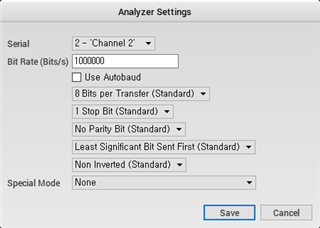
2. Arduino serial plotter

    Baud rate 1000000

I have confirmed that data is transmitted well in the sampling cycle of 110us, but it fails in communication at 70us.
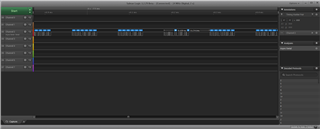
Data transmitted normally [sampling cycle 110us]

I want to change the sampling from 110 to 70. (Increase data sampling)
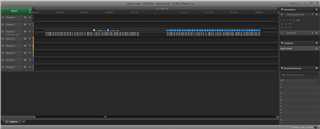
Dropped log out (sampling cycle 70us)
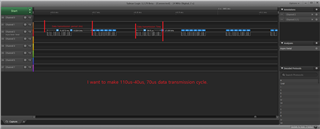
In theory, it turns out a speed of about 20k. (Ignore start/stop bits)
The calculation formula is as follows: 1000000 [Baud rate] / 8[data bit] / 6[char count] = 20,833

I used the following formula to check the number of samples.

Data transmission period (ms) = [sampling time] * [buffer count]
Number of interrupts per second = 1 / [Data transmission period (ms)] * 1000
ADC sampling count = [Number of interrupts per second] * [buffer count]

4606.adc-uart calc.xlsx

  • Hello,

    but it fails in communication at 70us.

    Please elaborate what you mean when you say that it fails at 70us. Do you mean that you are not seeing the sample output on UART every 70 us, or are you saying that a sample is not taken every 70us?
    Please also tell me if you are using the deferred logging option. This option will postpone log-processing until you reach your power management loop in the main context.

    I am also not exactly sure what you mean when you say "I want to make 110us-40us, 70us data transmission cycle".
    Are you saying that you would like your current setup of a sample written to UART every 110us to instead write out the sample every 70us to UART?
    To reduce the time actively spent by the CPI in the SAADC interrupt handler you could increase your sample buffer size. A size of 1 means that you CPU has to intervene and go through the SAADC interrupt handler every time a sample is produced.
    Additionally, please be aware that you are using the default channel configuration which uses 10us acquisition time.

    Could you also tell me which SDK version you are using?

    To check this, the following settings were made.

    1 Hz, 3.3 Vp-p


    0.nRF52832
        Baud rate 1000000
        ADC Sampling bit 12bit
        Modify the source code to check the optimized Arduino float output value (data [4byte] + newline character [2byte] = 6byte)

    I understand that you are working with the SAADC peripheral example from the SDK, and that you have made some changes to it. Could you elaborate on these two changes you have detailed? I am not sure that I am seeing any 1 Hz configuration, and I am not sure how you have included / what you mean when saying 'the optimized Arduino float output'. Please elaborate on this so I may understand your issue better.

    Looking forward to resolving this issue together!

    Best regards,
    Karl

  • The final goal of this question is I would like to use all the resources of UART for ADC data output.

    We will answer your questions on this basis.

    but it fails in communication at 70us.

    Please check the third image.

     60us about Data transmission, 

    I want to capture the ADC data 70us after data transmission and send it to uart. (For 10us spare, the shorter the better, but if there is no problem, I want to send it immediately.)

    The version you are using is 15.3.0.

    I am not sure that I am seeing any 1 Hz configuration

    1Hz, 

    1Hz Freq Sine wave.
    3.3 Ampl Vp-p 
    1.65V Offset

    the optimized Arduino float output

    This is the contents of using Arduino's serial plotter program.

    1 Shipping data optimized for uart graph drawing is as follows.
    Data character [4 bytes] + (\r\n) [2 bytes]
    It is a total of 6 bytes.

    When sending data continuously, is 20k correct as I calculated?
    What is the maximum number of samples for ADC between uart 1000000 baud rate at 12bit ADC?

    Thank you for responding to complex questions.

  • odenwar said:
    Thank you for responding to complex questions.

    No problem at all, I am happy to help!

    odenwar said:
    The final goal of this question is I would like to use all the resources of UART for ADC data output.
    odenwar said:
    The version you are using is 15.3.0.

    Thank you for clarifying, this is very helpful for me to understand your issue and goal. 

    odenwar said:

    1Hz, 

    1Hz Freq Sine wave.
    3.3 Ampl Vp-p 
    1.65V Offset

    Aha, I not understand that you were referring to what is being sampled. Thank you for clarifying. I was not sure if this was the case, since exactly what is being measured does not matter for the frequency of the samples and their output through UART - but it is good to have mentioned never the less, thank you.

    odenwar said:
    1 Shipping data optimized for uart graph drawing is as follows.
    Data character [4 bytes] + (\r\n) [2 bytes]
    It is a total of 6 bytes.

    If you wish to maximize the frequency of useful bytes you should instead just send the 4 meaningful float bytes, and then add the 2 arduino overhead bytes on the receiver side. This will increase your throughput of SAADC samples by 33%, so its quite the improvement.

    Furthermore, you could try to increase the sample buffer size, as mentioned in my previous comment.

    odenwar said:
    I want to capture the ADC data 70us after data transmission and send it to uart. (For 10us spare, the shorter the better, but if there is no problem, I want to send it immediately.)

    If you want the sample to happen exactly 70us after the previous sample was successfully transmitted, you should setup a timer to start when you receive the TX success event. Are you currently using NRF_LOG_RAW_INFO to send over the UART?
    If you would like to reduce the time between bytes sent, you should use the UARTE driver directly.

    Could you also tell me whether you are using the deferred logging option or not, like I asked in my previous comment? This is set by the NRF_LOG_DEFERRED define in your sdk_config.h file.
    If this is the case, your logger will only process the logs once NRF_LOG_PROCESS is called, which typically is only when the CPU has nothing else to do - right before going to SYSTEM ON sleep.

    Best regards,
    Karl

  • If you wish to maximize the frequency of useful bytes you should instead just send the 4 meaningful float bytes, and then add the 2 arduino overhead bytes on the receiver side. This will increase your throughput of SAADC samples by 33%, so its quite the improvement.

    How do you handle the above method?

    Could you also tell me whether you are using the deferred logging option or not, like I asked in my previous comment? This is set by the NRF_LOG_DEFERRED define in your sdk_config.h file.
    If this is the case, your logger will only process the logs once NRF_LOG_PROCESS is called, which typically is only when the CPU has nothing else to do - right before going to SYSTEM ON sleep.

    I'll check it out during business hours.

  • odenwar said:
    How do you handle the above method?

    Please keep in mind that I have no prior knowledge of the 'Arduino optimized float' implementation you reference - but it sounds to me like it is just a regular float type (4 bytes) with 2 bytes tacked on at the end, to delimitate the float, is this correct?
    If so, you expect to send these two static bytes at the end of every float (every sample) you send. If you instead just do not send them, but add them at the receiver side (which might be an arduino?) instead, you save yourself the trouble of sending the two end characters over and over - since they always will be present.
    So, you just send the 4 meaningful float bytes, and every time the Arduino receives a new float (every 4 bytes), it adds the delimination characters to the end.
    I might have misunderstood you earlier, and I am unable to find any direct reference to 'Arduino optimized float', so my suggestion might not be applicable.
    Please let me know if I should elaborate on this, or if any part of my suggestion is unclear.

    odenwar said:
    I'll check it out during business hours.

    Great, I look forward to hearing how it goes!
    Please also see my earlier suggestion about increasing the sample buffer size.

    Best regards,
    Karl


Related