Beware that this post is related to an SDK in maintenance mode
More Info: Consider nRF Connect SDK for new designs
This post is older than 2 years and might not be relevant anymore
More Info: Consider searching for newer posts

Nordic SDK & Custom boards

Hi,


can anyone provide any insight into moving beyond a pca10040 development board and creating a project for a custom board? What are the steps that you have to go through?

I am using a design based on a fanstel bt832. 

I take it that you have to modify "boards.h" and add a header file for your own board.

I am using Segger Embedded Studio and nRF5_SDK_15.2.0_9412b96.

Regards,

Steve.

Parents
  • Hey Steven,

    I'd recommend one of two options:

    1. Use an example project. You could pick an example project that's very close to what your custom project would look like. For example if you needed a project with I2C, you could start with the twi_scanner project.

    2. Use a template project. I believe there are two template projects in the SDK:
      1. examples > peripheral > template_project
      2. examples > ble_peripheral > ble_app_template

    When you have decided on either (1) or (2), then you'd have to modify the paths to the SDK files in your custom project. You can do that through the Solution Editor in Segger Embedded Studio.

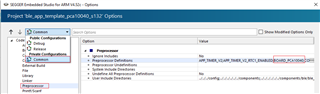
    And yes, you'd also have to create your own board file and add it to the boards.h file. You'd have to remove the BOARD_ PCA10040 macro in  the preprocessor definitions list and create your own macro, effectively enabling your own board definition.

    Hope it helps.

    Timothy

  • The define can be found under preprocessor defines in the "Common" configuration in SES project options:

    To get more familiar with using SES with nRF5 SDK, I recommend you to have a look at this video tutorial playlist.

  • For future reference, (this using SES Release 5.42):

    - In the project explorer right click on the project file, select options from the drop down menu.

    -In the project options window, select "Private Configurations -> Common" from the drop down menu at the top right of the GUI".

    - Under Code -> Preprocessor double click preprocessor definitions.

    - Change "BOARD_PCA10040" to "BOARD_CUSTOM"

    - Add your board header file to the SDK folder : eg ..\NordicSemi\nRF5_SDK_15.2.0_9412b96\components\boards 

    - In boards.h edit the line: 

    #elif defined(BOARD_CUSTOM)
    #include "custom_board.h"

    to your chosen .h board header filename eg:
    #include "my_board.h"

    - Edit the board file to suit your custom board.

Reply
  • For future reference, (this using SES Release 5.42):

    - In the project explorer right click on the project file, select options from the drop down menu.

    -In the project options window, select "Private Configurations -> Common" from the drop down menu at the top right of the GUI".

    - Under Code -> Preprocessor double click preprocessor definitions.

    - Change "BOARD_PCA10040" to "BOARD_CUSTOM"

    - Add your board header file to the SDK folder : eg ..\NordicSemi\nRF5_SDK_15.2.0_9412b96\components\boards 

    - In boards.h edit the line: 

    #elif defined(BOARD_CUSTOM)
    #include "custom_board.h"

    to your chosen .h board header filename eg:
    #include "my_board.h"

    - Edit the board file to suit your custom board.

Children
No Data
Related