This post is older than 2 years and might not be relevant anymore
More Info: Consider searching for newer posts

Debugging, NRF_LOG, Segger Embedded Studio Problems

I saw something in the list that might help but I have learned that if I go there I lose all the work I did to get here

I am having major problems with Segger Embedded Studio

  • NRF_LOG_x does not print either through the UART and putty OR RTT in SES [Manually set in the sdk_config.h file] since CMSIS Wizard is not present
  • The CMSIS Configuration Wizard is NOT present in my Tools.xml
  • Debug breakpoints are not hit unless it is in the main() part of main.c and when hit not in the code, only if a debug window to the left of the code
  • I can step line by line if I start and use F10/F11 from the start (do not use F5 and a break point) but never once I use F5 and a break point.

The only thing I can think of is that somehow the installation of SES got really corrupted or I am missing a major step. I have no idea how to fix.

Yet the code I have does partially run - it advertises, gets connected to, responds to service discovery, gets two characteristic descriptors enabled but then when I try and write from the client the write times out. I am not surprised that there are issues with the code as I have ported a SoftDevice only project from nRF51 and Keil.

But being unable to debug or even print to RTT (this is new for me) or via the UART and putty (the latter worked fine in the Keil project) is not helping.

Any help would be great. (Yes I have seen the debugging video and that's how I know my Tools.xml is corrupt).

Parents
  • Hi again

    It's very difficult to deduce what exactly has happened here to cause this I'm afraid, but I got some input from one of my colleagues after discussing your issue with him.

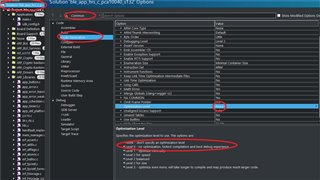
    The bad debugging likely has something to do with the debug optimizations set in the project after it was ported to SES. Can you check what the Optimization Level is set to in your project options. If it isn't already, try setting this to Level 0 for fast compilation and the best possible debug experience. Selecting None here might cause a less than optimal debug experience for instance.

    Best regards,

    Simon

  • You may be right here. I took the hts example program (unmodified) and switched to debug, did learn to get RTT working by trial and error with the SDK_config.h settings (as well as the NRF_LOG via UART and putty) but a break point in the connection event would not be hit. Optimization was set to None. So I put it to 0 and the breakpoint was hit.

    SO now I might be able to go back to my ported project and debug it!

  • Glad to hear that, please verify the answer if you found it helpful, so DevZone users with the same issue in the future can find a solution more easily.

    Best regards,

    Simon

  • Haven't succeeded yet with my project. Getting double \r\r even though I turned off that auto CR thing in the FPRINTF

    So there are still a lot of issues that make it impossible for me to validate anything 

  • Okay, I misunderstood then. But it's a step in the right direction at least.

    brianreinhold said:
    I turned off that auto CR thing in the FPRINTF

     I assume you're referring to the NRF_FPRINTF_FLAG_AUTOMATIC_CR_ON_LF_ENABLED define in your sdk_config.h file here, correct? 

    Best regards,

    Simon

  • Yes I meant I have  NRF_FPRINTF_FLAG_AUTOMATIC_CR_ON_LF_ENABLED 0. 

    What I did validate is that in the existing hts example, with optimization 'none' I could not hit a break point in the event handler. With optimization '0' I could.

    I have tried lots of things - none  have worked

    Started with porting Keil project to Segger but there are confusions in the tutorial - it mixes nrf52 stuff with nrf51. Found a post on this site that clarified some of those problems and stated why the tutorial did not work. I have not yet gotten that to work. I find inconsistencies in the nrf51.c file, one has an include file that does not exist, the other doesn't have it. The two files are of very different size.

    Its been so frustrating I am tossing out everything, restarting with a copy of the ses hts example for SDK 17+ and converting over to my project step by step. It will probably take several days but if I had done that from the start, I would be well ahead of where I am now. Its been about two weeks.

Reply
  • Yes I meant I have  NRF_FPRINTF_FLAG_AUTOMATIC_CR_ON_LF_ENABLED 0. 

    What I did validate is that in the existing hts example, with optimization 'none' I could not hit a break point in the event handler. With optimization '0' I could.

    I have tried lots of things - none  have worked

    Started with porting Keil project to Segger but there are confusions in the tutorial - it mixes nrf52 stuff with nrf51. Found a post on this site that clarified some of those problems and stated why the tutorial did not work. I have not yet gotten that to work. I find inconsistencies in the nrf51.c file, one has an include file that does not exist, the other doesn't have it. The two files are of very different size.

    Its been so frustrating I am tossing out everything, restarting with a copy of the ses hts example for SDK 17+ and converting over to my project step by step. It will probably take several days but if I had done that from the start, I would be well ahead of where I am now. Its been about two weeks.

Children
No Data
Related