This post is older than 2 years and might not be relevant anymore
More Info: Consider searching for newer posts

No Device available in nRF Connect Programmer

When I connect my Thingy 91 to my usb port open up nrf Connect and push Sw3 and turn on the board power I do not get any devices to show up under device selection in rf connect programmer?  I can hit Sw4 and power cycle and the bluetooth device shows up and I can not get the 9160 to show up. How can I fix this?

Steve

Parents
  • HI Steve, 

    Can you please clarify what you are trying to achieve? Are you trying to program the Thingy:91 using MCUboot (USB)? 

    If so, can you please download the latest precompiled firmware package from the Thingy:91 downloads page, and then update the nRF52840 with the connectivity bridge .hex file (img_fota_dfu_hex\thingy91_nrf52_connectivity_bridge_2021-03-04_8e8c6089.hex).

    You may also use the nRF9160DK to update the FW, just remember to set SW2 to nRF52. Note that when you press SW3 or SW4 while turning the Thingy:91 on, you are putting the device into serial recovery mode. This is only needed when a external debugger is not present. The nRF9160 DK is able to program the Thingy:91 as an external debugger if an external debugger probe is connected between the "Debug out" on the nRF9160 DK and "Debug in" on the Thingy:91.

    Kind regards,
    Øyvind

  • We I turn on the thingy91 I do not see any LEDs turning on. I check the battery voltage and it is good at 4.1 volts.

    Also if I power on thingy with sw4 pushed when I power up I see the board in the programmer, But if I do this with sw3 pushed on during power up I see nothing in the programmer.

    We I want to do load the tracker app to the thingy board with the nrfconnect programmer but I cannot get the program to see the board. 

  • Hello, 

    spope said:
    Also if I power on thingy with sw4 pushed when I power up I see the board in the programmer, But if I do this with sw3 pushed on during power up I see nothing in the programmer.

     It sounds like you need to program the nRF52840 with the newest connectivity bridge. Did you try this? You can put the device in serial recovery mode by pressing SW4 while powering the Thingy:91, which is probably why you see this device in the programmer app. Please follow my last comment: 

    Øyvind said:
    If so, can you please download the latest precompiled firmware package from the Thingy:91 downloads page, and then update the nRF52840 with the connectivity bridge .hex file (img_fota_dfu_hex\thingy91_nrf52_connectivity_bridge_2021-03-04_8e8c6089.hex).

     Kind regards,
    Øyvind

  • OK My Steps

    1) Bring up rfConnect

    2) Run the programmer

    3) Push sw4 turn on power

    4) Select nRF52840 in select drop down

    5 Drag thingy91_nrf52_connectivity_bridge_2021-03-04_8e8c6089.hex to programmer

    6 hit write

    I see the file start to download and then I keep getting a blank screen like this below

    I am on a macbook pro running 10.15.7

  • I was able to get the thingy91_nrf52_connectivity_bridge_2021-03-04_8e8c6089.hex programmed

    now I see device called thingy91 with two serial ports.. I then did a update modem

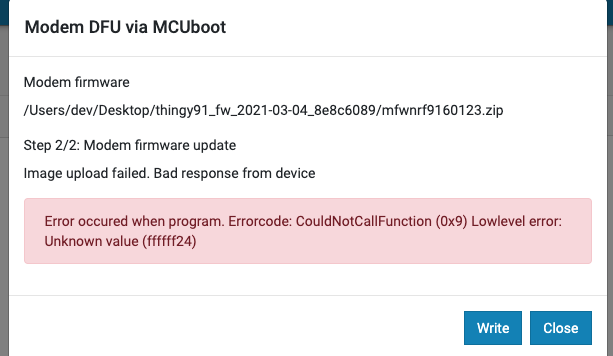
    with this file mfwnrf9160123.zip  and programmer does step 1 ok but I get error on step 2

    What I want to do is get the tracking working

Reply Children
Related