

Hello
I am testing out a blinky FreeRTOS example that's a part of the SDK and would like to use SystemView to visualize context switching and tasks. Are there any steps to go about using SystemView for debugging?
Hello
I am testing out a blinky FreeRTOS example that's a part of the SDK and would like to use SystemView to visualize context switching and tasks. Are there any steps to go about using SystemView for debugging?
There is a blogpost for this specific usecase. I recommend you to use only the part which covers profiling of the application and not the softdevice. The softdevice profiling is done using smart hacks and workarounds very specific to that older version of the softdevice.

Thanks for the response.
So you're implying I should skip steps involving the softdevice?
A couple of initial questions:
Thanks for the response.
So you're implying I should skip steps involving the softdevice?
A couple of initial questions:

morpho said:when it talks about creating a systemview folder in the project, is it referring to the local path or inside the Segger IDE? Because they aren't mapped.
This will be in your filesystem and in your project folder. The blog author has created a copy of hrs freertos example folder as quoted below.
"The following steps are based on the Heart Rate application with FreeRTOS example located in the SDK (11.0 and 12,0) in examples\ble_peripheral\ble_app_hrs_freertos. To keep the example clean, I made a copy of it and named the copy ble_app_hrs_freertos_sysview, where I will work."
morpho said:Where's Src/Config? It's currently not set up like that in ble_app_hrs_freertos example project. In fact, main.c is a part of the base folder and there's no such folder as Src.
When you are installing SystemView, it normally asks the path where to install it, you will find these files in those chosen installation path.
On my Windows system it is as below

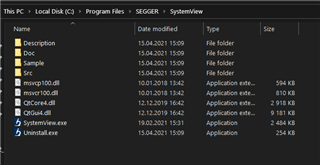
You need to copy mentioned files from here to your project folder
morpho said:Global.h are located under external/segger_rtt. Is there where I should be copying the files to my project?
This is under C:\Program Files\SEGGER\SystemView\Src\Config for me and yes, you need to copy this to your project folder
Thanks for the response.
Though my folder structure looks different than yours. Why is that so?
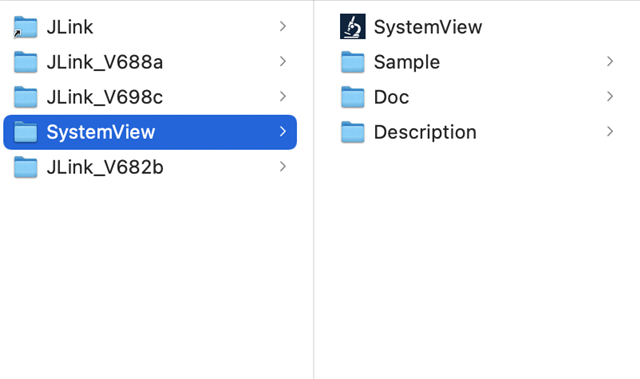
I am not sure, are you using different OS than Windows?
MacOS as you could tell.
I downloaded SystemView again and I see different set of files but still it doesn't fully match - there's no Src folder
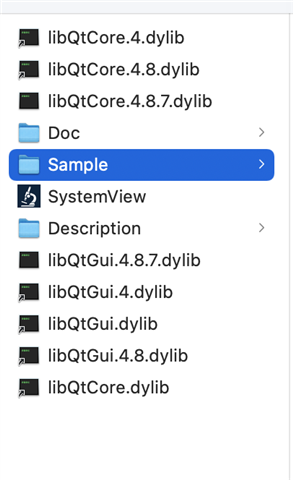
and I downloaded from here. Please point me to the right direction at your earliest convenience. It's just getting dragged...