This post is older than 2 years and might not be relevant anymore
More Info: Consider searching for newer posts

NRF52840-DK Jlink detection failed

Hi, I used my NRF52840-DK for few times but suddenly the jlink connection was not detectable. Before the Jlink failed, the main controller on board did not bring up the board properly after switching on/off the power switch. USB connection was running after a reset on the main controller. I think the board needs reloading the firmware. Please provide me the procedures how to do it without a programmer. Thanks.

Parents
  • Hi,

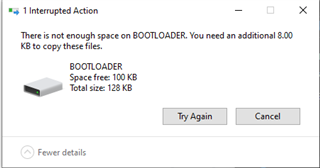
    To re-flash the onboard debugger push and hold the reset button while power cycling the board. Then you should se LED 5 start blinking slowly to indicate that the onboard debugger is in DFU mode, and you should see a removable mass storage device on your computer named "BOOTLOADER". Download the Interface MCU firmware from here and drag and drop it to the BOOTLOADER drive. After a while power cycle the board.

Reply
  • Hi,

    To re-flash the onboard debugger push and hold the reset button while power cycling the board. Then you should se LED 5 start blinking slowly to indicate that the onboard debugger is in DFU mode, and you should see a removable mass storage device on your computer named "BOOTLOADER". Download the Interface MCU firmware from here and drag and drop it to the BOOTLOADER drive. After a while power cycle the board.

Children
Related