This post is older than 2 years and might not be relevant anymore
More Info: Consider searching for newer posts

NRF52840-DK Jlink detection failed

Hi, I used my NRF52840-DK for few times but suddenly the jlink connection was not detectable. Before the Jlink failed, the main controller on board did not bring up the board properly after switching on/off the power switch. USB connection was running after a reset on the main controller. I think the board needs reloading the firmware. Please provide me the procedures how to do it without a programmer. Thanks.

Parents Reply Children
  • Hi,

    That should not be the case. Can you explain in more details? Which sized do you see for the BOOTLOADER drive and for the J-Link firmware? And what happens when you try to copy it over?

    And just to be sure that it is in the correct mode, can you check which files are there in the BOOTLOADER drive? You should see a file named bootload.htm.

  • Thanks for your fast reply

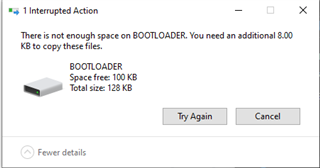
    Yes I can see that file. Size of the J-Link file is 108KB. Size of the BOOTLOADER drive is 128KB but 28KB are used, so its 100KB. The error I get is this:


    PS. Board Version is 2.0.1

  • That is odd. I will try to get hold of a 2.0.1 device and test on that, though it should not matter. Are you able to recover using the J-Link Configurator instead?

  • The board does not get recognized at all. When I open the J-Link Configurator it tell me there is no compatible board detected. 

    And if it helps, this has happend to me with two boards. One was brand new and the other one was used for a while.

    Maybe some of the software that was on the board had an impact on the BOOTLOADER size? Is there a way to clear the board without using a programmer?

    I will not be able to test anything out until monday bec I am off work, then I will give it a try again.

  • Hi,

    Elias Bruggmann said:
    And if it helps, this has happend to me with two boards. One was brand new and the other one was used for a while.

    That is interesting. Do you remember if something specific happened before this happened with the boards?

    Elias Bruggmann said:
    Maybe some of the software that was on the board had an impact on the BOOTLOADER size? Is there a way to clear the board without using a programmer?

    That should not be the case. The firmware on the nRF IC does not affect this, as this should be isolated to the onboard debugger (the big IC with the white sticker).

    I do not have any particular reason for suggesting this, but as I am not able to explain what happened: Can you check with another computer to see if you experience the same on that (available size is 100 instead of 108)? Also, can you list all files you see on the BOOTLOADER drive, including hidden files and the size of all of them?

Related