

Hi,all
As said above, and the error was in the picture below, so why?if any one have some ideas.thanks a lot
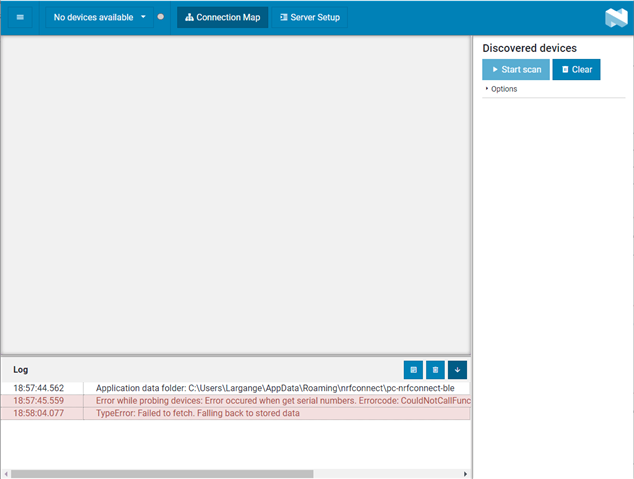
Hi,all
As said above, and the error was in the picture below, so why?if any one have some ideas.thanks a lot
which version of nrf connect for desktop and nRF chip do you have?
On the commandline can you try
> nrfjprog --recover

ok,
and i use the The latest version of NRF connect, i have nrf52832,and i use
s132 v6.0, SDK15.0
i'll reply you after i try in your way, thanks
Hi,
i have a question, if there's a way to take out the notification's value in " NRF CONNECT for desktop",
or i must design a client software to get the value?
Hi,
i have a question, if there's a way to take out the notification's value in " NRF CONNECT for desktop",
or i must design a client software to get the value?

nRF Desktop can be a client that can read the notifications from your device(server) no need to have another client.
nRF Desktop app will program one of the DK (not your DUT) with the firmware that will perform the functionalities that ae needed for client.
oh, you may didn't get my thoughts, i wan to use the value to do other jobs, like draw a curve based on the value
Hi, Susheel
Actually, i just want to connect my NRF52832 device with pc, then , use the value uploaded from the device to draw a curve in pc.
I have two questions,now.
1. I've see one of your answers, here. If i use the “hid example” in my device, regarding my device as keyboard/mouse, is it possible for me uploading data and drawing a curve?( i'm unfamiliar with the hid, i don't know if it can help me achieve my purpose.)
2. Now, i use the "ble_app_template", i try to connect my device with pc directly, but after connection between my laptop and NRF52832 module for a while ,
"disconnected" happened, and the status turned "connected" to "paired (they disconnected, actually)". I guess the reason of this situation is that i use the "ble_app_template" instead of "hids"?
please give me some response, thanks
Jerryxu said:Hi, Susheel
Actually, i just want to connect my NRF52832 device with pc, then , use the value uploaded from the device to draw a curve in pc.
I have two questions,now.
1. I've see one of your answers, here. If i use the “hid example” in my device, regarding my device as keyboard/mouse, is it possible for me uploading data and drawing a curve?( i'm unfamiliar with the hid, i don't know if it can help me achieve my purpose.)
Where do you want to draw the curve in the PC? do you want to create your own graph of the values that are received from the BLE? in that case you should not use nRF Connect for desktop but use pc-ble-driver for desktop
Jerryxu said:2. Now, i use the "ble_app_template", i try to connect my device with pc directly, but after connection between my laptop and NRF52832 module for a while ,
"disconnected" happened, and the status turned "connected" to "paired (they disconnected, actually)". I guess the reason of this situation is that i use the "ble_app_template" instead of "hids"?
Yes, hids or other profiles needs to be exposed from your device for the native bluetooth on your laptop to be able to communicate with your device.