This post is older than 2 years and might not be relevant anymore
More Info: Consider searching for newer posts

Problem with Testing nRF9160 DK on Bell Canada LTE-M

I am testing the nRF9160 DK (PCA10090 with PIN) on the Bell Canada LTE-M, run into some problem and will appreciate some help. 

At the beginning, the newest demo asset tracking firmware (2021-03-01) and modem firmware (Ver1.23) is programmed to the board.  There is no response on the "LTE Link Monitor". 

An older version tracking firmware (2020-04-09) and modem firmware (Ver 1.20) is reprogramed on the board, some LEDs (LED1 & LED3) starts to flash.  After a while, only LED3 is still flashing.  LTE Link Monitor shows a lot line of info.  It seems the cell network is working fine.  Please see the attached screenshot. 
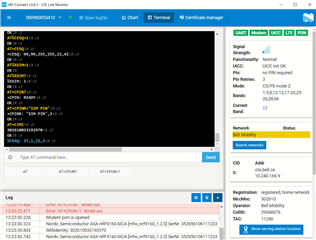
Login in nRF Cloud and try to add the device.  It fails with following message: 

"There was an error adding your device: No device found for this id. The device has not yet been provisioned. Troubleshoot nRF Code 40412"
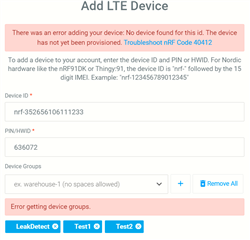
How may I add the device the nRF Cloud?

More info from the Modem: 


%CESQ: 37,1,17,2


[00:02:44.541,015] [0m<dbg> nrf_cloud_transport.nct_mqtt_connect: mqtt_connect failed -2
[0m


[00:02:44.549,377] [1;31m<err> asset_tracker: Failed to connect to cloud, error -7
[0m


[00:02:44.557,128] 
[1;31m<err> asset_tracker: Ensure device has a valid private key
[0m


[00:02:44.564,941] 
[1;31m<err> asset_tracker: Device will reboot in 300 seconds
[0m


[00:02:44.572,448] 
[1;31m<err> asset_tracker: LTE link disconnect
[0m


+CGEV: ME PDN DEACT 0


AT+CGDCONT?


+CEREG: 0,"2BE8","01BB3D0C",7,0,0,"11100000","11100000"


+CIND: "service",0


+CGEV: ME DETACH


%CESQ: 255,0,255,0


%XSIM: 0


[00:02:48.897,552] 
[1;31m<err> asset_tracker: Shutdown modem


Where may be my problem? Any help is appreciated. 

Thanks,

More info to follow:  

The problem is solved with the original iBasis SIM card.  The normal Bell SIM card does not support LTE-M yet, although it looks everything is working on LTE Link Monitor.  I will need to order a special SIM card to support the LTE-M protocol.   

Parents
  • Hi,

    An older version tracking firmware (2020-04-09)

    If you have downloaded the firmware from the download section of the nRF9160 DK page on our website here, I assume you mean 2020-04-29, as there are no downloads there from 9th of May 2020. This is built from NCS commit bc7ade8b, so between tags v1.2.0 and v1.2.99-dev1. I would not recommend using this version if you are able to use a newer one, as there has been a lot of updates, fixes and changes since this version.

    From the log you attached here it seems like the problem could be your certificates. I have been told that you had a call with one of our field application engineers (FAE) and that you provisioned new certificates to your device. Did this change anything or are you still getting the same error? Have you been able to test with the iBasis SIM card as suggested by the FAE?

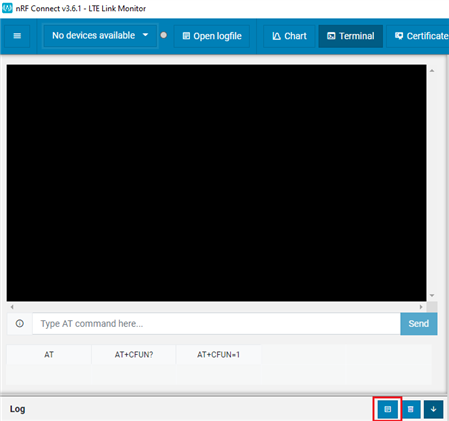
    Please attach the complete log from LTE Link Monitor, especially if you are getting a different error after updating the certificates. You can get the whole log as a file by clicking Open log file as shown below

    Best regards,

    Marte

Reply
  • Hi,

    An older version tracking firmware (2020-04-09)

    If you have downloaded the firmware from the download section of the nRF9160 DK page on our website here, I assume you mean 2020-04-29, as there are no downloads there from 9th of May 2020. This is built from NCS commit bc7ade8b, so between tags v1.2.0 and v1.2.99-dev1. I would not recommend using this version if you are able to use a newer one, as there has been a lot of updates, fixes and changes since this version.

    From the log you attached here it seems like the problem could be your certificates. I have been told that you had a call with one of our field application engineers (FAE) and that you provisioned new certificates to your device. Did this change anything or are you still getting the same error? Have you been able to test with the iBasis SIM card as suggested by the FAE?

    Please attach the complete log from LTE Link Monitor, especially if you are getting a different error after updating the certificates. You can get the whole log as a file by clicking Open log file as shown below

    Best regards,

    Marte

Children
Related