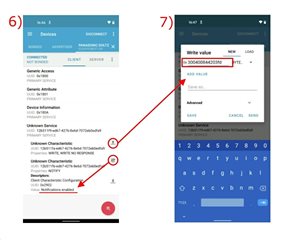
I am trying to send some values from nRF52810 Board to my Laptop. I am using a nRF52840 Bluetooth Dongle to connect the board to my laptop. I am using the "Heart Rate Collector" example as the base, and I have altered the "TARGET_DEV_NAME" constant correctly to the nRF 52810 board, and consequently I am able to establish a connection.
However, immediately after the connection is established, I always encounter the following error - "Service discovery failed. Error code 0x10A".
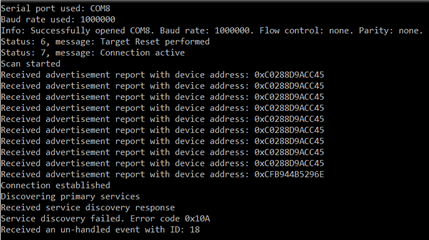
I suspect this might be because I have entered the wrong UUID constants.

Currently I have entered the UUID constants according to the UART Characteristic UUIDs form the following link : bluetooth-numbers-database/characteristic_uuids.json at master · NordicSemiconductor/bluetooth-numbers-database · GitHub
Could someone please help me correct my mistake, I am extremely new at working with hardware and I am not sure where I am going wrong with UUIDs.
Thanks a lot.