This post is older than 2 years and might not be relevant anymore
More Info: Consider searching for newer posts

Trouble Connecting nRF52840 Dongle (on windows) to nRF52810. Error : "Service discovery failed. Error code 0x10A"

I am trying to send some values from nRF52810 Board to my Laptop. I am using a nRF52840 Bluetooth Dongle to connect the board to my laptop. I am using the "Heart Rate Collector" example as the base, and I have altered the "TARGET_DEV_NAME" constant correctly to the nRF 52810 board, and consequently I am able to establish a connection. 

However, immediately after the connection is established, I always encounter the following error - "Service discovery failed. Error code 0x10A".
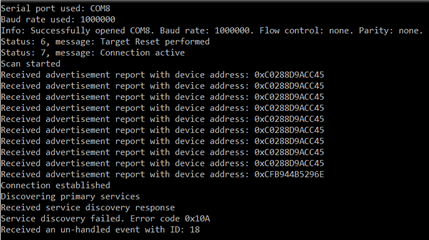
I suspect this might be because I have entered the wrong UUID constants. 

Currently I have entered the UUID constants according to the UART Characteristic UUIDs form the following link : bluetooth-numbers-database/characteristic_uuids.json at master · NordicSemiconductor/bluetooth-numbers-database · GitHub

Could someone please help me correct my mistake, I am extremely new at working with hardware and I am not sure where I am going wrong with UUIDs. 

Thanks a lot.

Parents
  • Does it work OK if you use nRF Connect (Desktop or Mobile) ?

  • Thanks for replying, Sigurd. Over the past few days - I have been trying to understand the NUS client example written by your colleague. I understand the general flow of it, but I still do not understand the meaning of different UUID constants

    I believe that I am able to connect with the nrf52832 SDK by just changing the TARGET_DEV_NAME to the device name. However, the program is not able to find and connect to the primary service as shown in the following screenshot. 


    And this is what happens when I press a random character on the keyboard. 

    As I said before, I am working with hardware for the first time, so I apologize for my lack of knowledge. I am fairly sure that the problem remains in the constants shown in the first screenshot, mainly because I am not sure what they mean. It would be a big help if you could help me understand what they mean or even better if you could help me figure out what to replace the UUID constants with using the screenshot posted below (screenshot of nRFConnect page, with list of UUIDs that do work with my application. ). 

    Usually this is my process to make it work on nRFConnect

    1. Connect to the brf52832 board (which I am already able to do)
    2. Download the Unknown Characteristic 2 by pressing on the three overlapping download arrows beside the characteristic
    3. Upload the value "0x300400844203FD" to Unknown Characteristic 1 by pressing on the upload arrow beside the characteristic

    After this I receive the values in the log file.

    Thank you.

Reply
  • Thanks for replying, Sigurd. Over the past few days - I have been trying to understand the NUS client example written by your colleague. I understand the general flow of it, but I still do not understand the meaning of different UUID constants

    I believe that I am able to connect with the nrf52832 SDK by just changing the TARGET_DEV_NAME to the device name. However, the program is not able to find and connect to the primary service as shown in the following screenshot. 


    And this is what happens when I press a random character on the keyboard. 

    As I said before, I am working with hardware for the first time, so I apologize for my lack of knowledge. I am fairly sure that the problem remains in the constants shown in the first screenshot, mainly because I am not sure what they mean. It would be a big help if you could help me understand what they mean or even better if you could help me figure out what to replace the UUID constants with using the screenshot posted below (screenshot of nRFConnect page, with list of UUIDs that do work with my application. ). 

    Usually this is my process to make it work on nRFConnect

    1. Connect to the brf52832 board (which I am already able to do)
    2. Download the Unknown Characteristic 2 by pressing on the three overlapping download arrows beside the characteristic
    3. Upload the value "0x300400844203FD" to Unknown Characteristic 1 by pressing on the upload arrow beside the characteristic

    After this I receive the values in the log file.

    Thank you.

Children
No Data
Related

