This post is older than 2 years and might not be relevant anymore
More Info: Consider searching for newer posts

Stack to use for Provisioning

Hi,

We would like your pointers for our following queries:-

1) Would like to know about which firmware stack we can  use for provisioning  nRF52840 Nordic boards via nRFMesh App/Any Mobile Application.

2) We could not find all the  provisioning pdu's  while provisioning(in the frames)in the Wireshark logs using nRF Sniffer(attached below) like Provisioning capabilities, Provisioning start and others.

3) Please find our analysis below, we could only find some of the PDU's SCAN_REQ,SCAN_RSP, CONNECT_IND, ADV_NONCONN_IND, ADV_IND. & Secure network Beacon after Provisioning.

Wireshark logs analysis.

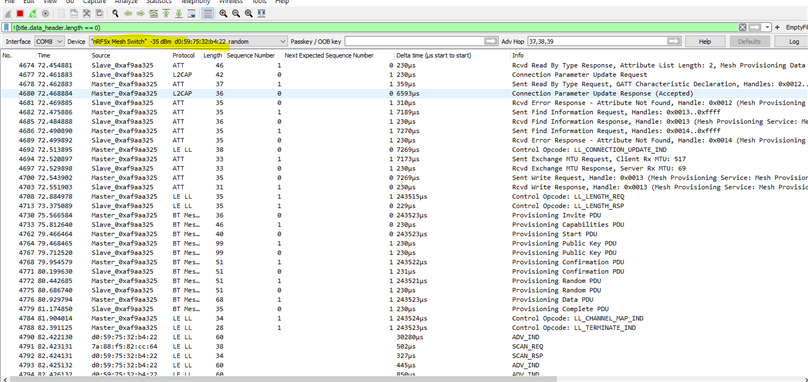
Wireshark Logs during Provisioning

Thanks,

Vithika

Parents
  • Hi Vithika, 

    1. You can use any of our nRF5 SDK for Mesh example as the provisionee to test with the nRF Mesh App. I would suggest to try the light switch server example. It's located at \examples\light_switch\server

    2. If you are provisioning through nRF Mesh app, you would need to catch and follow the connection because the provisioning is performed via PB-GATT (BLE connection) not via PB-ADV (via advertising packets). To follow the connection you would need to select the advertiser in the drop down menu list in the nRF Sniffer menu in wireshark. 

    If you want to do PB-ADV you would need to use either the provisioner we provided in the nRF5 for Mesh SDK or use the PyACI tool we provided on PC

    3. Please follow #2. In addition, we don't usually use wireshark for debugging mesh, we usually use the logging on the node.

  • Hi,

    We would like your pointers for our following queries:-

    1) Please give details about logging on the node ,what does that mean and how can we see that , those details.[referred above in the answer]

    2) Also, please find the attached logs we have got in nRF Connect App while provisioning nRF52840 Nordic boards via nRF Mesh App. We would like to know how to understand which provisioning PDU's does these packets represent. Is there any way /tool to  find out how to parse this data and to understand more about Provisioning PDU's and packets info from these logs.

     for example -

    03-06-EB-30-F6-6D-CE-24-9E-D2-15-40-9B-8D-24-49-8C-51 ,we have some data like this ,any way.to find out which Provisioning PDU's and data packet/info does this represent.

    We are getting only Mesh Provisioning Data out characteristics details not Data In. Can you please help us with this also that why Data IN characteristics are not displayed in logs.

    Logs

    Thanks,

    Vithika

Reply
  • Hi,

    We would like your pointers for our following queries:-

    1) Please give details about logging on the node ,what does that mean and how can we see that , those details.[referred above in the answer]

    2) Also, please find the attached logs we have got in nRF Connect App while provisioning nRF52840 Nordic boards via nRF Mesh App. We would like to know how to understand which provisioning PDU's does these packets represent. Is there any way /tool to  find out how to parse this data and to understand more about Provisioning PDU's and packets info from these logs.

     for example -

    03-06-EB-30-F6-6D-CE-24-9E-D2-15-40-9B-8D-24-49-8C-51 ,we have some data like this ,any way.to find out which Provisioning PDU's and data packet/info does this represent.

    We are getting only Mesh Provisioning Data out characteristics details not Data In. Can you please help us with this also that why Data IN characteristics are not displayed in logs.

    Logs

    Thanks,

    Vithika

Children
  • Hi Vithika, 

    Could you please let us know what exactly you want to achieve by looking at the sniffer trace of the provisioning process? Do you want to debug something ? 
    Do you have control over both side of the communication (provisionee & provisioner ) ? 

    If you want to understand what's transferred in the provisioning process it's easier to use wireshark than looking at the phone's log. I attached here the screenshot when I do provisioning, note that I have to follow the "nRF5x Mesh Switch" in the Interface menu: 

    1) If you want to see logging from the provisionee, you can enable logging inside prov_provisionee.c , setting PROV_DEBUG_MODE = 1. And enable logging for LOG_SRC_PROV when init logging. 

Related