This post is older than 2 years and might not be relevant anymore
More Info: Consider searching for newer posts

Merging nRF52 blinky into uart for peripheral as well as central role.

I'm merging nRF5_SDK_17.0.2_d674dde\examples\ble_peripheral\ble_app_blinky\pca10040\s132\ses to nRF5_SDK_17.0.2_d674dde\examples\ble_peripheral\ble_app_uart\pca10040\s132\ses, but getting error. Also, I want to merge nRF5_SDK_17.0.2_d674dde\examples\ble_central\ble_app_blinky_c\pca10056\s140\ses to nRF5_SDK_17.0.2_d674dde\examples\ble_central\ble_app_uart_c\pca10056\s140\ses. Can anybody help me? or If their already merged then it will be benefit.

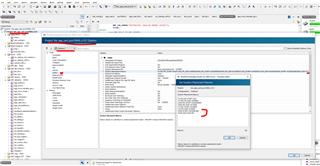
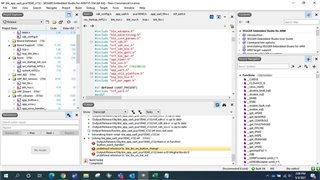
Please find below error screenshot,
Parents
  • Hi,

    I don't think we have any ready examples that merges ble_app_blinky and ble_app_uart.

    If you can upload your project here, then I will take a look at what's missing.

  • Hi,

    Please find below link to download the project:

    https://smetgroup-my.sharepoint.com/:u:/g/personal/megha_choudhari_mysmindia_com/ESMV-B9MJLdEvC0eyhJ2ghgBXCsVIT4OQg3A2CFfrWDq9w?e=lYWprR

    Added comments with //03/05/21 for easy understanding of changes, I have merged - 

    1. ble_peripheral - ble_app_blinky into ble_app_uart

    2. ble_central -  ble_app_blinky_c into ble_app_uart_c 

    Now both project builds successfully but enable to connect ble_app_uart to ble_app_uart_c. Also, the advertising, connection LED status not visible.

    Checked in debug mode both goes to NRF_BREAKPOINT_COND; in app_error_weak.c file

    Looking forward for your reply.

    Regards,

    Megha Choudhari

  • Hi,

    When can I get reply?

    Regards,

    Megha Choudhari

  • Hi,

    I took a look at the ble_app_uart. In services_init(), you need to init the LBS service, and add the led_write_handler().

    /**@brief Function for handling write events to the LED characteristic.
     *
     * @param[in] p_lbs     Instance of LED Button Service to which the write applies.
     * @param[in] led_state Written/desired state of the LED.
     */
    static void led_write_handler(uint16_t conn_handle, ble_lbs_t * p_lbs, uint8_t led_state)
    {
        if (led_state)
        {
            bsp_board_led_on(LEDBUTTON_LED);
            NRF_LOG_INFO("Received LED ON!");
        }
        else
        {
            bsp_board_led_off(LEDBUTTON_LED);
            NRF_LOG_INFO("Received LED OFF!");
        }
    }
    
    
    /**@snippet [Handling the data received over BLE] */
    
    
    /**@brief Function for initializing services that will be used by the application.
     */
    static void services_init(void)
    {
        uint32_t           err_code;
        ble_nus_init_t     nus_init;
        ble_lbs_init_t     init     = {0};
        nrf_ble_qwr_init_t qwr_init = {0};
    
        // Initialize Queued Write Module.
        qwr_init.error_handler = nrf_qwr_error_handler;
    
        err_code = nrf_ble_qwr_init(&m_qwr, &qwr_init);
        APP_ERROR_CHECK(err_code);
    
        // Initialize NUS.
        memset(&nus_init, 0, sizeof(nus_init));
    
        nus_init.data_handler = nus_data_handler;
    
        err_code = ble_nus_init(&m_nus, &nus_init);
        APP_ERROR_CHECK(err_code);
    
        // Initialize LBS.
        init.led_write_handler = led_write_handler;
    
        err_code = ble_lbs_init(&m_lbs, &init);
        APP_ERROR_CHECK(err_code);
    }

    Since you are adding a second custom service, you need to increase the value of NRF_SDH_BLE_VS_UUID_COUNT in sdk_config.h to 2

    If you are having trouble viewing the RTT log inside SES, then set NRF_FPRINTF_FLAG_AUTOMATIC_CR_ON_LF_ENABLED in sdk_config.h to 0

    After adding the 2nd service, you need to allocate more RAM to the SoftDevice. You typically will get something like this printed in the log when this is needed:

    <warning> nrf_sdh_ble: Insufficient RAM allocated for the SoftDevice.
    <warning> nrf_sdh_ble: Change the RAM start location from 0x20002AD8 to 0x20002AE8.
    <warning> nrf_sdh_ble: Maximum RAM size for application is 0xD518.
    <error> nrf_sdh_ble: sd_ble_enable() returned NRF_ERROR_NO_MEM.

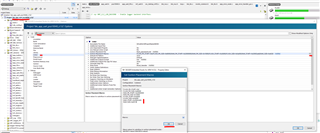
    You then need to adjust this values, like this:

    If you connect with a phone, using e.g. nRF Connect for Mobile app, you should see that the LBS Service has been added.

    Let me know if you need more help with this.

Reply
  • Hi,

    I took a look at the ble_app_uart. In services_init(), you need to init the LBS service, and add the led_write_handler().

    /**@brief Function for handling write events to the LED characteristic.
     *
     * @param[in] p_lbs     Instance of LED Button Service to which the write applies.
     * @param[in] led_state Written/desired state of the LED.
     */
    static void led_write_handler(uint16_t conn_handle, ble_lbs_t * p_lbs, uint8_t led_state)
    {
        if (led_state)
        {
            bsp_board_led_on(LEDBUTTON_LED);
            NRF_LOG_INFO("Received LED ON!");
        }
        else
        {
            bsp_board_led_off(LEDBUTTON_LED);
            NRF_LOG_INFO("Received LED OFF!");
        }
    }
    
    
    /**@snippet [Handling the data received over BLE] */
    
    
    /**@brief Function for initializing services that will be used by the application.
     */
    static void services_init(void)
    {
        uint32_t           err_code;
        ble_nus_init_t     nus_init;
        ble_lbs_init_t     init     = {0};
        nrf_ble_qwr_init_t qwr_init = {0};
    
        // Initialize Queued Write Module.
        qwr_init.error_handler = nrf_qwr_error_handler;
    
        err_code = nrf_ble_qwr_init(&m_qwr, &qwr_init);
        APP_ERROR_CHECK(err_code);
    
        // Initialize NUS.
        memset(&nus_init, 0, sizeof(nus_init));
    
        nus_init.data_handler = nus_data_handler;
    
        err_code = ble_nus_init(&m_nus, &nus_init);
        APP_ERROR_CHECK(err_code);
    
        // Initialize LBS.
        init.led_write_handler = led_write_handler;
    
        err_code = ble_lbs_init(&m_lbs, &init);
        APP_ERROR_CHECK(err_code);
    }

    Since you are adding a second custom service, you need to increase the value of NRF_SDH_BLE_VS_UUID_COUNT in sdk_config.h to 2

    If you are having trouble viewing the RTT log inside SES, then set NRF_FPRINTF_FLAG_AUTOMATIC_CR_ON_LF_ENABLED in sdk_config.h to 0

    After adding the 2nd service, you need to allocate more RAM to the SoftDevice. You typically will get something like this printed in the log when this is needed:

    <warning> nrf_sdh_ble: Insufficient RAM allocated for the SoftDevice.
    <warning> nrf_sdh_ble: Change the RAM start location from 0x20002AD8 to 0x20002AE8.
    <warning> nrf_sdh_ble: Maximum RAM size for application is 0xD518.
    <error> nrf_sdh_ble: sd_ble_enable() returned NRF_ERROR_NO_MEM.

    You then need to adjust this values, like this:

    If you connect with a phone, using e.g. nRF Connect for Mobile app, you should see that the LBS Service has been added.

    Let me know if you need more help with this.

Children
Related