This post is older than 2 years and might not be relevant anymore
More Info: Consider searching for newer posts

Heart Rate collector example - how is it suppose to work?

Hi, 

i'm running the Heart Rate collector example and have a question. What is the expected behaviour? From the description on the infocenter I read that it should print out the HR reading from the connected HRM. And while it does so the first time I run it on a fresh dongle, it doesn't do it the next time or any other time for that matter. I cannot figure out the difference and don't know what is going on. The following runs only print out the following info on the log:

00> <info> app_timer: RTC: initialized.
00> 
00> <info> app: Heart Rate collector example started.
00> 
00> <info> app: Starting scan.
00> 
00> <info> peer_manager_handler: Peer data updated in flash: peer_id: 0, data_id: Peer rank, action: Update, no change
00> 
00> <info> app: Connected.
00> 
00> <info> app: GATT ATT MTU on connection 0x0 changed to 23.
00> 
00> <info> peer_manager_handler: Connection secured: role: Central, conn_handle: 0, procedure: Encryption
00> 
00> <info> peer_manager_handler: Peer data updated in flash: peer_id: 0, data_id: Peer rank, action: Update, no change
00> 
00> <info> app: Data length for connection 0x0 updated to 27.
00> 
00> <info> peer_manager_handler: Connection secured: role: Central, conn_handle: 0, procedure: Encryption
00> 
00> <info> peer_manager_handler: Peer data updated in flash: peer_id: 0, data_id: Peer rank, action: Update, no change
00> 
00> <info> app: Battery Level Read as 85 %.

PS: I use the NRF52 dongle together with a j-link debugger and I'm displyaing the logs via RTT. I use the example from the SDK 17.0.2, with SD 340.

Parents
  • Hi Lukasz, 

    The HRS_C was made to test with the HRM example. It was not made to work with all the HRM on the market as there could be incompatibility issue. (even thought BLE standard was created to avoid such incompatibility)

    Please confirm that you can use the HRM_C with the HRM example in the SDK . 

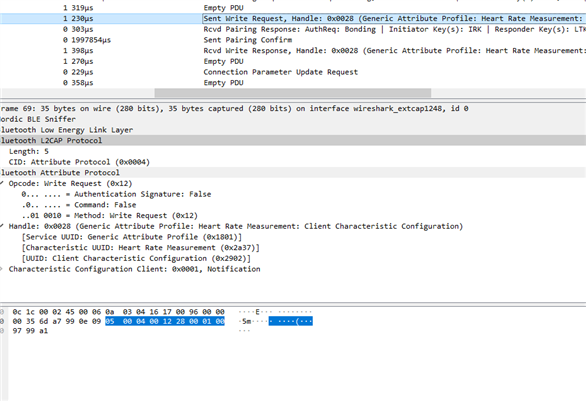
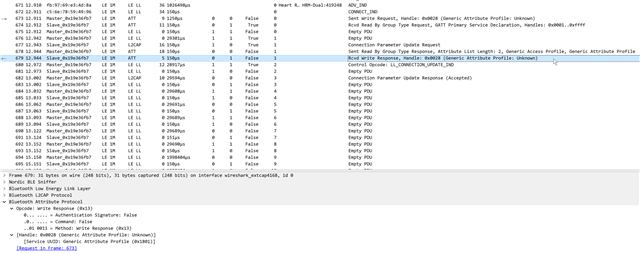
    Regarding your concern about " BLE_HRS_C uses Generic Attribute Profile (0x1801):" it was just the interpretation of wireshark of the handle 0x0028 based on the service discovery process. I'm not sure why it confused and say it's Generic Attribute Profile when it's obviously not. 
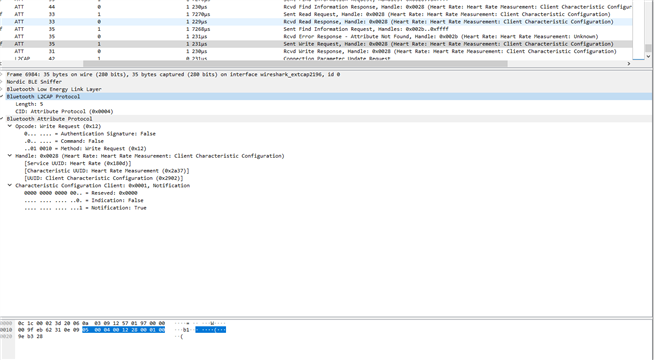
    From what I can see the command to enable notification are the same between the two traces:

    Same with the response. 

    So I'm not so sure why the Garmin didn't send the notification. 
    You may need to modify the HRM so that it would behave as similar as nRF Connect to make the Garmin HRM works. 

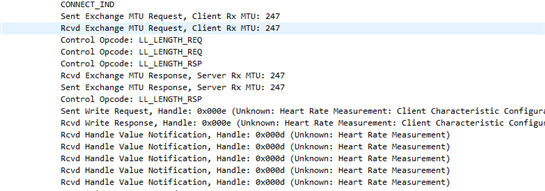
    I can see that in the hrs_c there was MTU request and LL_LENGTH_REQ, you can try to turn that off in the HRS_C firmware. Turn off pairing as well. 

    Try to match as much as possible to the nRF Connect trace. 

    The service discovery I don't think would cause any difference here. 

  • I can see that in the hrs_c there was MTU request and LL_LENGTH_REQ, you can try to turn that off in the HRS_C firmware. Turn off pairing as well. 

    Can you please give me a hint where I shoul look for it? How to turn it off?

    In the mean time I will try to make the HRS app work.

    edit: I think I found it. In function nrf_ble_gatt_on_ble_evt:

    void nrf_ble_gatt_on_ble_evt(ble_evt_t const * p_ble_evt, void * p_context)
    {
        nrf_ble_gatt_t * p_gatt      = (nrf_ble_gatt_t *)p_context;
        uint16_t         conn_handle = p_ble_evt->evt.common_evt.conn_handle;
    
        if (conn_handle >= NRF_BLE_GATT_LINK_COUNT)
        {
            return;
        }
    
        switch (p_ble_evt->header.evt_id)
        {
            case BLE_GAP_EVT_CONNECTED:
                on_connected_evt(p_gatt, p_ble_evt);
                break;
    
            case BLE_GAP_EVT_DISCONNECTED:
                on_disconnected_evt(p_gatt, p_ble_evt);
                break;
    
            case BLE_GATTC_EVT_EXCHANGE_MTU_RSP:
                on_exchange_mtu_rsp_evt(p_gatt, p_ble_evt);
                break;
    
            case BLE_GATTS_EVT_EXCHANGE_MTU_REQUEST:
                on_exchange_mtu_request_evt(p_gatt, p_ble_evt);
                break;
    
    /*#if !defined (S112) && !defined(S312) && !defined (S122)
            case BLE_GAP_EVT_DATA_LENGTH_UPDATE:
                on_data_length_update_evt(p_gatt, p_ble_evt);
                break;
    
            case BLE_GAP_EVT_DATA_LENGTH_UPDATE_REQUEST:
                on_data_length_update_request_evt(p_gatt, p_ble_evt);
                break;
    #endif // !defined (S112) && !defined(S312) && !defined (S122)
    */
            default:
                break;
        }
    /*
        if (p_gatt->links[conn_handle].att_mtu_exchange_pending)
        {
            ret_code_t err_code;
    
            err_code = sd_ble_gattc_exchange_mtu_request(conn_handle,
                                                         p_gatt->links[conn_handle].att_mtu_desired);
    
            if (err_code == NRF_SUCCESS)
            {
                p_gatt->links[conn_handle].att_mtu_exchange_pending   = false;
                p_gatt->links[conn_handle].att_mtu_exchange_requested = true;
    
                NRF_LOG_DEBUG("Requesting to update ATT MTU to %u bytes on connection 0x%x (retry).",
                              p_gatt->links[conn_handle].att_mtu_desired, conn_handle);
            }
            else if (err_code != NRF_ERROR_BUSY)
            {
                NRF_LOG_ERROR("sd_ble_gattc_exchange_mtu_request() returned %s.",
                              nrf_strerror_get(err_code));
            }
        }
    */
    }

    Same result :(

    edit2: Also, I think it's worth to note, that the Garmin has HAS the Body Sensor Location characteristic, just next to Hear Rate and the sniffer trace clearly shows an error (rcvd error response). So I think, that maybe this is the problem after all - the HRS_C is looking for both chars inside the "Gemeric Attribute Profile". I know they look the same as the Heart Rate char used by NRF Connect BLE, but there must be some difference that causes the problem. 

    edit3: I can confirm it works with the BLE_APP_HRS example. But It doesn't solve my problem.

  • Hi Lukasz,

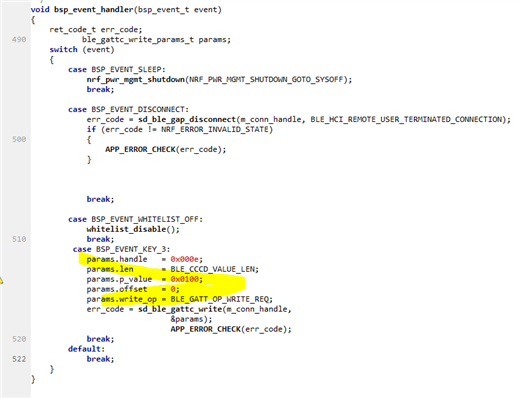
    I added this code into bsp_event_handler() and can enable notification without service discovery. When pressing button 4 on the DK it will send the write request. 

    2133.main.zip


    You may want to modify the handle to 0x0028 as in the Garmin HRM. Also service discovery need to be disabled. 

    Is there any chance that the Garmin HRM only response to the paired device and you may need to clear all paired device before it response  ? 

  • Hi. I tried modyfing the handle to 0x0028 but with no luck. I think service discovery is disbaled. I removed the peer_manager entirely, so there is no pairing/bonding. Also I think pairing is NOT required as the HRM sends notofication to NRF Connect BLE app on my PC, and there is no pairing there. 

    I deleted the whole pairing information from the device as well (I cleared the flash and installed the Softdevice and my program again).

    Today I also tried calling sd_ble_gattc_write directly. I ended up just adding the following code to the ble_evt_handler (case BLE_GAP_EVT_CONNECTED:)

    err_code = nrf_ble_gq_conn_handle_register(m_hrs_c.p_gatt_queue, p_ble_evt->evt.gap_evt.conn_handle);			
    APP_ERROR_CHECK(err_code);
    
    ble_gattc_write_params_t params;
    					
    uint16_t cccd_val = 1;
    uint8_t cccd[2];
    
    // originally it was reversed, but then it sends 0x0100, and it should send 0x0001?
    cccd[1] = LSB_16(cccd_val);
    cccd[0] = MSB_16(cccd_val);
    					
    params.write_op = 1;
    params.offset = 0;		
    params.handle = 0x0028;
    params.len = 2;
    params.p_value = cccd;
    
    err_code = sd_ble_gattc_write(p_ble_evt->evt.gap_evt.conn_handle, &params);
    APP_ERROR_CHECK(err_code);

    The results are basically the same all the time.

    PS: I did try both 0x0100 and 0x0001. I understand it should be in little endian, but I just checked both ways to eliminate all possible mistakes.

    After your last reply I also skipped nrf_ble_gq_conn_handle_register and just used the m_conn_handle.The code is simpler but works the same :(

    I tried lookng for some information about garmin HRM specific BLE data, but coudln't find anything. I also tried removing the batter from the HRM itself to somehow reset it, but with no luck.

    I'm looking for some other ideas. Do you have any?

  • I would suggest to try using a phone or other central device to connect to the HRM and check if it can receive the notification. 

    In the sniffer trace have you checked if the write request and the write response is exactly the same as when the nRF Connect on PC connected to the HRM ? 
    If they are matched I don't see any reason why the notification shouldn't sent. 
    Please try to test on the ble_app_hrs to check if you can get the notification. Then please try to test on other HRM device on the market. If it works with other HRM device then it's could be something tricky with the Garmin one. 

  • I did try to get notifications on my phone. I used NRF Connect BLE for my android phone and it works. I can enable and disable the notifications without any problems.

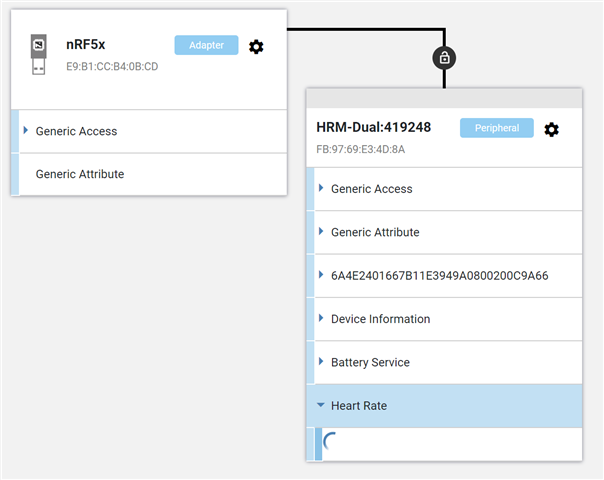
    However there is something strange happening to the HRM when I try to use the NRF Connect BLE on my PC now, Wireshark shows that the HRM sends notifications as soon as I connect to it from my PC. It sends them right away and I cannot stop it. I can't even expand the Heart Rate section - it freezes (see the screen). 

    Is it possible that the HRM somehow remembers my PC? Or maybe it's the dongle that stored some information and enables the notifications instantly when connected?

    Is there a way I could have broken the HRM by sending some weird data to wrong handles? I guess it shouldn't be possible, but maybe?

  • If you see the HRM send notification as soon as you connect to it meaning that it's bonded and stored the CCCD value so it send the notification automatically. 
    The nRF COnnect on PC on the other hand may not store the bond information or cache the CCCD value. For some reason the Heart Rate service discovery wasn't finished properly. 
    I think you would need to find a way to erase bonding on the HRM or at least set it to pairing mode to pair again. 

Reply
  • If you see the HRM send notification as soon as you connect to it meaning that it's bonded and stored the CCCD value so it send the notification automatically. 
    The nRF COnnect on PC on the other hand may not store the bond information or cache the CCCD value. For some reason the Heart Rate service discovery wasn't finished properly. 
    I think you would need to find a way to erase bonding on the HRM or at least set it to pairing mode to pair again. 

Children
  • Ok. There is something wierd happening with this HRM for sure. I found an old one of mine, broken a bit, but still good for testing (not good for using though). Our example here works with it - I can get notifications. So it must be the HRM that is faulty. There is no official Garmin way to reset it (erase bonds). I tried putting the battery upside down to short the battery terminals but it didn't help. The worst is - I cannot tell Garmin it doesn't work, because it does - everywhere except NRF Connect BLE and my application.

    Is there a way to remove bonds on it? Doesn BLE support this kind of operation?

    PS: anyway, thank you very much for your help.

  • Hi Lukasz, 

    I'm sorry that we couldn't help regarding a 3rd party software. The software on the Garmin HRM is something outside of what we can cover or discuss. 

    I would suggest to check on Garmin support channel. You can test by using a phone or other devices and try to connect and enable CCCD to see if the HRS is reported. If it works with a new device, I don't see any reason it wouldn't work with our DK (you can change the MAC address of the DK so it appear as a new device to the Garmin HRM).

  • Can I change the MAC of the NRF52 Dongle as well? How?

  • If you use nRF Connect on PC with the default serial firmware on the dongle , it's not possible to change the address. You can recompile the serial firmware and change the address using sd_ble_gap_addr_set() call. 

    Similarly, you can change the address if you flash the central firmware on the dongle using the same command. 

Related