This post is older than 2 years and might not be relevant anymore
More Info: Consider searching for newer posts

add uart peripheral into client example returns "app_error_weak.c, 105, Mesh assert at 0x0002C8B0 (:0)"

I am using sdk for mesh v.5 (s140.7.2.0) and nrf52840 DK and want to add uart peripheral into the client in the light switch mesh example and then trigger button 1 once a sting data is received.

I added drivers and libraries c.files of the art peripheral, paths, headers, and finally added these functions in the main.c file.

void uart_error_handle(app_uart_evt_t * p_event)
void uart_event_handle(app_uart_evt_t * p_event)
void uart_init(void)

And with an "if" I checked a string received from uart and then I trigger buttun1 by call the "button_event_handler(button_number)" function.

and I added the "uart_init()" function in the main () function .


When I press the button 1 it works fine, although when I write the "string" on the uart, it returns:


<t: 0>, main.c, 573, ----- BLE Mesh Light Switch Client Demo -----
<t: 12650>, main.c, 412, Initializing and adding models
<t: 12702>, main.c, 209, Node Address: 0x0004
<t: 12704>, mesh_app_utils.c, 66, Device UUID (raw): 137FF47B11294702B381A62F60654E45
<t: 12708>, mesh_app_utils.c, 67, Device UUID : 137FF47B-1129-4702-B381-A62F60654E45
<t: 12731>, main.c, 625,
------------------------------------------------------------------------------------
Button/RTT 1) Send a message to the odd group (address: 0xC003) to turn on LED 1.
Button/RTT 2) Send a message to the odd group (address: 0xC003) to turn off LED 1.
Button/RTT 3) Send a message to the even group (address: 0xC002) to turn on LED 1.
Button/RTT 4) Send a message to the even group (address: 0xC002) to turn off LED 1.
------------------------------------------------------------------------------------
<t: 483794>, main.c, 489, Data is Successfully Received
<t: 483797>, main.c, 312, Button 1 pressed
<t: 483799>, main.c, 335, Sending msg: ONOFF SET 1
<t: 483809>, app_error_weak.c, 105, Mesh assert at 0x0002C8B0 (:0)

I searched my problem and found this case.

So I tried to add app_scheduler in my codes based on this tutorial.

#include "app_scheduler.h"

static void button_event_handler_app_sched(void * p_event_data, uint16_t event_size)
{
uint8_t * button_number = (uint8_t *) p_event_data;
NRF_MESH_ASSERT(event_size == 1);
button_event_handler(*button_number);
}
static void button_event_handler_irq(uint32_t button_number)
{
static uint8_t bt_num;
bt_num = button_number;
app_sched_event_put((void *)&bt_num, sizeof(bt_num), button_event_handler_app_sched);
}

static void initialize(void)

{

.

.

#if BUTTON_BOARD
ERROR_CHECK(hal_buttons_init(button_event_handler_irq));
#endif

.

.

.

}

int main(void)
{

///////////////////////add by Sama
/*scheduler*/
APP_SCHED_INIT(SCHED_MAX_EVENT_DATA_SIZE, SCHED_QUEUE_SIZE);
app_sched_execute();

/*UART_Interface*/
uart_init();

///////////////////////end by Sama
initialize();
start();

for (;;)
{
/*scheduler*/
//(void)sd_app_evt_wait();
bool done = nrf_mesh_process();
if (done)
{
sd_app_evt_wait();
}

}
}

However, it does not work. Here is the log file:
t: 0>, main.c, 594, ----- BLE Mesh Light Switch Client Demo -----
<t: 12031>, app_error_weak.c, 115, Mesh error 8 at 0x0002846B (D:\Behine Niroo\Nordic\NRF Mesh\nrf5_SDK_for_Mesh_v5.0.0_src\examples\common\src\simple_hal.c:244)

Could you please advise me?

Thank you in advance.

Br,

Sama

Parents Reply
  • Hi Hung,

    Thank you very much for your reply.


    I can read from and write on the UART by enabling the peripheral resource sharing for UART and UARTE. This was done by setting #define NRFX_PRS_ENABLED 1' and '#define NRFX_PRS_BOX_2_ENABLED 1' in your sdk_config.h file.

    My trouble is that I want to call "button_event_handler(button_number)" function from the "uart_event_handle(app_uart_evt_t * p_event)" function, exactly same as this case .

     initialized the Mesh stack with NRF_MESH_IRQ_PRIORITY_LOWEST but that did not work and returned "Mesh assert at 0x0002C8B0 (:0)". 

    I thought this needs to have a scheduler to order the interrupts.
    Isn't it?

    Br,
    Sama

Children
  • Update:

    Hi Hung,

    I managed to solve the problem by changing "APP_IRQ_PRIORITY_LOWEST" to "APP_IRQ_PRIORITY_LOW" in the "APP_UART_FIFO_INIT" function.

    Could you please let me know will make a problem for other parts? Is there anything I should consider with this change?

    What about if I initialise mesh with the "LOW" priority?

    Br,

    Sama

  • Hi Sama, 

    Please use the add2line to find where the assert is. 

    https://devzone.nordicsemi.com/f/nordic-q-a/25886/70-mesh-assert-at-0x00023680

    I assume you are calling a mesh API inside the button_event_handler()  ?

    Using APP_IRQ_PRIORITY_LOWEST for APP_UART_INFO should work as you can find that in my example. 

  • Hi Hung,

    Thank you for your reply.

    Yes, I call "send_message" function in the button_event_handler().

    
    void send_message (void) 
    {
        uint32_t status=0;
        uint8_t buffer[5]={0x44,0x61,0x74,0x61};
        uint8_t length;
        uint16_t address;
        access_message_tx_t msg;
        length= sizeof(buffer);
                   if (length)
                    { 
                      msg.opcode.opcode = simple_message_OPCODE_SEND ;
                      msg.opcode.company_id = 0x0059; // Nordic's company ID
          
                      msg.p_buffer = (const uint8_t *) &buffer[0];
                      msg.length =length;


                      //SEGGER_RTT_printf(0,"Sending to group address 0x%04x\n", address);
                      status= access_model_publish(m_clients[0].model_handle, &msg);        //CHANGED TO 0 FROM 3 
                      __LOG(LOG_SRC_APP, LOG_LEVEL_INFO, "Status : %u \n", status);
    
                      if (status == NRF_ERROR_INVALID_STATE ||
                      status == NRF_ERROR_BUSY||status == NRF_ERROR_NO_MEM)
                       {
                         __LOG(LOG_SRC_APP, LOG_LEVEL_INFO, "Cannot send. Device is busy.\n");
                          hal_led_blink_ms(LEDS_MASK, 50, 4);
                       }
                       else
                       {
                             ERROR_CHECK(status);
                       }
                    }
    }

    The log is:

    *************************************************************

    <t: 0>, main.c, 581, ----- BLE Mesh Light Switch Client Demo -----
    <t: 11932>, main.c, 405, Initializing and adding models
    <t: 11982>, main.c, 206, Node Address: 0x0002
    <t: 11985>, mesh_app_utils.c, 66, Device UUID (raw): 137FF47B11294702B381A62F60654E45
    <t: 11988>, mesh_app_utils.c, 67, Device UUID : 137FF47B-1129-4702-B381-A62F60654E45
    <t: 12012>, main.c, 628,
    ------------------------------------------------------------------------------------
    Button/RTT 1) Send a message to the odd group (address: 0xC003) to turn on LED 1.
    Button/RTT 2) Send a message to the odd group (address: 0xC003) to turn off LED 1.
    Button/RTT 3) Send a message to the even group (address: 0xC002) to turn on LED 1.
    Button/RTT 4) Send a message to the even group (address: 0xC002) to turn off LED 1.
    ------------------------------------------------------------------------------------
    <t: 753856>, main.c, 482, Data is Successfully Received
    <t: 753859>, main.c, 309, Button 1 pressed
    <t: 753861>, main.c, 332, Sending msg: ONOFF SET 1
    <t: 753872>, app_error_weak.c, 105, Mesh assert at 0x0002C7E8 (:0)

    *************************************************************

    I used the add2line tool:

    arm-none-eabi-addr2line -e light_switch_client_nrf52840_xxAA_s140_7.2.0.elf 0x2C7E8

    and here is the result:

    ..\Nordic\NRF Mesh\nrf5_SDK_for_Mesh_v5.0.0_src\mesh\core\src/timer_scheduler.c:218 (discriminator 1)


    I lookforward to hearing from you.

    Br,

    Sama

  • Hi Sama, 

    Do you have a particular reason why you need to use app_scheduler in your application ? 

    If you are using app_scheduler and if you initialize your mesh stack with NRF_MESH_IRQ_PRIORITY_THREAD you should call any mesh API from thread context (main loop, app_scheduler). 
    So if you use app_scheduler, you need to pass your mesh API call to the app_scheduler instead of calling it directly. 

    If you don't use app_scheduler, you can just call the mesh API in the interrupt handler (such as the button event handler) as long as the priority is APP_IRQ_PRIORITY_LOWEST 

  • Hi Hung,

    I did not use the "app scheduler".

    The "timer scheduler" was added in the client example by default in the Core folder.

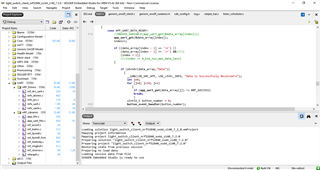
    I have just added the drivers and libraries of UART into the client example as you can see in the image.

    As I said when I change the priority of the UART it works fine.

    I have another question that may be not related to this topic.

    Is it possible to use the UART peripheral beside the DFU mesh example?

    Actually, I want to have a serial connection to send and receive string data, and also do DFU mesh through the serial port. 

    Please let me know if I should create a new case for my question.

    Br,

    Sama

Related