

This isn't really a question, it's more feedback, and also a solicitation to expand my knowledge (if I'm just flat out wrong).
Yesterday I attempted to upgrade my SDK to the latest. My real goal was just to update Segger. I started by following the manual installation instructions, because I'm stubborn. I noticed there are a lot of dependencies now - Zephyr, West, Chocolatey, possibly gccarm. Obviously some of that also means you have to have python. I couldn't get any of this to work, so I fell back to just installing it all with nRF Connect. It did install that way, so I am thankful for having that installation vector provided.
One of the things I find most tedious about any embedded environment is having to deal with the tool chain. Is it just me or is the nRF tool chain / sdk getting heavier and more complicated with the passage of time? I think the reasons include that they want to make all of their projects easily set up to support multiple platforms. I get that, but it's not really a concern of mine, so all that stuff just seems to get in my way all the time. I think the complexity is underscored by looking at the questions people have about creating new projects. The vast majority of answers tell you to find a close-enough example project and clone it, then work from there. So this morning I tried exactly that. I selected "open nRF SDK Project" and selected iBeacon on an nRF52840_DK. What it did was opened up a project with no source files:
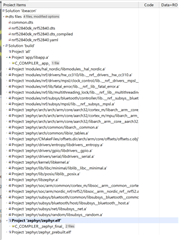
To see some actual source code I have a few choices: "Open file in project" and "Open file in solution." There are no significant files in the 'project' but the 'solution' does have a main.c but it also has a dozen or two files named arch.c. I opened main.c and then it showed me that maybe my file really was in the solution after all:
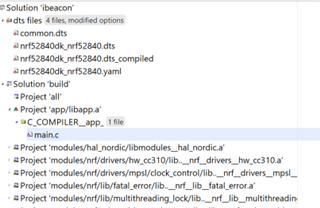
So I guess I'm wondering if other people find this obvious, or is it just me?
What I really want is a flat project structure with a src/ include/ and out/ and not a whole lot more. What would I lose by saying forget all this and just use my own C++ IDE and makefiles, compile it all with GCC, and use one of nordic's linker configuration files to make sure it's all targeted to the right address for whatever device I'm on? Then rather than having all of these board-specific files just use #ifdefs to handle the few cases I really have - for example, developing and debugging on a 52840DK then targeting a 52840 dongle. Is the main thing I lose there having an interactive debugger? Or can I just use gdb (I have no actual jlink, just the jlink emulation on the 52840-DK).
I'm really interested in hearing some thoughts on all of this from the community.

