This post is older than 2 years and might not be relevant anymore
More Info: Consider searching for newer posts

Thermostat cluster enable issue

Hi All,

I am developing product using nRF52840 and SDK nRF5_SDK_for_Thread_and_Zigbee_v3.0.0_d310e71.

This product is basically, using the Thermostat cluster and Zigbee protocol to communicate with the Zigbee gateway.

So, I referred light_bulb example and followed steps to enable "Thermostat cluster and attributes".

I have included the respective files also but I am unable to execute the below callback function case statement,

static zb_void_t zcl_device_cb(zb_uint8_t param)
{
    zb_uint8_t                       cluster_id;
    zb_uint8_t                       attr_id;
    zb_buf_t                       * p_buffer = ZB_BUF_FROM_REF(param);
    zb_zcl_device_callback_param_t * p_device_cb_param =
                     ZB_GET_BUF_PARAM(p_buffer, zb_zcl_device_callback_param_t);

    NRF_LOG_INFO("zcl_device_cb id %hd", p_device_cb_param->device_cb_id);

    /* Set default response value. */
    p_device_cb_param->status = RET_OK;

    switch (p_device_cb_param->device_cb_id)
    {
        case ZB_ZCL_SET_ATTR_VALUE_CB_ID:
            cluster_id = p_device_cb_param->cb_param.set_attr_value_param.cluster_id;
            attr_id    = p_device_cb_param->cb_param.set_attr_value_param.attr_id;

            if (cluster_id == ZB_ZCL_CLUSTER_ID_THERMOSTAT)
            {
                uint16_t value = p_device_cb_param->cb_param.set_attr_value_param.values.data16;

                NRF_LOG_INFO("thermostat local temperature: %d", value);
                if (attr_id == ZB_ZCL_ATTR_THERMOSTAT_LOCAL_TEMPERATURE_ID)
                {
                    local_temperature_value(value);
                }
            }
            else
            {
                /* Other clusters can be processed here */
                NRF_LOG_INFO("Unhandled cluster attribute id: %d", cluster_id);
            }
        break;

        default:
            p_device_cb_param->status = RET_ERROR;
            break;
    }

    NRF_LOG_INFO("zcl_device_cb status: %hd", p_device_cb_param->status);
}

Also, I am attaching code for reference please let me know what else I forgot to enable the functions. It is urgent for me to solve this issue.

Radiator_nRF_v0.9.0.zip

And, with these attributes, for some of the commands, I need to implement custom attributes so if you share how to add custom attributes to this cluster.

Thanks in advance.

Regards,

Rohit R

Parents
  • Hi Marte,

    Thank you for the details, 

    As of now, sending custom command is pending. I will work on this in some time. 

    But current requirement I am trying to enabled the required attributes list. With reference to your code and other I have created extended list also. 

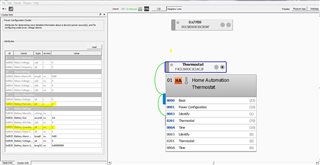
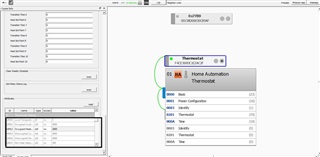
    But unoccupied, min and max, local_calibration and etc are not getting highlighted from thermostat cluster. And also Battery percentage attribute also facing same problem. they are not getting highlighted and these are must attributes (mandatory ids). 

    I have tested in SDK 3.0 I am getting highlighted below points but in SDK 4.1 i am facing this issue. Let me know why?

    Below is the image attached for both cluster. And also my thermostat.h file please check what is wrong. Why I am not getting these attributes highlighted. 

    0508.zb_zcl_thermostat.h

    5807.zb_zcl_power_config.h

    Thanks and regards

    Rohit 

  • Hi Marte, 

    Any update on this. 

    Urgent!

    Is there any difference in my file. 

    Thanks and Regards

    Rohit R

  • Hi Marte, 

    I have compared .h files from both SDK 3.0 and SDK 4.1 both are same. 

    Have you checked whether the problem can be with the manufacturer code, as it was previously?

    - yes manufacturer code is = 0x1037 it is same defined. 

    - In SDK 3.0 I have kept ZB_ZCL_MANUF_CODE_INVALID in zb_custom_thermostat.h file. It worked here. 

    - And in SDK 4.1 I have changed to as per your suggestion. Please find the attached .h file for the same. 

    Still I see that attributes are not visible on GUI. 

    zb_custom1_thermostat.h

    - On node descriptor on GUI I can see that Power source = "Mains". How to set this battery? I have checked API for set but couldn't found anyone. 

    Thanks and Regards

    Rohit R

  • Hi Rohit,

    Rohit Rajapure said:
    I have compared .h files from both SDK 3.0 and SDK 4.1 both are same. 

     Did you compare both the cluster files and the zb_custom_thermostat file? What about main.c?

    Previously you were able to extend the thermostat attribute list with your custom attribute, and you were able to see it in the GUI. Have you made any other changes since that version besides adding more attributes to your attribute lists, both custom and not? Not just to the .h files, but the main.c file as well.

    I compared your latest zb_custom_thermostat file with the zb_custom_thermostat file I was sent by one of your colleagues previously. I cannot find any reason why the changes between the two should cause issues. Previously, there were only a few attributes in the thermostat attribute list, only local temperature, occupied heating setpoint and current setpoint. I do not know if the problem might be caused by specific attributes, by the number of attributes in the attribute list, or something else. Have you tried increasing the attribute list with just a few attributes at a time and testing with the GUI, to see when the problem arises, and to check if it is at a certain amount of attributes, or if there are specific attributes causing this? Since it did work previously you might be able to get some more information about what the problem can be doing this.

    It is also difficult to say what the problem might be by just looking at one file, as that does not give a complete picture of the project, and I am unable to test it.

    I do not know what options deCONZ has when it comes to debugging, as the attribute simply being grey does not help when trying to understand why the attribute is unsupported. When you send ZCL commands to the device, are you able to see the response from the device in deCONZ? If you send the Discover Attributes command, do you see the response? If so, are the attributes lacking in this response as well? Are you only able to send more general commands from somewhere in the program? For example, can you only read attributes using the "read" button above the attribute table, or are you able to send a Read Attributes command from somewhere where you can send ZCL commands? If you can, do you get any response when trying to send a Read Attributes command to one of the grey attributes?

    Rohit Rajapure said:
    How to set this battery?

     The power source attribute is part of the Basic cluster. Setting this attribute to ZB_ZCL_BASIC_POWER_SOURCE_BATTERY should fix this, but I see in your file zb_custom_thermostat.h that you have already defined THERMOSTAT_INIT_BASIC_POWER_SOURCE to be this. Have you tried reading this attribute to see what the value is?

    Best regards,

    Marte

  • Hi Marte, 

    Thank you for the response. 

    Yes, I have compared all the files but I didn't see any change. Even I have followed the same steps in SDK3.0 to enable attributes and here I can see that whatever attributes I have extended are visible and able to edit also. 

    But not possible in SDK 4.1. Attached is the code built in SDK 4.1. Hope this will help us to find reason. 

    to ZB_ZCL_BASIC_POWER_SOURCE_BATTERY should fix this, but I see in your file zb_custom_thermostat.h that you have already defined THERMOSTAT_INIT_BASIC_POWER_SOURCE to be this. Have you tried reading this attribute to see what the value is?

    - Yes, I have done that but still it shows main power source only. 

    0020.Radiator_nRF_v0.9.6.zip

    modified file, zb_zcl_thermostat.h file 

    2148.zb_zcl_thermostat.h

    Thanks and Regards

    Rohit R

  • Hi Rohit,

    I have started looking into your latest project, but I have not been able to figure out the issue yet. All the commands work as expected, and I do not get any errors when testing.

    Have you tried debugging using some of the things I suggested in my last reply?

    Best regards,

    Marte

  • Hi Marte, 

    Thank you for the response and support. 

    yes, I had compared both project as per my knowledge. But due to completion pressure we have decided to develop product using SDK 3.0 has we can see attribute access and edit is possible here. And when product in testing phase we will look into the issue with SDK 4.1. 

    So, I have started degrading the code to SDK 3.0 and my development is in progress. 

    I will inform you once if i get anything and you also let me know if you found the issue here. 

    Along with this I need one more information regarding power management. As you know we are developing Radiator device using nRF52840 and this device is powered up using 2xAA batteries. 

    Requirement of device is battery should last long for 2 year. It should in hibernation unless and until any interrupts. 

    I have one GPIO interrupt and any Zigbee commands from gateway. If either of interrupt device it should wake up from sleep. 

    Can you guide me what all things I should take care while implementing sleep mode. And I get maximum battery life. 

    If you have any example with similar configuration it will help me to quick implementation. 

    Let me know your feedback on this sleep configuration. 

    Thanks and Regards

    Rohit R

Reply
  • Hi Marte, 

    Thank you for the response and support. 

    yes, I had compared both project as per my knowledge. But due to completion pressure we have decided to develop product using SDK 3.0 has we can see attribute access and edit is possible here. And when product in testing phase we will look into the issue with SDK 4.1. 

    So, I have started degrading the code to SDK 3.0 and my development is in progress. 

    I will inform you once if i get anything and you also let me know if you found the issue here. 

    Along with this I need one more information regarding power management. As you know we are developing Radiator device using nRF52840 and this device is powered up using 2xAA batteries. 

    Requirement of device is battery should last long for 2 year. It should in hibernation unless and until any interrupts. 

    I have one GPIO interrupt and any Zigbee commands from gateway. If either of interrupt device it should wake up from sleep. 

    Can you guide me what all things I should take care while implementing sleep mode. And I get maximum battery life. 

    If you have any example with similar configuration it will help me to quick implementation. 

    Let me know your feedback on this sleep configuration. 

    Thanks and Regards

    Rohit R

Children
  • Hi Rohit,

    All the Zigbee examples in our SDK are by default power optimized such that the CPU enter low power mode in times of inactivity.

    If your device is an end device, you can use Sleepy End Device to reduce current consumption. You can see Power saving for ZED for more information. This is used in the light switch example in our SDK. With this, the CPU enter sleep mode when there is nothing happening on the stack, and the device will automatically wake up on an event, as well as waking up from time to time to ensure correct processing of the stack.

    In the projects I have received from you, your device has had the router role. Routers enter low power mode, instead of sleep mode, when the stack has nothing to do. You can for example use the weak function zb_osif_go_idle(), which can be found in external/zboss/osif/zb_nrf52_common.c. This functions is defined to check if the logger has anything to process, and if it does not, then the CPU goes idle. You can also redefine this function to check for other things or to do something else. An example of this is used in the light bulb example.

    Please make sure to do power consumption measurements. For more information you can check out this page.

    Best regards,

    Marte

  • Hi Marte, 

    Thank you so much for the details.

    In the projects I have received from you, your device has had the router role.

    - With reference to multi sensor example I have changed to end point role. 

    This is used in the light switch example in our SDK

    - Okay, I will check the switch example. Is there any explanation regarding switch example work flow to understand sleep?. 

    I will go through the links and If any unclear points i will get back to you. 

    Thanks and Regards

    Rohit R

  • Hi Rohit,

    If you enable sleepy end device, then the signal ZB_COMMON_SIGNAL_CAN_SLEEP is generated when the device can be put to sleep. In the light switch example, sleepy end device is enabled by pressing Button 3 on the board while resetting the board. However, you can enable it by simply calling zb_set_rx_on_when_idle(ZB_FALSE) in main(), as in the multi sensor example.

    Since you are using SDK v3.0.0, which does not have the default signal handler in zigbee_helpers.c, you will have to handle the signal ZB_COMMON_SIGNAL_CAN_SLEEP in zboss_signal_handler(). You should call the function zb_sleep_now() to put the device to sleep when this signal is received. This is done in multiple examples in v3.0.0 already, such as the light switch and the multi sensor examples, so you can look at those to see how to do this. 

    Best regards,

    Marte

  • Hi Marte, 

    Thank you for the response. 

    In the light switch example, sleepy end device is enabled by pressing Button 3 on the board while resetting the board.

    - I saw the code, this means If button is pressed device will not go into sleep correct? or is it wake up from sleep when button pressed?

    you can enable it by simply calling zb_set_rx_on_when_idle(ZB_FALSE) in main()

    - Means, only calling this function device will go to sleep correct? But when it wake up ? Is it wake up periodically or any other way? 

    you will have to handle the signal ZB_COMMON_SIGNAL_CAN_SLEEP in zboss_signal_handler().

    - Okay, I will enable this by referring both codes. 

    My wake up mechanism should be. 

    - If there is no activity or any data on UART  go to sleep. 

    - Wake up if there is interrupt from GPIO or any UART data 

    - Wake up if there is Zigbee command. 

    Let me know your feedback. 

    Thanks and Regards

    Rohit R

  • Hi Rohit,

    Rohit Rajapure said:
    this means If button is pressed device will not go into sleep correct? or is it wake up from sleep when button pressed?

     The button does not make the device go into sleep mode or wake up from sleep when it is pressed. What it does is to enable sleepy end device behavior. This is there so that the user can decide, when resetting the device, whether they want the behavior enabled or not. In the multi sensor example it is enabled from start, as zb_set_rx_on_when_idle(ZB_FALSE) is called in main() before the Zigbee stack is started. Light switch instead calls sleepy_device_setup(), which checks whether the button for enabling sleepy end device is pressed or not, and will enable the behavior if the button is pressed. Additionally, the button must be pressed while resetting the board. Pressing the button while the device is on will not affect the sleepy end device behavior.

    Rohit Rajapure said:
    Means, only calling this function device will go to sleep correct? But when it wake up ? Is it wake up periodically or any other way? 

     No, it will not go to sleep. As I explained in my previous reply and above, zb_set_rx_on_when_idle(ZB_FALSE) will not make it go to sleep, it will enable sleepy end device behavior. It will go to sleep when there is nothing to do and the signal ZB_COMMON_SIGNAL_CAN_SLEEP is generated. This happens when there is no immediate callback for execution and there is no outgoing packet on the MAC level. If there are any alarms in the queue, then the device will wake up when the first alarm is called. If there are no alarms in the queue, then the sleep duration is set to 10 seconds.


    You will not be able to use sleepy end device if you want your device to wake up if there is a Zigbee command. When using sleepy end device, the device will not receive messages while it is asleep, but will poll it's parent at intervals to see if there are any messages waiting for it. 

    You can also change the sleep functionality if you do not want to use the default behavior by using the weak functions zb_osif_go_idle or zb_nrf52840_sleep. See Zigbee stack sleep routines for more information. This documentation is for v4.1.0, as the "Zigbee application helper functions" is not in the documentation for v3.0.0, but the weak functions exist in both versions.

    Please also see Power saving for ZED to get a clearer understanding of the power saving mechanisms for end devices in the SDK.

    Best regards,

    Marte

Related