This post is older than 2 years and might not be relevant anymore
More Info: Consider searching for newer posts

nRF52840 Zephyr tickless low power idle always ticking

I'm working on a custom board using an nRF52840 for a sensor Tag (light, hum, temp, press)
https://www.homesmartmesh.com/docs/microcontrollers/nrf52/thread_sensortag/

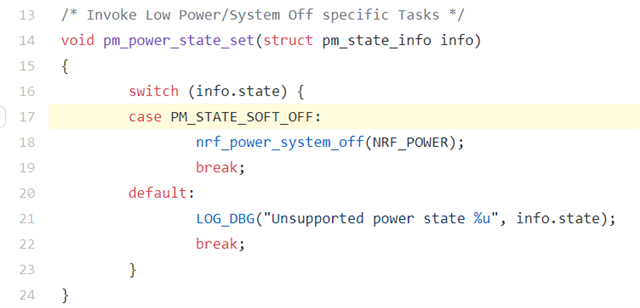
I would like to use openthread over Zephyr. Using a previous nRF-SDK without Zephyr is being considered, but this ticket is only about the Zephyr solution. Given that Zephyr needs some 250 ms to boot, and that I would like to use the internal RTC to periodically wakeup and take measures, the target solution is to use the kernel sleep in low power mode and keep the RAM context. But it seems that the in `zephyr\soc\arm\nordic_nrf\nrf52\power.c` only `PM_STATE_SOFT_OFF` is implemented. So I'm still not sure if I did not wrongly configure, but in the meanwhile, I'm giving it a try to patch zephyr and implement the missing power modes myself.
I started by implementing `pm_policy_next_state` in the main.c of the tag_power sample also the `pm_min_residency` table in the same file

https://github.com/HomeSmartMesh/sdk-hsm-sensortag/blob/f0b72b1786f0ca93666defaa23e008f85fcd4c9f/samples/tag_power/src/main.c#L52

And I patched Zephyr with the following content, I did not integrate this yet, so the modified file is in the read me
https://github.com/HomeSmartMesh/sdk-hsm-sensortag/tree/main/samples/tag_power#zephyr-patch

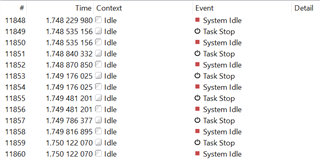
The problem now seems to be more related to Zephyr configuration where the idle task keeps ticking in 264 uS periods, that means every period the RTC is configured to wakeup after 264 uS and sleep again which obviously due to the overhead reduces the low power performance.
The `CONFIG_PM` is used as I'm building with `west build -b nrf52840_sensortag -- -DCONF_FILE=prj-low.conf`
https://github.com/HomeSmartMesh/sdk-hsm-sensortag/blob/f0b72b1786f0ca93666defaa23e008f85fcd4c9f/samples/tag_power/prj.conf#L2

and in `hsm\samples\tag_power\build\zephyr\.config` I could verify that the config `CONFIG_TICKLESS_KERNEL=y` is enabled.

This is the startup sequence and the whole sample test run

And this is a zoom over the first two tests lines 89,90 with 1 ms, hen the test with 250 ms line 98 where we see that the idle task keeps ticking over the sleep and wakeup functions where the debug pins are driven


So my question is, does anyone knows why despite the low power mode config the idle task keeps ticking ?

Parents
  • You actually don't need to do anything actively to put the chip into System ON sleep: https://devzone.nordicsemi.com/f/nordic-q-a/65959/how-to-enter-system-on-sleep-in-zephyr/269893#269893. It will happen automatically when nothing else is going on. Just configure the RTC to wake it up periodically and the chip will go to sleep in between.

    Hopefully I have understood you correctly. If not, please tell me and clarify.

    Best regards,

    Simon

  • I tried that in the first place but it did not work, the current consumption was high, only then I started digging deeper. That's when I realized that the CONFIG_PM had no effect.
    The first issue start in `soc/arm/nordic_nrf/nrf52/power.c` where only `PM_STATE_SOFT_OFF` is implemented.

    https://github.com/zephyrproject-rtos/zephyr/blob/3d39f72a88b3100ac83e7c6c285ae567aca640d0/soc/arm/nordic_nrf/nrf52/power.c#L17

    That means if we call the kernel sleep functions that give back the hand to the OS to keep the idle task running and start tracing back from there you would go through `idle()` task from `zephyr\kernel\idle.c` that only in case `CONFIG_PM` is enabled will call pm_save_idle -> pm_system_suspend -> pm_policy_next_state which then always returns `PM_STATE_ACTIVE`.

    And that is not exactly what my question was about, my question is about the tickless idle.


    We have two paths on how we could progress on this, if you or someone know an example proven to have driven an nRF52840 with Zephyr into less than 10 uA in a kernel sleep function, then having a commit with all the code and config in a repo would be much appreciated, I can test it. My target is exactly the nRF52840.

    Otherwise, we can also talk about code review, and how the zephyr sleep is supposed to put the nRF52 target in sleep and the resume after waking up from the RTC interrupt. I did implement additional low power states (in the patch link I provided), but due to what seams like a bug, the idle Task does not let go and keeps ticking, it's hard to debug as the RTC behavior cannot be step debugged and the real time pio debug does not output values. And by the way Zephyr OS is using the RTC so the user is not expected to touch it and the system would wakeup on the next expected event. To be more specific, in tickless mode, the system is only expected to wakeup in the next planned event and not keep waking it periodically every 264 uS to check if something has to happen, that is what I'm observing now. That frequent wakeup creates a cpu overhead that deteriorates the average current consumption during the kernel sleep period.

    More obvious with SystemView
    This is how a supposedly low power kernel sleep looks like, idle keeps looping and scheduler keep triggering periodically

  • We have two paths on how we could progress on this, if you or someone know an example proven to have driven an nRF52840 with Zephyr into less than 10 uA in a kernel sleep function, then having a commit with all the code and config in a repo would be much appreciated, I can test it. My target is exactly the nRF52840.

    I guess the current consumption is caused by UART/logging being enabled. Can you test the sample zephyr/samples/basic/blinky with CONFIG_SERIAL=n in prj.conf?

  • You were right, I managed to get ~ 3uA of sleep current with a simple k_sleep(K_MSEC(5000)). I set your answer to verified because it is correct, although it does not explain the issue I've run into, which is I think beyond the goal of this ticket.
    The goal of this ticket was to get the simplest low power kernel sleep running and it is achieved.
    The flag you suggested was already set in my example `CONFIG_SERIAL=n`, but as an exercise, I went through all the config to check what is set by default to "y" and likely to use a peripheral that consumes power, as info for others this is the config I used 

    CONFIG_SERIAL=n
    CONFIG_LOG=n
    CONFIG_CONSOLE=n
    CONFIG_UART_CONSOLE=n
    CONFIG_RTT_CONSOLE=n
    CONFIG_USE_SEGGER_RTT=n
    CONFIG_PRINTK=n

    I got stuck while trying to do something very simple, and the more I altered the config and used custom functions, the more it interfered with the proper running of the OS. It went as far as a simple comment of a custom function call fixed the issue and allowed the k_sleep power to go from 460 uA down to the expected 3uA.
    So as a hint for anyone who does not manage to get k_sleep into low power in a complex example => make sure your code is not messing up with low level calls `sys_clock_set_timeout, nrf_clock_task_trigger, nrf_power_task_trigger,__WFE, _SVE, ...` unless you're on your own and you know what you're doing.

    So on the positive side, I leaned a lot from this issue by looking into the depth of Zephyr.
    The work is only starting now, I need to get my complex example of openthread as Sleepy End Device into this ultra low power sleep, if I manage, I'll update here as the code being optimized is already available so if someone wants to help or give advices, feel free : https://github.com/HomeSmartMesh/sdk-hsm-sensortag/tree/main/samples/tag_sensors_broadcast

  • I'm glad to help, and happy you got the power down. Unless you're not already aware of it, I would recommend you to check the file <application>/build/zephyr/.config to see what the Kconfigs are actually set to (e.g. if CONFIG_SERIAL is equal to n).

    Be aware that if you're building a multi image application, e.g. with mcuboot, you have to set CONFIG_SERIAL in the other images as well to get the power down.

Reply
  • I'm glad to help, and happy you got the power down. Unless you're not already aware of it, I would recommend you to check the file <application>/build/zephyr/.config to see what the Kconfigs are actually set to (e.g. if CONFIG_SERIAL is equal to n).

    Be aware that if you're building a multi image application, e.g. with mcuboot, you have to set CONFIG_SERIAL in the other images as well to get the power down.

Children
Related