This post is older than 2 years and might not be relevant anymore
More Info: Consider searching for newer posts

Adapting ble_app_blinky_c to work with nRF52840 Dongle

Using this \nRF5_SDK_17.0.2_d674dde\examples\ble_peripheral\ble_app_blinky and nRF5_SDK_17.0.2_d674dde\examples\ble_central\ble_app_blinky_c

As described in \examples\ble_central\ble_app_blinky_c 

I am using win 10, VS Code and a Dongle!!!

The \examples\ble_peripheral\ble_app_blinky works fine and I can use the Android app BlinkyTest to flash the dongle (using nrfutil, not nrfjprog) to test it and it works ok, so I assume I have a working toolchain.

Basically I want to make one dongle (the server, aka ble_app_blinky) turn the light on and off on the other dongle (the client akak ble_app_blinky_c)  (and for the server to recognise that a button was pressed on the client dongle). At least that is how I read the documentation says it should work.

I realise that I will have to make adjustments to at least main.c to re-assign the leds and buttons, but first I need to get the thing to build.

Because you don't have a dongle version of the examples\ble_central\ble_app_blinky_c I am trying to adapt it to work with the dongle pca10059. To do this I have copied over the code from the pca10056 folder. I have adjusted the Makefile and c_cpp_properties.json which tells the compiler where to look for the include files. (I am a bit of a noob with C, but I'm getting there).

So my first problem is that I am getting problems with intellisense telling me that in main.c


90  NRF_BLE_SCAN_DEF(m_scan);
and some other stuff isn't defined.        
So if I go to the definition I locate nrf_ble_scan.h   I have referenced this in my include files
However, at about line 137 I am getting a strange error where it is saying it doesn't like a "const"!!!
typedef struct
{
    ble_gap_scan_params_t const * p_scan_param;    
And at this point I'm stuck.
I'm assuming that ble_gap_scan_params_t
 is defined somewhere, but the IDE is telling me that it is defined in 17 out of 20 files. I'm thinking I'm on a lost trail here.
Any ideas please.
By the way any thoughts on what else I might need to look at (like removing any Segger stuff) that I should consider?
Of course the ideal solution for me would be for Nordic to provide an actual version for the dongle!!!!! I mean, you sell it after all Slight smile
Thanks
Gordon.

Parents
  • So, I seem to be narrowing down on the issue (perhaps).

    If I go to the definition for "params" in the offending line in main.c

    err_code = sd_ble_gap_conn_param_update(p_gap_evt->conn_handle,
                                            &p_gap_evt->params.conn_param_update_request.conn_params);
    I go to ble_gap.h
    However on closer examination and by fluke I noted this was referring to the soft device s112 headers and not s140 which is the sd I need for pca10059. So I think I need to fix how this wrong reference is occurring.
Reply
  • So, I seem to be narrowing down on the issue (perhaps).

    If I go to the definition for "params" in the offending line in main.c

    err_code = sd_ble_gap_conn_param_update(p_gap_evt->conn_handle,
                                            &p_gap_evt->params.conn_param_update_request.conn_params);
    I go to ble_gap.h
    However on closer examination and by fluke I noted this was referring to the soft device s112 headers and not s140 which is the sd I need for pca10059. So I think I need to fix how this wrong reference is occurring.
Children
  • Yay O frabjous day! Callooh! Callay! I have slain the Jabberwock!!!

    So, all of these issues resolved down to VS Code deciding to search all kinds of paths looking for include files. I have quite a few projects which I cloned from Github that contained various versions of the nRF sdk rather than one.

    So I removed all my includes from c_cpp_properties.json, removed the unused soft devices from the sdk leaving just s140 and the within VS Code ran the command: "Reset IntelliSense Database"  (Use F1 or ctrl+shift+p).

    Then I slowly re-introduced my include paths ending up with:

                "includePath": [
                    "${workspaceFolder}/pca10059/s140/config/**",
    
                    "C:/nRF52840/nRF5_SDK_17.0.2_d674dde/components/**",
                    "C:/nRF52840/nRF5_SDK_17.0.2_d674dde/modules/**",
    
                    "${env:GNU_GCC}/**"
                ],
    The errors have now all gone and I can get on with trying to understand the code.
    Hope this helps someone Slight smile
    Gordon
    This can be closed now.
  • Thanks for keeping the post up to date, great work!

    Regards,
    Jonathan

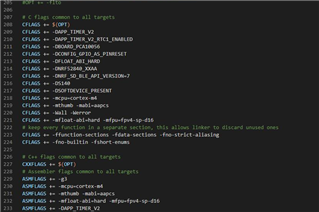
  • Spoke too soon, but here is a better list of defines that I grabbed by downloading and installing Segger SES and looking through the pre-processor options

                "defines": [
                    "APP_TIMER_V2",
                    "APP_TIMER_V2_RTC1_ENABLED",
                    "BOARD_PCA10059",
                    "CONFIG_GPIO_AS_PINRESET",
                    "FLOAT_ABI_HARD",
                    "INITIALIZE_USER_SECTIONS",
                    "NO_VTOR_CONFIG",
                    "NRF52840_XXAA",
                    "NRF_SD_BLE_API_VERSION=7",
                    "S140",
                    "SOFTDEVICE_PRESENT"
                ],
    

    There is another one as well: "NDEBUG" which I think is for release code.

    I have opened another ticket on how to locate the documentation which tells us what defines we should consider as I am not certain this is an exhaustive list, but at least I'm not getting any VS Code "PROBLEMS" with intellisense on any opened files.

    Slight smile

  • Thanks again for keeping this updated,

    As fare as I am aware, look at the example you want to reference and take a peek at the makefile to see what defines are there.


    Then add the info to the json file in VSC, so that the .json and makfile match

    Regards,
    Jonathan

  • Oh, okay. I guess I just remove the D! 

    Thanks.

Related