This post is older than 2 years and might not be relevant anymore
More Info: Consider searching for newer posts

Nrfutil dfu ble fails without any error message, using maximum verbosity and also log file. Same command works on another Windows PC.

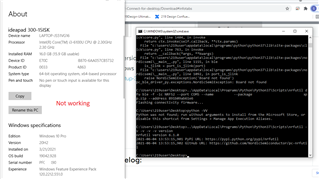
My CMD.EXE is copied here, it shows the command I'm trying to run, and the output of the program. As you can see, there is no error message.

C:\Users\user\Desktop>nrfutil -v -v -v -v dfu ble -f -ic NRF52 --port COM3 --name REDACTED --package REDACTED.zip --address fa78d43f5ec0
Flashing connectivity firmware...
2021-06-02 10:20:29,337 Sending SoftDevice image...

C:\Users\user\Desktop>echo %ErrorLevel%
-1073741819

C:\Users\user\Desktop>nrfutil -o log.txt -v -v -v -v dfu ble -f -ic NRF52 --port COM3 --name REDACTED --package REDACTED.zip --address fa78d43f5ec0
Flashing connectivity firmware...
2021-06-02 10:24:43,587 Sending SoftDevice image...

C:\Users\user\Desktop>type log.txt
2021-06-02 10:24:43,587 Sending SoftDevice image...

However, it does not succeed. I can know this for certain because the image on the device is not modified to the new package. I can verify this according to the behavior of the device. Thus the command fails. There is no error message to help me diagnose the error.

I am certain that the COM port is correct, please see the screenshot of Windows Device Manager below.
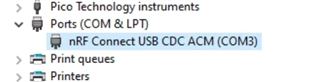
I have set the verbosity to the maximum verbosity (-v -v -v -v). I also tried using the log, which has less output than not using the log.

The same command works on another Windows 10 PC (after adjusting the COM port), so I am certain that the command is valid. Because the command works, I am also certain that the receiving device is working properly. I can determine that the command succeeded based on the behavior of the device. Thus, I am 100% confident that the command is valid and works on another machine.

1) Have I missed some debugging information that would help you or me diagnose the problem?

2) How can I make the command work on this other machine?

Thank you!

Parents
  • Hi,

    It seems nrfutil exits silently early on without any error or any obvious reason. I have not been able to reproduce this, but it is interesting that it has been spotted by several users and also that you see different behavior on different computers.

    Do you see any pattern in which computers it works on and which it does not? Which python version do you have? Which windows version? Are there other similarities or issues? The more information the better so that we can try to reproduce and understand the issue.

  • Tried it on another machine, this one is also Windows 10 Pro. It also fails in a similar way.

  • Hi,

    Just to double check, you are using the nRF52840 dongle, and not the nRF51 dongle?

    I have not been able to reproduce so I am afraid I have to ask a bit more.

    1. Does getSerialNumber() return a serial number? What value is that? Can you add some logging around there to see what happens
    2. Do you have more than one nRF52840 dongle you can try?
    3. Does this seems dependent on which computer you use (with all that entails) or which nRF52840 dongle you use?
    4. Which Python version do you use on the computer where it fails and where it does not?
  • Yes, NRF52840 dongle, thanks for double checking. I updated the original post with the appropriate tag.

    1. No, getSerialNumber does not return. Instead, the process exits within that function call, without any error output. I already added logging immediately before and immediately after. The logging flushes to disk after appending, which should be a pretty good guarantee that no logging statements are lost to buffering. Based on the fact that I see the log message before getSerialNumber, but not after, I arrive at the conclusion that getSerialNumber exits the program without generating any error message or a Python exception.

    2. Sort of, it will take a little time to work out the logistics. I will report back with a more detailed answer to this question later today.

    3. Yes, it works on one machine (W10pro) and fails on two machines (one W10pro, one W10home). Check my other posts in this thread for details. Let me know if there are other details I've missed

    4. The working machine has Python 3.7.0. One failing machine has Python 3.7.0, the other has 3.7.9.

    My next debugging step is to make a custom build of libusb to add logging calls within getSerialNumber, but this will take substantially more time compared with modifying the python fies and running python setup.py install.

    Thanks!

  • 2.  I have two dongles. I tested the behavior with the other one, and it is the same. The failure occurs in the same place with both dongles.

Reply Children
Related